
Best Monologue Alternatives in 2026
Monologue combines system-wide dictation, voice notes, and bot-free meeting transcription in an Apple-focused workflow. It supports Mac, iPhone, iPad, and Apple Watch, with local raw transcription on Apple silicon Macs. Smart formatting still needs a connection.
If you need Windows or Android support, offline processing, file transcription, or a different pricing model, several alternatives cover those workflows.
This guide compares seven speech-to-text tools by features, platform availability, processing methods, pricing, and limitations.
Alternatives to Monologue in a Nutshell
- VoiceDash: Live dictation with text cleanup, a personal dictionary, and reusable snippets. Supports Mac, Windows, iOS, and Android. It inserts text at the cursor in the app you already have open. Command mode edits, formats, and moves that text by voice, without copy-paste.
- Wispr Flow: Cross-platform cloud dictation with platform-specific free limits and separate meeting features.
- Superwhisper: Dictation with local and cloud AI models, including offline workflows when local models are enabled.
- VoiceInk AI Voice to Text: An Android voice-to-text app from Fantastic Byte with AI summaries, generated titles, semantic search, related-note discovery, and to-do reminders.
- Willow Voice: Dictation for Mac, Windows, and iPhone, with offline dictation listed in its Pro plan.
- Apple Dictation: Built-in voice typing with on-device processing for many supported languages and configurations.
- MacWhisper: Local audio and video transcription, with system-wide dictation in its direct-download Mac version.
These products do not all solve the same problem. Some are primarily live dictation tools, while others focus on recorded-audio transcription, meeting notes, or AI-powered note organization. The comparison therefore focuses on the workflow each product currently supports rather than treating all seven tools as direct substitutes for Monologue.
Monologue Alternatives Compared
| Tool | Platforms | Processing | Pricing |
|---|---|---|---|
| VoiceDash | Mac, Windows, iOS, Android | Per-request transcription and cleanup routing; AI editing may need internet | Free: 1,000 words/month; Pro: $15/month or $12/month annually |
| Wispr Flow | Mac, Windows, iOS, Android | Cloud dictation | Free: 2,000 words/week desktop, 1,000/week shared iOS+Android; Pro: $15/month or $12/month annually |
| Superwhisper | Mac, Windows, iOS | Local and cloud models | Free tier; Pro $8.49/mo, $84.99/yr, or $249.99 lifetime |
| VoiceInk AI Voice to Text | Android | AI voice-to-text, summaries, semantic search, related notes | Free; ads and in-app purchases |
| Willow Voice | Mac, Windows, iOS | Cloud and on-device workflows | Free Basic; Pro $15/mo or $12/mo annual; Business $35/$28 |
| Apple Dictation | macOS, iOS, iPadOS | On-device processing for supported configurations | Free |
| MacWhisper | macOS; iOS app under Whisper Transcription | Local Whisper and Parakeet models | Free; Pro: €64 one-time |
Prices and features reflect the vendors’ published information reviewed in September 2026. Confirm current availability and checkout pricing before subscribing.
1. VoiceDash: Cross-Platform AI Dictation Alternative to Monologue
VoiceDash is a live voice-to-text application that converts spoken input into written text. Its workflow includes direct text insertion, filler-word removal, grammar cleanup, a personal dictionary, and a snippet library.
VoiceDash does not run a single speech model. Transcription, text cleanup, and output shape are selected per request, based on the language spoken and the destination app. That routing is a live configuration. Traffic can be moved between models, rolled back, or pinned for one user without a new app release. Candidate models are tested against real transcripts and can run in shadow beside production before they reach users. According to VoiceDash’s architecture notes, infrastructure is EU-first: processing in Frankfurt, with cleanup on EU-hosted models.
Pricing
| Plan | Price | Included features |
|---|---|---|
| Free | $0 | 1,000 words/month, basic voice-to-text, filler removal, Mac and Windows |
| Pro | $15/month or $12/month annually | Unlimited words, advanced AI editing, personal dictionary, snippets |
| Teams | $29/month or $24/month annually | Pro features, shared snippets, up to 5 team members |
Advantages compared with Monologue
- Adds Windows support alongside Mac, iOS, and Android.
- Offers a personal dictionary and reusable snippets.
- Provides direct dictation with text cleanup.
- Publishes a free monthly word allowance. Routes transcription and cleanup per language and destination app, according to VoiceDash’s architecture description.
Limitations
VoiceDash AI-powered editing may require an internet connection.
Best suited for
People who want live dictation, text cleanup, and reusable writing shortcuts across desktop and mobile workflows, including language- and app-specific cleanup rather than one fixed model.
Open the next email or document you already have to finish. Speak it in VoiceDash. The free plan is 1,000 words, enough for several real drafts. You will know in one sitting whether filler removal, routing, and snippets beat pasting out of an Apple Notes app. If the text is sendable faster, keep it. If the cap blocks you, that is the only reason to open Pro.
2. Wispr Flow: Cross-Platform AI Dictation Instead of Monologue
Wispr Flow is an AI dictation application for Mac, Windows, iOS, and Android. Its features include voice typing, custom vocabulary, and meeting notes through its separate Notetaker functionality.
Pricing
| Plan | Price |
|---|---|
| Free | $0 |
| Pro monthly | $15/user/month |
| Pro annual | $12/user/month |
| Growth, Dictation only | $23/user/month or $18/month billed annually |
The Free plan has different limits by platform:
- Desktop: 2,000 words per week
- iPhone: 1,000 words per week
Advantages compared with Monologue
- Supports Windows and Android.
- Offers custom vocabulary and team features.
- Includes meeting-related functionality through Notetaker.
- Provides a free tier with documented usage limits.
Limitations
Wispr’s documentation describes cloud-based dictation. The reviewed materials do not establish a fully offline dictation mode.
Notetaker has different platform and plan requirements from Wispr Flow’s core dictation feature. Current Wispr documentation lists Growth options for dictation only or dictation with unlimited Notetaker.
Best suited for
Users who want cross-platform dictation and teams that need shared terminology, centralized billing, and meeting workflows.
Wispr Flow and VoiceDash both support live dictation across platforms beyond Apple devices, but their current feature sets differ. Wispr Flow offers live dictation alongside its Notetaker feature for meeting transcription and summaries, while VoiceDash currently emphasizes live dictation, text cleanup, personal dictionaries, and snippets. VoiceDash’s dedicated meeting experience, including Meeting Summary, is currently in development.
3. Superwhisper
Superwhisper combines voice dictation with local and cloud AI models. Its official platform listings include Mac, Windows, iOS, and Android.
Pricing
| Plan | Price |
|---|---|
| Free | $0 |
| Pro | $8.49/month, $84.99/year, or $249.99 lifetime |
Pro includes access to cloud and local AI models, custom API keys, translation, and audio/video transcription.
Advantages compared with Monologue
- Supports Windows and Android.
- Offers local-model processing.
- Supports custom prompts and model configurations.
- Provides audio and video transcription.
Limitations
Offline functionality depends on the selected model and configuration. Cloud-based workflows require network access.
Users should verify which models are available in their installed version and whether those models can run locally on their hardware.
Best suited for
Users who want more control over transcription models, prompts, and local-versus-cloud processing.
Local models solve Monologue’s Apple-only limit only if you will configure them. If that setup cost is the reason you opened this page, read Superwhisper alternatives next; same job, fewer moving parts, including VoiceDash when the need is clean live writing rather than model control.
4. VoiceInk AI Voice to Text for Android Instead of Monologue
VoiceInk AI: Voice to Text is an Android voice-to-text and note-taking application published by Fantastic Byte. It combines speech transcription with AI-generated summaries and titles, semantic search, related-note discovery, and to-do reminders.
The app is distinct from the VoiceInk application available through tryvoiceink.com, so the results and features discussed in this section apply specifically to the Android app published by Fantastic Byte.
Pricing
The current Google Play listing describes VoiceInk AI as free to use, while also showing ads and in-app purchases.
Advantages compared with Monologue
- Available on Android.
- Combines voice transcription with AI-generated summaries and titles.
- Provides semantic search across notes.
- Automatically discovers related notes.
- Can identify to-do items and send reminders.
Limitations
VoiceInk AI is a separate Android product from the VoiceInk application published at tryvoiceink.com. Its Google Play listing does not establish the same local Whisper workflow or Mac licensing model associated with that other product.
Best suited for
Android users who want voice transcription combined with AI-powered note organization, summaries, semantic search, and reminders.
VoiceInk AI on Play is a notes-and-summary app. VoiceDash is live cursor writing. Those are different jobs.
5. Willow Voice
Willow Voice is a dictation application for Mac, Windows, and iPhone. Its documented features include smart formatting, personal vocabulary, style matching, and offline dictation in the Individual Pro plan.
Pricing
| Plan | Price |
|---|---|
| Free | $0 |
| Individual Pro | $15/month or $12/month billed annually |
| Business | $35/month or $28/month billed annually |
| Enterprise | Custom |
Advantages compared with Monologue
- Supports Windows.
- Offers writing-style personalization.
- Includes a personal dictionary.
- Lists offline dictation in Individual Pro.
Limitations
Plan features differ. Enterprise security and compliance options should not be assumed to apply to Individual Pro.
Android is listed as coming soon in the vendor’s plan comparison.
Best suited for
Users who want dictation with personalized writing style, vocabulary adaptation, and an offline option.
Style memory is Willow’s claim. Cleanup routing and snippets are VoiceDash’s. If that is the decision, read Willow Voice vs VoiceDash before you pick a $12–$15 plan on either side.
6. Apple Dictation
Apple Dictation is built into macOS, iOS, and iPadOS. It lets users speak text into supported text fields without installing a separate dictation application.
Pricing
Free with supported Apple devices.
Advantages compared with Monologue
- No additional subscription.
- Integrated into Apple’s operating systems.
- Supports on-device processing in many languages, although language availability and features vary by device, language, and region.
- Allows users to dictate wherever text entry is supported.
Limitations
Apple Dictation does not provide Windows or Android applications. Available languages and processing behavior vary by device, language, and region.
Its built-in workflow also differs from dedicated dictation tools that provide specialized dictionaries, snippets, or advanced AI editing.
Best suited for
Apple users who need basic voice typing without subscribing to another application.
If Apple Dictation already finishes short messages, stop. If the draft still needs cleanup, another operating system, or a dedicated dictionary, read Apple Dictation alternatives.
7. MacWhisper
MacWhisper has separate direct-download and App Store versions. The direct-download Mac version supports system-wide dictation, while the App Store version, Whisper Transcription, has a different feature set and subscription structure.
Its direct-download Mac version also supports system-wide dictation into text fields. The App Store version, named Whisper Transcription, has different feature availability and is also available on iOS.
Pricing
| Version | Price |
|---|---|
| Free | €0 |
| MacWhisper Pro | €64 one-time |
The direct-download Pro license includes lifetime updates.
Advantages compared with Monologue
- Supports local audio and video transcription.
- Offers a one-time Pro license.
- Includes system-wide dictation in the direct-download version.
- Supports transcription workflows involving recorded media.
Limitations
MacWhisper is not a Windows dictation application. The direct-download and App Store versions have different feature sets, so users should verify the version before purchasing.
Best suited for
Mac users who need local transcription of recordings, audio files, or video, with system-wide dictation available in the direct-download version.
Recordings and live typing are different jobs. MacWhisper is built for files. VoiceDash is built for the cursor. The side-by-side is MacWhisper vs VoiceDash: Which Speech-to-Text Tool Is Right for You?
Choosing an Alternative to Monologue by Workflow
| If your priority is… | Consider |
|---|---|
| Live dictation with text cleanup | VoiceDash, Wispr Flow, Willow Voice |
| Windows and Android support | Wispr Flow, VoiceDash |
| Offline transcription | Superwhisper, MacWhisper, Apple Dictation |
| Built-in voice typing without a subscription | Apple Dictation |
| Audio and video file transcription | MacWhisper, Superwhisper |
| Meeting transcription and summaries | Wispr Flow, VoiceDash coming soon |
| Local Whisper processing | Superwhisper, MacWhisper |
| Personal dictionaries and reusable snippets | VoiceDash, Wispr Flow |
These voice-to-text tools address overlapping but different workflows. Platform support, offline processing, meeting capture, and pricing should be checked against the specific plan and app version before making a decision.
Real Voice-to-Text Test Among Monologue Alternatives
This is a short speech-to-text stress test: homophones, currency, account digits, edit commands, a sudden German switch, and natural fillers. We fed the same audio to the tools available for testing and compared the resulting transcripts with the original script line by line.
What we tested: one Android phone, one mic, one 45-second English/German clip, 26 September 2026. What we did not test: desktop builds, WER, or every plan tier.
VoiceDash Test
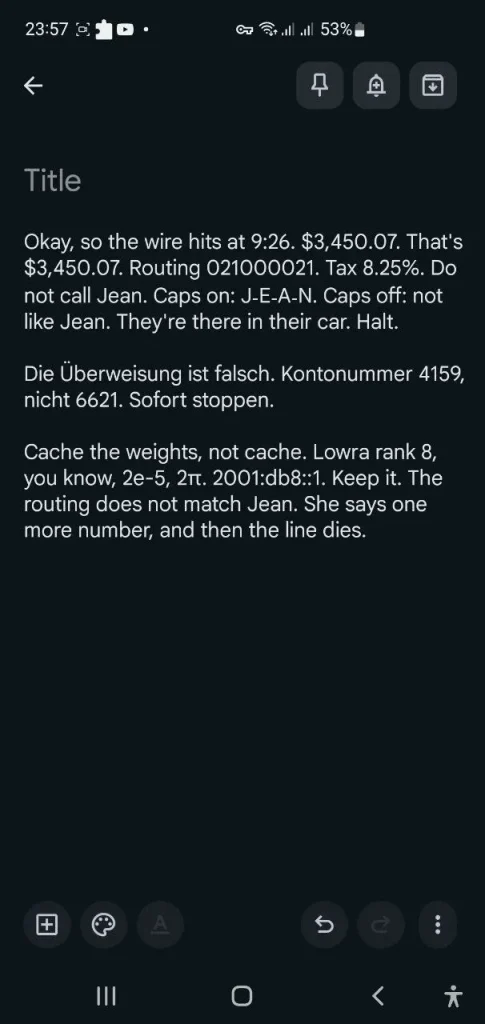
VoiceDash treated the clip as live writing, not as a raw recording.
Time, currency, routing, and the tax rate landed in standard written form: 9:26, $3,450.07, 021000021, 8.25%. The German turn stayed German, including Überweisung, the two account fragments, and Sofort stoppen. The chain “They’re there in their car” stayed intact. The IPv6 documentation address 2001:db8::1 and the compact forms 2e-5 and 2π survived as symbols, not spelled-out noise. Spoken punctuation was applied. Fillers were largely removed. The scene still ends on Jean, the extra number, and the dead line.
In this specific test, VoiceDash produced an output that required fewer visible transcription and formatting corrections across the tested elements.
VoiceInk AI Test
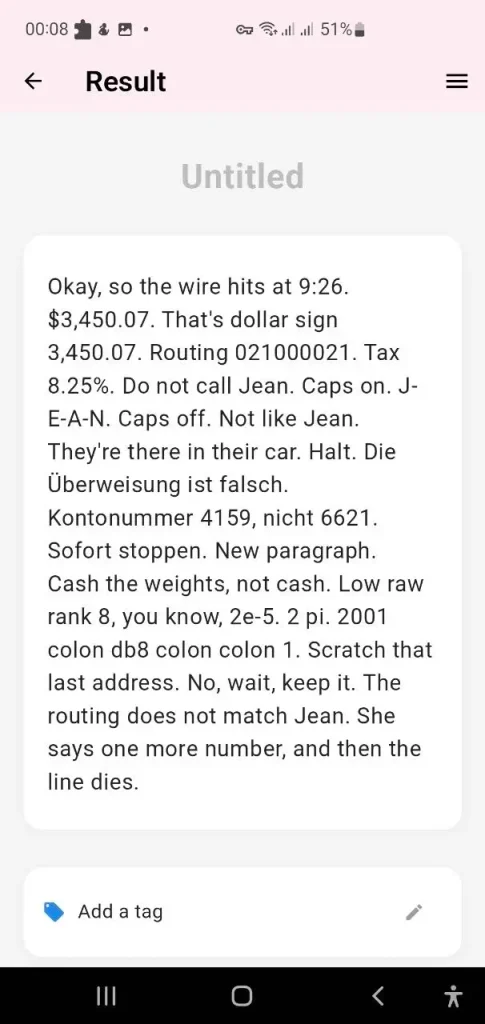
VoiceInk AI kept more of the spoken commands on the page. In this test, that also left more command-related text requiring manual cleanup.
- Homophones: The first token is the one that mattered. Not like Gene came out, not like Jean, so the Jean/Gene contrast is gone.
- Terms and notation: LoRA split into Low raw. Two pi stayed 2 pi instead of 2π. The documentation IPv6 2001:db8::1 was written as 2001 colon db8 colon colon 1.
- Commands treated as text: The dollar sign was not converted to $ on the second money mention. Caps on / Caps off and New paragraph remain in the transcript instead of being executed and discarded. Scratch that last address. No, wait, keep it is preserved verbatim, which is faithful to speech and noisy as a draft.
- What still parsed: 9:26, $3,450.07, routing 021000021, 8.25%, the German block, and They’re there in their car are usable.
- Read: In this test, VoiceInk retained more of the spoken command trail instead of converting those commands into formatting or editing actions. It holds the command trail and drops the lexical traps that decide whether the page is sendable: cache/cash, LoRA, pi, and the IPv6 form.
- Android testing in this article used a separate Google Play app named VoiceInk AI: Voice to Text, published by Fantastic Byte. It is distinct from the VoiceInk application published at tryvoiceink.com. Results below apply only to that Android app.
Wispr Flow Test
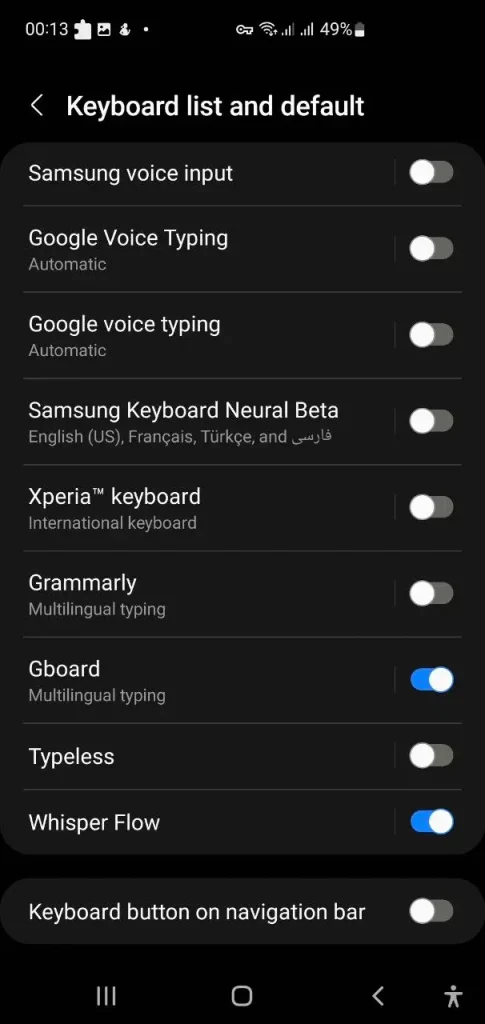
Wispr Flow hit friction on the phone. It asked to take over the system keyboard.
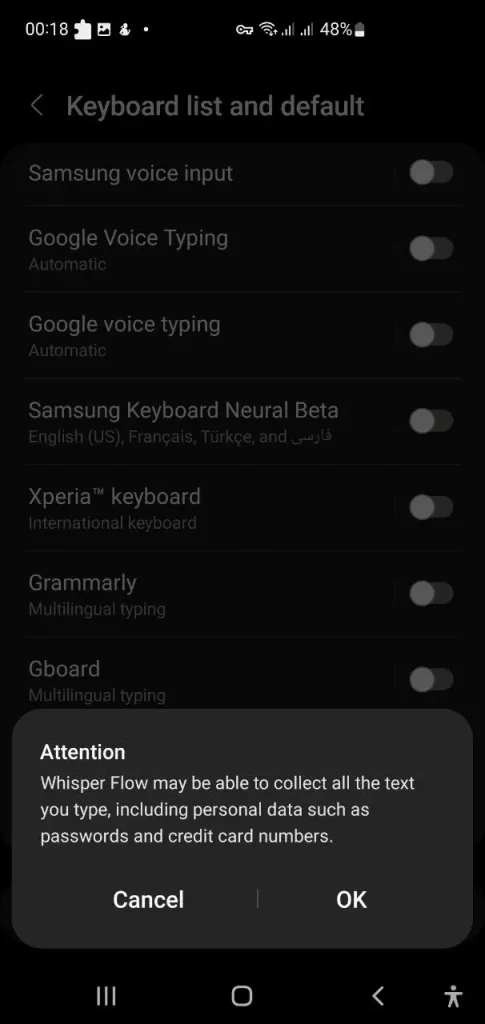
During the Android test, a system prompt warned that the keyboard could potentially handle sensitive information such as passwords and credit card numbers. That prompt is an Android keyboard permission warning on this device. It is not a finding that Wispr stored a password in this test.
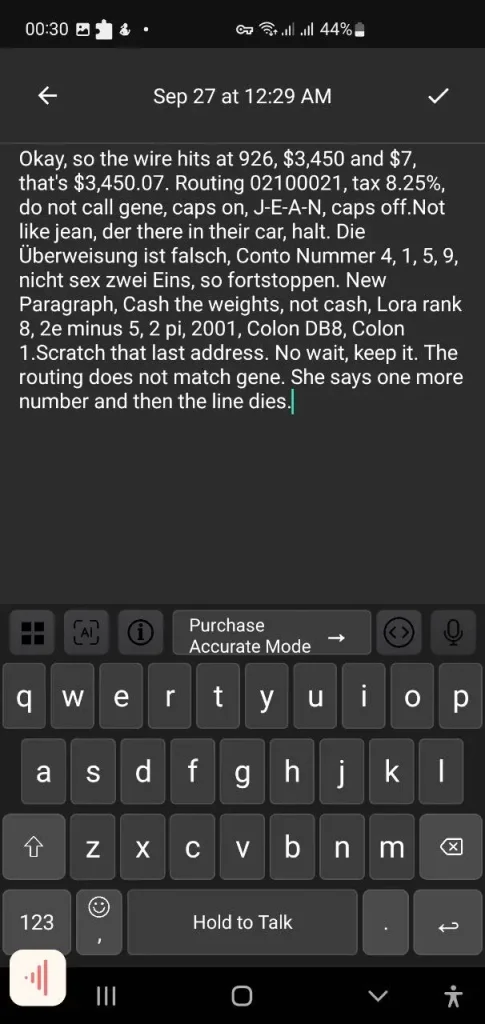
- In this test, Wispr Flow produced a readable through-line of the scene. Several high-value tokens did not survive in their written form.
- Time was rendered as 926 rather than 9:26. The amount appeared first as $3,450 and $7, then as $3,450.07. The routing number was stored as 02100021 against the spoken 021000021.
- ‘Jean’ appears as ‘gene’ in two places. The contrast ‘not like Gene’ is ‘Not like jean’. ‘They’re there in their car’ is ‘der there in their car’. Cache in Cache the weights is Cash.
- In the German turn, ‘Kontonummer’ is ‘Conto Nummer’, the digits are comma-separated, ‘sechs’ is ‘sex’, and ‘Sofort stoppen’ is ‘so fortstoppen’.
- LoRA is Lora. 2e-5 is 2e minus 5. The IPv6 string is 2001, Colon DB8, Colon 1 rather than 2001:db8::1. Spoken commands (caps on, New Paragraph, scratch/keep) remain in the text.
- The recording is still recognizable as the same script. For a test built around digits, names, German, and compact notation, those substitutions are the measurable result.
Other Audio-to-Text Alternatives to Monologue
The remaining tools in this set did not have an Android app that could be installed for the test, so they were not run on the same clip.
Test Results
On this test, VoiceDash produced the more usable written draft. That still sits inside a narrow check: one Android device, one microphone, one room, one 45-second script. It is not a lab benchmark, and it is not a Word Error Rate. Homophones, code-switching, and edit commands were chosen to stress writing tools, not to rank vendors in general. Another accent, network condition, app version, or language pair can move every score. Treat the transcripts as a worked example from 26 September 2026, then rerun the same file on your own hardware before you treat any result as settled.
Bottom Line
The AI dictation tools in this comparison are not interchangeable. Some focus on live dictation, others on local transcription, meeting notes, or recorded audio.
Before choosing a tool, verify its current platform availability, subscription terms, offline capabilities, and privacy documentation. In particular, distinguish vendor privacy policies from independently verified security certifications and local processing claims.
Before choosing a tool, test it with the types of speech you actually use. Include names, numbers, technical terms, multilingual phrases, and spoken editing commands if those are part of your workflow. Compare the resulting transcript with the source audio and check the current plan, platform availability, privacy documentation, and processing options.
Dictate the next email you already need to send. Free plan: 1,000 words. Judge the draft, not the homepage.
