
- Voicy Alternatives: Quick Comparison Table
- What Matters Most in a Dictation Tool
- VoiceDash: Practical Choice for Everyday Voice Writing
- Wispr Flow: Leading AI Dictation
- Superwhisper: Local Models and Configuration Control
- Aqua Voice: Technical Vocabulary and Real-Time Voice Writing
- “Aqua Voice could not be tested because it did not offer a version compatible with the test phone.”
- Other Notable Options to Replace Voicy
- How to Choose an Alternative for Voicy
- Understanding the AI Dictation Metrics
- Bottom Line
- Frequently Asked Questions
Best Voicy Alternatives: 13 Dictation Tools Compared in 2026
The right Voicy alternative depends on your priorities. VoiceDash suits users who want polished, ready-to-use text across Mac, Windows, iOS, and Android with AI cleanup and Zero Data Retention. Wispr Flow is stronger for heavy multi-device use and broader language support. Superwhisper and local tools (Spokenly, VoiceInk, Handy) are better when offline processing or model control matters. Aqua Voice stands out for its technical and coding vocabulary. This guide compares 13 options on real usability, platforms, privacy, and pricing.
This guide compares the leading Voicy alternatives available in 2026.
Voicy Alternatives: Quick Comparison Table
| Tool | Suitable For | Platforms | Processing | Pricing (approx. 2026) | Notes on Accuracy |
|---|---|---|---|---|---|
| VoiceDash | Everyday polished dictation | Mac, Windows, iOS, Android | Cloud | Free + Pro | Focuses on usable output after AI cleanup |
| Wispr Flow | Cross-platform natural writing | Mac, Windows, iOS, Android | Cloud | Free + $15/mo or $144/yr | Public independent data is limited |
| Superwhisper | Local control and model choice | Mac, Windows, iPhone, iPad | Local + Cloud | Free + $8.49/mo or $249.99 lifetime | Varies by model |
| Aqua Voice | Technical and coding vocabulary | Mac, Windows, iPhone | Cloud | Free + $8/mo annual | 97.3% on its AISpeak benchmark |
| Typeless | Conversational to structured text | Desktop + mobile | Cloud | Free + paid | Public independent data is limited |
| Spokenly | Local-first privacy | Mac, Windows, Linux, iOS | Local + Cloud | Free + paid options | Depends on the selected model |
| Monologue | Apple ecosystem | Mac, iPhone, iPad, Watch | Local + Cloud | Subscription | Apple-focused workflow |
| VoiceTypr | Offline-first dictation | Mac, Windows | Local | One-time purchase | Whisper-class models |
| MacWhisper | Audio and file transcription | Mac | Local + Cloud options | Free + €64 Pro | Whisper-based |
| VoiceInk | Private Mac dictation | Mac | Local | Lifetime purchase | Whisper-based |
| Handy | Open-source offline dictation | Mac, Windows, Linux | Local | Free | Local speech-recognition models |
| Otter.ai | Meeting transcription | Web, desktop, mobile | Cloud | Free + paid | Meeting-oriented |
| Dragon Professional | Professional dictation | Windows | Local | Premium one-time license | Specialized professional workflows |
Pricing and features may change. Check the vendor’s current pricing page before you buy.
What Matters Most in a Dictation Tool
Raw Word Error Rate is only one piece of the puzzle. Modern tools should also be evaluated by Functional Text Usability: how much editing is left after filler words are removed, punctuation is restored, grammar is corrected, and the text is cleaned up structurally.
Other practical factors include:
- System-wide insertion
- Platform coverage, especially Android
- Privacy architecture
- Personal dictionaries and reusable snippets
- Latency after you stop speaking
- Pricing model
- Local versus cloud processing
- Support for specialized vocabulary
Advanced engineering metrics such as Real-Time Factor, first-token latency under load, Voice Activity Detection behavior, beam width, language-model weight, substitution/deletion/insertion breakdowns, and phoneme-level diagnostics are rarely published for consumer apps.
For that reason, we separate published benchmark data, vendor-reported claims, and our own qualitative assessment rather than treating every accuracy figure as directly comparable.
The observations below about specific recognition accuracy, installation issues, and platform limitations come from our own hands-on testing conducted in 2026. Results can vary depending on hardware, microphone, accent, and software version.
VoiceDash: Practical Choice for Everyday Voice Writing
VoiceDash is an AI-powered system-wide Speech-to-Text tool focused on turning natural speech into usable written text. It combines speech recognition with AI-assisted cleanup, including filler-word removal, punctuation, grammar correction, and text refinement.
Platforms
Mac, Windows, iOS, Android.
Pros
- AI-assisted post-processing
- System-wide dictation
- Personal Dictionary
- Snippet Library
- Cross-platform workflow including Android
- Zero Data Retention policy stated by the company
- Free tier for testing the workflow
Cons
- Requires an internet connection for its cloud-based AI features
Insights
VoiceDash takes a different approach from tools that primarily compete on raw transcription accuracy. Its emphasis is on the distance between spoken input and usable written output.
For someone dictating emails, documents, messages, research notes, or content, this distinction matters. A transcript can be technically accurate and still require substantial cleanup. Conversely, a slightly less literal transcript may be more useful if the system removes filler words and produces readable sentences.
Download VoiceDash and turn your speech into polished text across your devices, no credit card required.
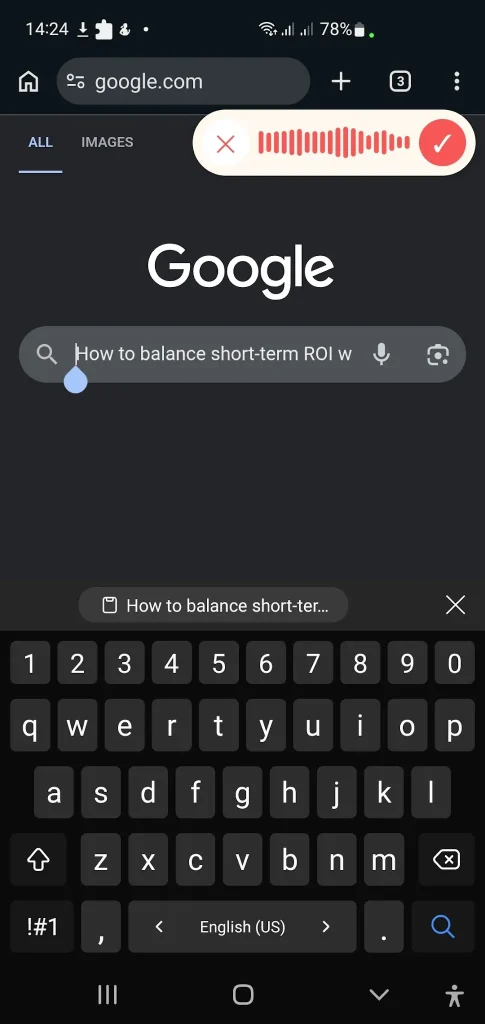
“VoiceDash nailed the sentence that tripped up Wispr Flow: “How to balance short-term ROI with long-term brand building.”
Wispr Flow: Leading AI Dictation
Wispr Flow focuses on turning natural speech into polished text across apps and devices. It supports Mac, Windows, iPhone, and Android, with dictation available in 100+ languages. It also learns personal vocabulary and supports dictionaries and snippets
Wispr Flow focuses on turning natural speech into polished text across apps and devices. It supports Mac, Windows, iPhone, and Android, with dictation available in 100+ languages. It also learns personal vocabulary and supports dictionaries and snippets.
Platforms
Mac, Windows, iOS, Android.
Pros
- System-wide dictation
- 100+ languages
- Personal vocabulary learning
- Dictionary and snippets
- Cross-device workflow
- Developer-focused features
- Team and enterprise administration
Cons
- Cloud-based processing
- Heavy users need a paid plan for unlimited dictation
- Some advanced controls are limited to certain plans or platforms
Insights
Wispr Flow is especially useful for people who switch between devices and applications throughout the day. Its workflow is built around speaking naturally instead of manually dictating punctuation and formatting commands.
Its developer workflow is another differentiator. Wispr Flow specifically supports technical terms, camelCase, snake_case, acronyms, and coding-focused workflows.
Current pricing is $15/user/month for Pro when billed monthly, or $144/year when billed annually. The free tier has weekly usage limits that vary by platform.
Privacy
Wispr Flow says users can opt out of model training. Enterprise customers can also enforce Zero Data Retention and use access controls such as SSO, SCIM, audit logs, and domain management.
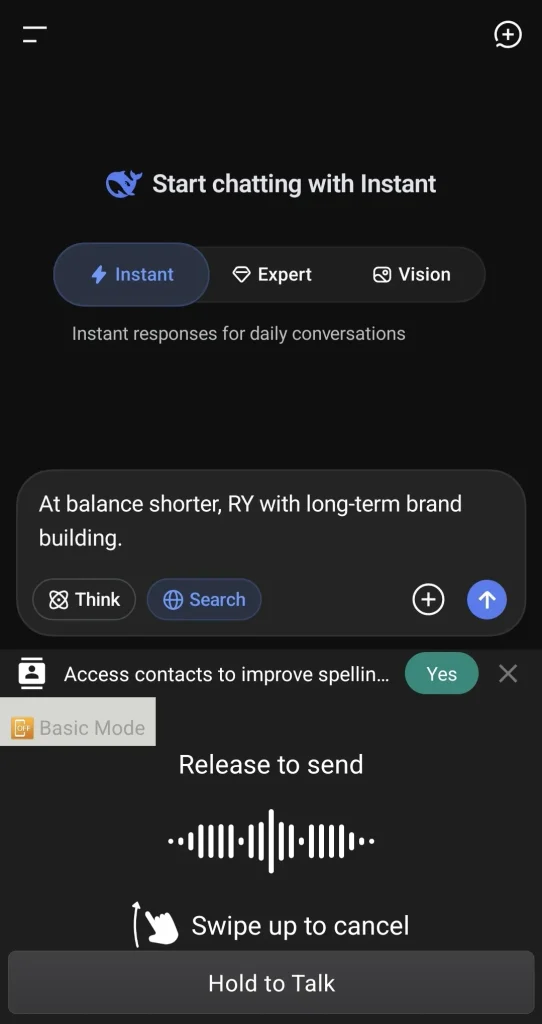
“Wispr Flow could not recognize ‘How to balance short term ROI’ in the sentence.”
Superwhisper: Local Models and Configuration Control
Superwhisper is a voice-to-text application available on Mac, Windows, iPhone, and iPad. It supports both local and cloud AI models, giving users a choice of how their speech is processed.
Platforms
Mac, Windows, iPhone, iPad.
Pros
- Local and cloud models
- Offline processing
- 100+ languages
- Custom vocabulary
- Custom modes
- Audio and video transcription
- Lifetime license option
Cons
- Model selection can make results less predictable for less experienced users
- Local performance depends on hardware and model size
- Advanced configuration adds complexity
Insights
Superwhisper is less focused on giving every user the same transcription pipeline and more focused on giving users control over how that pipeline works.
Users can run local models when privacy or offline operation matters, while cloud models can be used when additional computational resources are useful. The Pro plan also includes custom modes, custom vocabulary, local models, cloud models, and audio and video transcription.
The current listed Pro pricing is $8.49/month, $84.99/year, or $249.99 for a lifetime license.
“Superwhisper does not have an Android version, so it could not be tested on an Android phone.”
Aqua Voice: Technical Vocabulary and Real-Time Voice Writing
Aqua Voice is designed for real-time dictation, with a particular focus on specialized vocabulary, including technical and AI-related terminology. It supports Mac, Windows, and iPhone and currently advertises 49 languages.
Platforms
Mac, Windows, iPhone.
Pros
- Technical vocabulary support
- Custom dictionary
- Custom instructions
- System-wide dictation
- 49 languages
- Public benchmark
- Low-friction real-time workflow
Cons
- Cloud processing
- No Android support listed
- Free usage is limited
- Advanced features require paid plans
Insights
Aqua Voice stands out for its focus on vocabulary that general-purpose speech recognition systems can struggle with. Its custom dictionary lets users add names, brands, and technical terms, while custom instructions can shape the resulting writing style.
Aqua currently offers 1,000 free words, with Pro listed at $8/month when billed annually. Its Max plan adds features such as Realtime Mode and voice commands.
“Aqua Voice could not be tested because it did not offer a version compatible with the test phone.”
Other Notable Options to Replace Voicy
Some alternatives take a different approach, such as local processing, open-source models, or more specialized workflows. Here are the options worth considering.
Typeless
Typeless is built around natural, conversational dictation rather than traditional word-by-word speech recognition. The idea is simple: users can speak in a relatively unstructured way, while the system turns that speech into cleaner, more polished written language.
This makes Typeless particularly relevant for users who think aloud, revise sentences as they speak, or prefer not to dictate punctuation manually.
The main trade-off is that the final output is shaped by AI rewriting rather than being a purely literal transcript. That can produce more readable text, but it also means raw transcription accuracy and final writing quality should be evaluated separately.
Suitable for: users who want to speak naturally and receive structured written output.
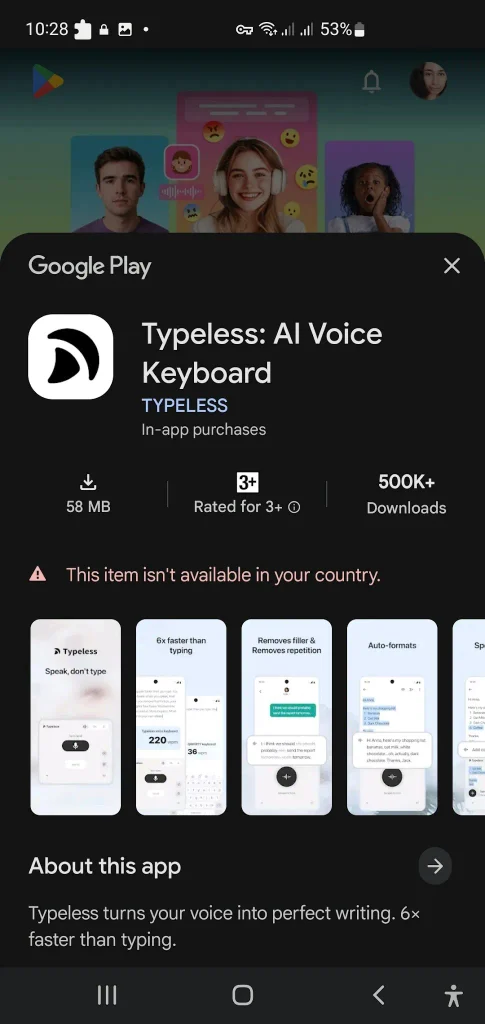
“Typeless seemed worth testing, but the app could not be downloaded or installed successfully.”
Spokenly
Spokenly takes a local-first approach to voice input. Its appeal is less about AI rewriting and more about giving users control over where speech processing happens.
The tool supports desktop platforms including Mac, Windows, and Linux, as well as iOS. Its local workflow can be useful for users who want to keep everyday dictation off third-party cloud services. Depending on the setup, cloud models can also be used through BYOK-style workflows.
Suitable for: privacy-conscious users who want local processing without giving up the option of cloud models.
Trade-off: local-first workflows can require more configuration than a fully managed cloud service, and the writing cleanup may be less extensive than what AI-first dictation products provide.
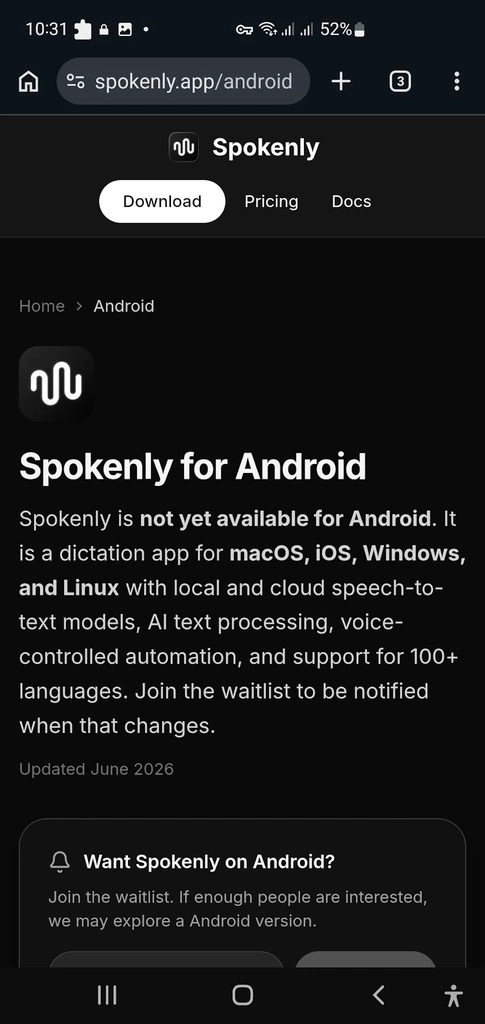
“Spokenly seemed worth testing, but there was no Android version available yet.”
Monologue
Monologue is designed primarily for users who work within the Apple ecosystem.
Its value is less about being a general-purpose, cross-platform dictation service and more about fitting naturally into an Apple-centered workflow across devices such as Mac, iPhone, iPad, and Apple Watch.
Suitable for: users who already rely heavily on Apple devices and want voice input integrated into that environment.
Trade-off: Apple-centric workflows are less useful for people who regularly switch between Windows, Android, and Apple devices.

“Monologue also seemed worth testing, but without an Android app, testing could not proceed. Monologue currently supports Mac, iPhone, iPad, and Apple Watch.”
VoiceTypr
VoiceTypr takes an offline-first approach to voice transcription. Instead of relying on a cloud service for every dictation, it uses local speech-recognition models to process voice data on the device.
That makes it a practical option for users who prefer to avoid recurring subscriptions or want their voice data processed locally. Like other Whisper-based apps, though, the experience depends on the model you choose and the hardware available to run it.
Suitable for: users who want offline dictation and a one-time purchase model.
Trade-off: local processing can use more computing resources, and the experience may be less polished than cloud-first AI writing tools.

“VoiceTypr currently supports macOS and Windows, with no iOS or Android app.”
MacWhisper
MacWhisper is more than a simple voice-typing application. It is primarily a transcription tool for recorded audio and video, while also offering system-wide dictation.
It supports common audio and video formats, batch transcription, speaker recognition, subtitle export, translation, and automatic cleanup. The current Pro version is listed at €64 as a one-time license and includes lifetime updates.
MacWhisper can also use local models, while optional cloud transcription and AI features are available through its Assistant functionality.
MacWhisper or VoiceDash? Find out which one fits the way you actually use speech-to-text.
Suitable for: Mac users who need to transcribe interviews, meetings, podcasts, lectures, or other recorded material.
Trade-off: users looking primarily for continuous voice typing across Windows, Android, and iOS may need a more cross-platform tool.
“MacWhisper was another dead end for my workflow; it doesn’t have an Android app, so I couldn’t use it as a true cross-device alternative to Voicy.”
VoiceInk
VoiceInk is an application built around local speech recognition.
Its main distinction is privacy: speech can be processed on the Mac rather than being sent to a remote transcription service. This makes it relevant to users who want system-wide dictation while keeping their recordings local.
VoiceInk or VoiceDash? See which dictation tool fits your workflow. Compare privacy, platform support, accuracy, and everyday usability before you choose.

“Even after selecting the language beforehand, VoiceInk failed to understand the speech.”
Handy
Handy is an open-source dictation application built around local and offline speech recognition.
Its appeal is straightforward: the core application does not require a recurring subscription, and speech recognition runs locally instead of relying on a cloud transcription provider.
This makes Handy particularly relevant for privacy-conscious users, developers, and people comfortable with open-source software.
Suitable for: users who prioritize open-source software, offline processing, and avoiding recurring fees.
Trade-off: local speech recognition can require more system resources, while an open-source workflow may involve more technical setup than commercial cloud applications.

“Handy was also tested, but the lack of a mobile app makes it less practical for everyday, on-the-go dictation.”
Otter.ai
Otter.ai takes a different approach to voice transcription. Rather than focusing primarily on replacing the keyboard, it is built around meetings, conversations, transcripts, and collaboration.
It can identify speakers, create searchable transcripts, and generate AI-powered meeting summaries. This makes it useful when the goal is to capture information from a conversation rather than continuously dictate text into an email or document.
Otter or VoiceDash? Find the right tool for how you actually use your voice.
Suitable for: meetings, interviews, lectures, research, and collaborative note-taking.
Trade-off: if the primary requirement is system-wide voice typing, Otter.ai addresses a different use case.

“An error prevented access to Otter.ai on an Android phone, making it impossible to properly test the platform.”
Dragon Professional
Dragon Professional remains relevant for users with specialized professional dictation requirements, particularly on Windows.
Its strength is not simplicity. Dragon provides extensive vocabulary customization, voice commands, macros, and professional dictation workflows. That can make it valuable in environments where users repeatedly dictate specialized terminology or control software through voice.
Suitable for: professionals with demanding Windows-based dictation workflows and specialized vocabulary.
Trade-off: Dragon is significantly more specialized and expensive than lightweight consumer dictation tools. It also has a steeper learning curve.
Pricing varies by market and licensing arrangement, so a fixed “$699” figure should not be presented as a universal current price. For example, a 2026 European reseller price list lists Dragon Professional 16 at €999 including VAT.

“Dragon Professional was another option that could not be tested because it wasn’t accessible on the available setup.”
How to Choose an Alternative for Voicy
The right choice depends more on your workflow than on a single accuracy score.
- Polished everyday voice writing: VoiceDash
- Cross-device AI dictation: Wispr Flow
- Local processing and model control: Superwhisper
- Technical vocabulary: Aqua Voice
- Natural conversational rewriting: Typeless
- Local-first privacy: Spokenly, VoiceInk, or Handy
- Recorded audio transcription: MacWhisper
- Meeting notes and collaboration: Otter.ai
- Apple-focused workflow: Monologue or Apple Dictation
- Specialized professional Windows dictation: Dragon Professional
Understanding the AI Dictation Metrics
Word Error Rate (WER) measures substitutions, deletions, and insertions against the words in a reference transcript. Lower is generally better.
Character Error Rate (CER) applies the same concept at the character level.
But neither metric captures the full picture of modern AI dictation.
A system can produce a relatively accurate transcript while still leaving behind filler words, awkward phrasing, missing punctuation, or formatting issues. Conversely, an AI rewriting layer can produce more usable text even when the underlying transcription is not perfect.
That is why we distinguish between:
- Raw transcription accuracy
- Post-processing quality
- Final editing burden
- Latency
- Terminology handling
- Privacy architecture
- Platform coverage
Public independent data for consumer dictation apps remains limited. A practical rule of thumb is:
- High deletions can indicate endpointing or Voice Activity Detection issues.
- High insertions can indicate decoding or language-model issues.
- High substitutions can indicate acoustic-model or vocabulary limitations.
These are diagnostic hypotheses, not universal rules. The same error pattern can have multiple causes depending on the system architecture.
In practice, the amount of editing required after dictation may be more meaningful to a writer than a benchmark WER score alone.
Bottom Line
There is no single Voicy alternative that stands out for every use case.
- If your priority is polished text with system-wide dictation across desktop and mobile, VoiceDash is one option worth testing.
- If you need cross-device AI dictation, Wispr Flow takes a similar voice-writing approach, with broader language support and team features.
- If offline processing and model control matter more, Superwhisper offers both local and cloud options.
- If your work involves technical terminology, Aqua Voice has published benchmark results focused specifically on technical and AI vocabulary.
- If your primary requirement is recorded-audio transcription rather than live voice typing, MacWhisper is built around that workflow.
Ready to replace Voicy? Try VoiceDash for free and see how much easier voice writing can be.
Frequently Asked Questions
VoiceDash focuses on polished system-wide voice writing, Wispr Flow on cross-device AI dictation, Superwhisper on local and cloud model choice, and Aqua Voice on technical vocabulary.
The best option depends on your preferred workflow, platforms, and processing requirements.
The exact offline capabilities vary by platform, model, and feature. For example, Superwhisper supports local speech models, while VoiceInk and Handy use local speech recognition.
Dedicated applications become more valuable when you need system-wide workflows, personalization, AI cleanup, offline processing, or specialized terminology.

Anonymous
08/31/2026बहुत बढ़िया! ये टूल वाकई काम का है, फiller words हटा देता है और टेक्स्ट साफ-सुथरा बना देता है। जरूर ट्राई करो 👍
Anonymous
09/02/2026Voicy सबसे बेकार ऐप है।
Sahar Haghshenass
09/02/2026We suggest you give VoiceDash a try and we would appreciate your feedback.