

- Best Keyboards for Arthritis: Quick Picks
- Match the Keyboard to the Problem
- 1. Kinesis Freestyle2 + VIP3 Kit — Best Overall
- 2. MoErgo Glove80 — Best for Reducing Finger Reach
- 3. Kinesis Advantage360 — Best Premium Contoured Keyboard
- 4. Logitech Ergo K860 — Best for an Easy Transition
- 5. Kinesis mWave — Best Light Mechanical Option
- 6. Dygma Raise 2 — Best Adjustable Mechanical Split
- 7. UHK 80 — Best Modular Setup
- 8. Perixx Periboard-512 — Best Budget Option
- The Keyboard Features That Matter Most for Arthritic Hands
- Before Spending $400 on a Keyboard, Decide What You Are Actually Trying to Reduce
- Where VoiceDash Fits
- How We Chose These Keyboards
- Final Verdict
- Frequently Asked Questions
8 Best Keyboards for Arthritis in 2026
If arthritis makes typing difficult, do not start by looking for a keyboard labeled “ergonomic.” Start with the movement that gives you trouble. A split keyboard can change wrist and forearm position. Lighter switches can reduce the force required for each press. Contoured or columnar layouts can reduce how far your fingers need to reach. Those are different problems, and they do not always need the same keyboard.
For most people, the Kinesis Freestyle2 with the VIP3 Kit is the best place to start because it offers meaningful adjustment without forcing you to relearn how to type.
Best Keyboards for Arthritis: Quick Picks
| Keyboard | Our pick for | What matters most | Main trade-off |
|---|---|---|---|
| Kinesis Freestyle2 + VIP3 Kit | Best overall | Adjustable split, 5°/10°/15° tenting, light membrane keys | Palm rests and tenting cost extra |
| MoErgo Glove80 | Best for reducing finger reach | Concave wells, columnar layout, thumb clusters | Major learning curve |
| Kinesis Advantage360 | Best premium contoured keyboard | Deep key wells, independent halves, adjustable tenting | Expensive |
| Logitech Ergo K860 | Best for an easy transition | Familiar layout, short key travel, curved split shape | Fixed split and 60 gf actuation |
| Kinesis mWave | Best light mechanical option | 45 g Quiet Red switch, fixed split, familiar layout | Less adjustable than a true split |
| Dygma Raise 2 | Best adjustable mechanical split | Independent halves, hot-swap switches, up to 60° tenting | Expensive once configured |
| UHK 80 | Best modular setup | Split design plus optional pointing-device modules | More complexity than most users need |
| Perixx Periboard-512 | Best budget option | Fixed ergonomic split shape at a low price | Bulky and not adjustable |
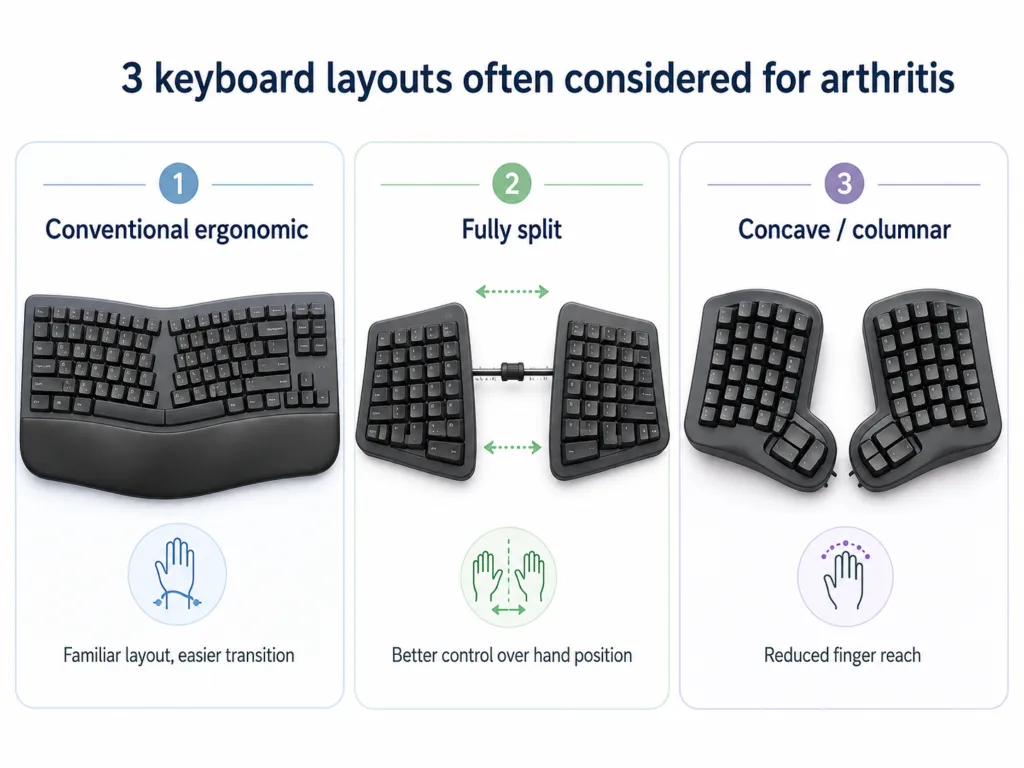
The first distinction is more useful than any product ranking:
Split and tented keyboards mainly change wrist and forearm position. Lighter switches change keypress force. Contoured and columnar keyboards change finger travel. None of those features treats arthritis; the useful one is the feature that addresses the part of typing you actually find difficult. OSHA recommends workstation setups that keep the wrists close to neutral and notes that alternative designs such as split keyboards may make neutral positioning easier. The Arthritis Foundation similarly recommends ergonomic equipment that keeps the hands and forearms in a more neutral position.
Match the Keyboard to the Problem
Arthritis in the finger joints and uncomfortable wrist positioning are not the same typing problem.
If pressing keys is difficult, look closely at switch force. If reaching across the keyboard is difficult, key wells, columnar layouts and thumb clusters become more relevant. If your wrists bend inward on a normal keyboard, separation and tenting deserve more attention.
That distinction also explains why the most aggressively ergonomic keyboard is not automatically the best purchase.
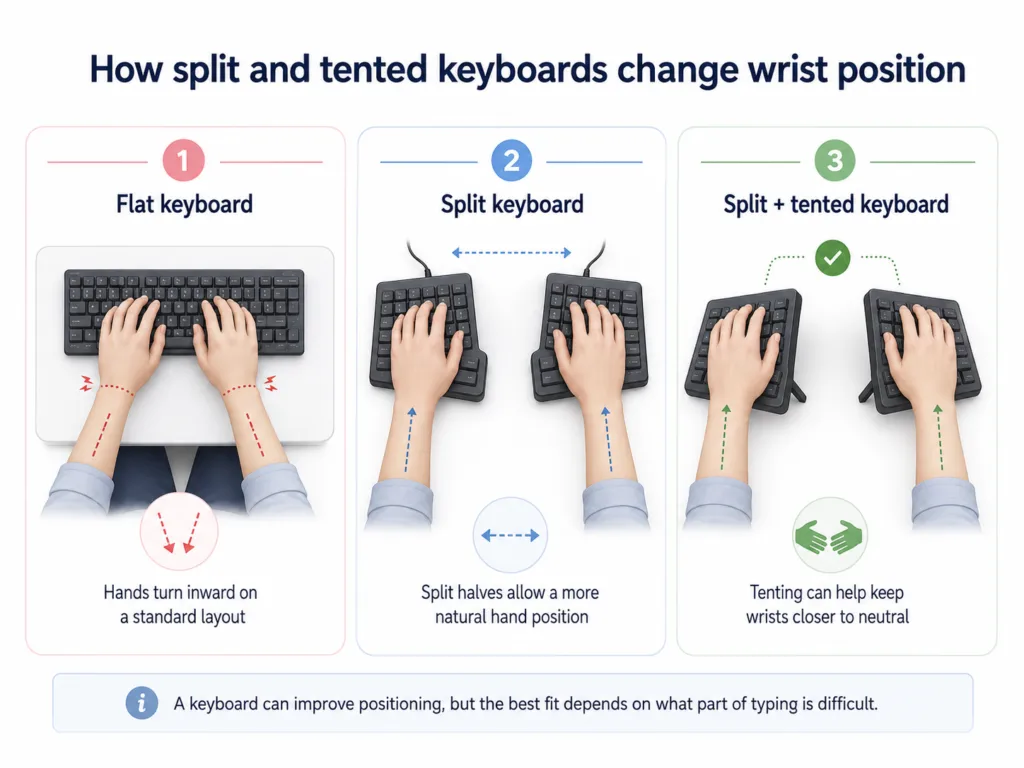
If your wrists or forearms bother you while typing
A fully split keyboard is the strongest place to start.
The two halves can be moved apart and rotated until your arms approach the keyboard in a position that suits your shoulder width. OSHA specifically notes that split designs may make neutral wrist positioning easier.
The Kinesis Freestyle2 and Dygma Raise 2 are the clearest examples in this guide.
If finger reach is the problem
Look at the MoErgo Glove80 or Kinesis Advantage360.
Their layouts are built around reducing the distance between the fingers and useful keys instead of simply bending a normal keyboard into a new shape. The Glove80 uses concave wells, vertical key columns and six-key thumb clusters; RTINGS also identifies its key wells and columnar layout as features intended to reduce finger travel.
The trade-off is obvious once you use a radically different layout: muscle memory becomes part of the cost.
If you cannot afford a major learning curve
The Logitech Ergo K860 and Kinesis mWave make fewer changes to the conventional staggered layout.
That does not make them less legitimate. Someone who needs to write for work tomorrow may get more value from a moderate ergonomic change they can actually use than from a theoretically superior layout that temporarily destroys their typing speed.
For a broader look at adapting your computer workflow around joint stiffness and hand discomfort, see our guide to typing with arthritis.
1. Kinesis Freestyle2 + VIP3 Kit — Best Overall
The Freestyle2 gets our top spot because it addresses wrist and forearm positioning without asking you to abandon a familiar keyboard layout.
Its two halves are physically separate. You can increase the distance between them and rotate each side instead of keeping both forearms pointed toward the center of one fixed keyboard.
The VIP3 Kit is the part that turns the Freestyle2 from a basic split keyboard into the version we recommend. It adds palm supports and repeatable tenting positions of 5, 10 and 15 degrees. Kinesis lists the switches at 44 g operating force, 35 g activation force and 3.9 mm of travel.
There is also useful independent data here. TechGearLab measured the Freestyle2 at 43.26 gf in its own force-displacement testing and rated it highest overall among the nine ergonomic keyboards in its 2025 comparison. That measurement is independent of Kinesis’s specification and lands very close to it.
That is a stronger reason to consider the Freestyle2 for this particular guide than the word “ergonomic” on the box.
It gives you relatively light keys, independent positioning and optional tenting without introducing ortholinear columns, layers or thumb clusters.
Buy it if: wrist position, forearm rotation or hand separation is the main issue and you still want a conventional layout.
Skip it if: the difficult part is reaching between keys rather than positioning your wrists. The Glove80 or Advantage360 addresses that problem more directly.
The main complaint is justified: the keyboard’s best features are not all included in the base package. We would not rank the bare Freestyle2 this highly without the VIP3 Kit.
2. MoErgo Glove80 — Best for Reducing Finger Reach
The Glove80 is not the keyboard we would hand to everyone with mild hand discomfort.
It is the keyboard we would investigate when a normal layout itself has become part of the problem.
Each hand gets an independent wireless half. The keys sit in a concave well, the columns run vertically rather than using the normal horizontal stagger, and each thumb has six dedicated keys. MoErgo also builds continuously adjustable tenting into the keyboard.
The point of the columnar layout is straightforward: fingers naturally curl and extend more easily than they move sideways. MoErgo explicitly designed the columns to reduce lateral reaching, while its thumb cluster is designed so the six keys can be reached with little or no palm movement.
RTINGS currently names the Glove80 the best ergonomic keyboard it has tested. Its review specifically calls out the fully split design, concave key wells and columnar layout.
The less attractive part belongs in the recommendation too.
This layout has to be learned.
MoErgo itself says people coming from conventional staggered keyboards should expect an adaptation period and that mastery can take weeks. TechGearLab’s testers also found the Glove80 substantially harder to learn than conventional ergonomic boards.
Hand size matters as well. In TechGearLab’s test panel, its small-handed tester rated the Glove80 much lower for comfort than its large-handed tester. That is a useful reminder that “more ergonomic features” and “more comfortable for your hands” are not interchangeable claims.
Buy it if: reducing reaching and redistributing work toward the thumbs matters enough to justify relearning your keyboard.
Skip it if: you need your normal typing speed immediately or prefer a conventional layout.
3. Kinesis Advantage360 — Best Premium Contoured Keyboard
The Advantage360 makes more sense once you stop thinking of a keyboard as a flat board.
Its two modules are independent, its keys sit in concave wells, frequently used non-letter keys move toward the thumbs, and the integrated mechanism provides three tenting heights.
For arthritis specifically, the key wells are more interesting than the premium construction or programmability.
A contoured layout changes where your fingers have to travel. That is a fundamentally different intervention from an Ergo K860, which changes the angle of an otherwise familiar keyboard.
Current Advantage360 configurations also offer several switch choices. Kinesis lists options ranging from 35 g Kailh Box Silent Pink linear switches through 50 g and 55 g options depending on the model.
That flexibility matters if key force is part of your problem.
It does not mean the lightest available switch is automatically the correct one. Extremely light linear switches can also lead to accidental presses, especially for someone accustomed to resting fingers heavily on the keys.
The Advantage360 earns its place when both positioning and finger reach need adjustment. If all you need is a wider hand position, buying this much keyboard is unnecessary.
Buy it if: you want independent halves, contoured wells and switch choice in one premium setup.
Skip it if: your symptoms are mild or you are still figuring out whether a split keyboard helps. Test the less expensive concept first.
4. Logitech Ergo K860 — Best for an Easy Transition
The Ergo K860 is easier to recommend to someone who does not want their keyboard to become a new hobby.
Its curved split keyframe changes the angle of the hands while preserving a full-size, conventional layout. That substantially reduces the adaptation burden compared with the Glove80 or Advantage360.
The specification that matters for this article is not just its shape.
Logitech lists 1.8 mm of total key travel and 60 gf of actuation force.
That combination tells us something useful.
The keys do not move very far, but they are not especially light. If your difficulty is bending or moving the fingers through a large distance, short travel may appeal. If pressing against resistance is the painful part, a 60 gf keyboard would not be our first recommendation.
This is why “low-profile,” “mechanical” and “ergonomic” are poor shortcuts for this topic. They describe categories. They do not tell you which physical demand the keyboard changes.
RTINGS currently positions the K860 as its mid-range ergonomic recommendation, reflecting its more conventional approach compared with specialized boards such as the Glove80.
Buy it if: you want a meaningful change in wrist positioning without learning a new key layout.
Skip it if: low key force or independently adjustable hand spacing is your priority.

5. Kinesis mWave — Best Light Mechanical Option
The mWave is the model we would look at before telling someone they need a $350–$450 split mechanical keyboard.
Its basic shape is closer to the old Microsoft Sculpt school of ergonomics: a fixed split, built-in contour and tenting, but with modern low-profile mechanical switches.
The useful configuration here is the Quiet Red version.
Kinesis specifies the Gateron low-profile Quiet Red at 45 g, with a linear feel and 3.0 mm total travel. The Brown alternative moves up to 55 g and adds tactile feedback.
For someone with sensitive finger joints, that gives the mWave a clearer arthritis-specific reason to exist in this list than simply saying “mechanical keyboards feel better.”
The fixed body also removes one annoyance of fully separated keyboards: you do not need to reposition two independent halves every time the desk setup moves.
That convenience is also the limitation.
If the angle or spacing built into the mWave does not fit your body, you cannot simply move the halves farther apart.
Buy it if: you want a lighter mechanical switch and a familiar layout with moderate ergonomic changes.
Skip it if: adjustable separation is more important than mechanical key feel.
6. Dygma Raise 2 — Best Adjustable Mechanical Split
The Raise 2 is the better fit for someone who wants mechanical-switch flexibility without moving to a columnar keyboard.
The halves separate completely, the MX switch sockets are hot-swappable, and the wireless version supports USB, Bluetooth and low-latency RF.
Add Dygma’s tenting hardware and the keyboard can reach angles up to 60 degrees, with reverse tilting also supported.
Do not read “60 degrees” as a recommendation to type at 60 degrees.
The value is range, not maximum angle.
A highly adjustable board allows you to change one variable at a time until the setup feels right instead of assuming that one manufacturer’s fixed curve happens to match your shoulders and wrists.
Hot-swappable switches provide another form of adjustment. If a switch is too heavy or the tactile bump bothers your fingers, the board does not have to be replaced.
RTINGS currently recommends the Raise 2 as its ergonomic gaming pick. For an arthritis-focused guide, the gaming features are secondary; separation, tenting and switch choice are the reasons it belongs here.
Buy it if: you want substantial positional adjustment while keeping staggered keys.
Skip it if: you want a simple office keyboard. You are paying for adjustability and customization that many users will never exploit.

7. UHK 80 — Best Modular Setup
The UHK 80 becomes interesting when moving between the keyboard and mouse is part of the problem.
It is a wireless split mechanical keyboard with hot-swappable switches. Its optional Riser supports tenting between 10 and 60 degrees, while the standard feet allow smaller adjustments.
The more unusual feature is the module system.
A trackball, trackpoint, touchpad or additional key cluster can be mounted next to the thumb area. That lets some pointer work happen without repeatedly moving the whole hand away from the keyboard.
This is one of the few products where “ergonomic” thinking extends beyond the keyboard itself.
OSHA also recommends keeping the pointing device close enough to avoid unnecessary reaching, so the idea behind these modules has a legitimate ergonomic rationale even though that does not prove a particular module will reduce arthritis symptoms.
Buy it if: repeated movement between keyboard and pointing device is something you specifically want to reduce.
Skip it if: you just want easier typing. The modular system adds cost and complexity that has no value unless you use it.
8. Perixx Periboard-512 — Best Budget Option
The Periboard-512 is not a budget version of a Glove80.
It solves a much simpler problem.
The board uses a fixed split-key shape, a three-dimensional curve, an integrated palm rest and membrane switches. Perixx lists its dimensions at 485 × 236 × 44 mm, so this is a large keyboard.
Its advantage is that you can try a more natural hand angle without committing hundreds of dollars.
Its weakness is that almost none of the important geometry is adjustable.
TechGearLab’s testing puts that limitation into context. The Periboard-512 scored well below the Freestyle2, Glove80, Ergo K860 and several other boards in its ergonomics comparison, and testers also rated its palm-rest design poorly.
That is useful information because an integrated palm rest is often treated as an automatic positive in product marketing.
It is not.
Buy it if: you want a cheap first experiment with an angled split layout.
Skip it if: you already know you need adjustable separation, tenting or reduced finger reach.
The Keyboard Features That Matter Most for Arthritic Hands
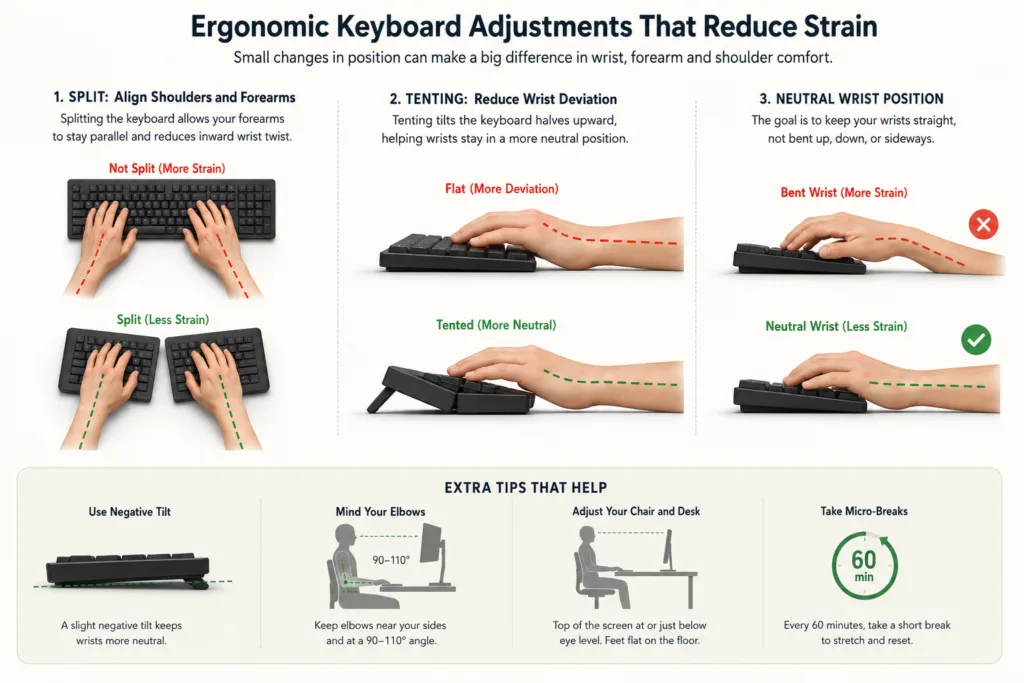
1. Split design: for wrist and forearm position
A split keyboard lets the hands sit farther apart and, on fully separated models, lets you rotate each side independently.
That can matter when a conventional board forces your wrists inward.
It does not automatically make pressing keys easier.
If finger-joint pressure is the main issue, look beyond the split.
2. Tenting: for forearm rotation
Place both hands flat on a desk, then rotate them slightly toward a handshake position.
That is the movement tenting tries to accommodate.
OSHA’s larger principle is neutral positioning rather than a prescribed tenting angle. The correct setup is the one that avoids forcing your wrist upward, downward or sideways.
Do not buy the keyboard with the highest possible tenting angle and assume it is therefore more ergonomic.
3. Actuation force: for how hard you have to press
This is one of the most useful specifications in an arthritis-focused comparison.
The Freestyle2 is around the mid-40-gram range by both manufacturer specification and TechGearLab’s independent measurement. The mWave Quiet Red is specified at 45 g. The Ergo K860 is specified at 60 gf.
Those numbers do not tell you which keyboard will feel best.
They do tell you that these keyboards demand different amounts of force.
That is more useful than sorting products into “mechanical” and “membrane.”
4. Key travel: for how far the finger moves
Low force and short travel are not the same thing.
The Ergo K860 travels only 1.8 mm, while the Freestyle2 travels 3.9 mm. The Freestyle2 requires less force according to their respective manufacturer specifications.
Someone who dislikes finger movement may prefer one characteristic; someone who dislikes resistance may prefer the other.
This is why there is no defensible rule saying that laptop-style shallow keys or full-travel mechanical switches are universally better for arthritis.
5. Contoured and columnar layouts: for reach
The Glove80 and Advantage360 go beyond wrist positioning by changing where the keys physically sit.
That can reduce reaching, especially when frequently used modifiers and editing keys are moved toward the thumbs.
The price is adaptation.
Do not underestimate that cost if typing speed matters to your work.
6. Palm support: useful when used correctly
A large wrist rest is not proof that a keyboard is ergonomic.
OSHA says palm supports can help facilitate neutral wrist angles, but pressure should be placed around the heel or base of the palm rather than directly on the wrist while keying. The Arthritis Foundation similarly warns against excessive pressure on the wrist.
The word palm matters more than the word wrist.
Before Spending $400 on a Keyboard, Decide What You Are Actually Trying to Reduce
Every keyboard in this guide still has the same fundamental requirement:
You have to press the keys.
A better keyboard can change the angle of your wrists. It can lower key force. It can bring keys closer to your fingertips. Those changes may make a real difference to comfort.
They do not reduce the amount of text you need to enter.
That becomes important when the problem is not ten uncomfortable keystrokes. It is thousands.
An ergonomic keyboard changes how you type.
Dictation changes how much you have to type.
The Arthritis Foundation itself includes both ergonomic keyboards and voice-recognition software among possible workplace modifications for people managing arthritis.
This is also where the hidden cost of prolonged typing becomes more relevant than another switch comparison.
If your job involves writing emails, reports, notes, support replies, forms or long documents all day, reducing manual text entry attacks a different part of the problem.
Where VoiceDash Fits
VoiceDash is a cross-platform voice-to-text and dictation platform for iOS, Android, Mac and Windows. It works wherever there is a cursor, so text can be dictated directly into the email, document, browser field, chat box or productivity app already in use.
That matters because ordinary dictation often solves only the first half of the workflow.
You speak the first draft.
Then you return to the keyboard to correct it.
VoiceDash’s Command Mode is intended to reduce that handoff by letting you edit, format and control text by voice as well.
VoiceDash is not an arthritis treatment. It is not a reason to throw away your keyboard. It solves one narrower problem: the amount of manual text entry required to produce and edit text.
For many people, the sensible setup is therefore not:
ergonomic keyboard or dictation.
It is:
ergonomic keyboard for shortcuts and precise input + dictation for the bulk of writing.
That distinction becomes especially important if you already own a reasonable ergonomic keyboard and are considering spending several hundred dollars on another one because long writing sessions still bother your hands.
Before upgrading, identify what is still difficult.
If it is wrist position, improve the workstation or keyboard geometry.
If it is key resistance, examine switch force.
If it is finger reach, consider a contoured layout.
If it is the sheer number of keys you press every day, a more expensive keyboard does not change that number.
For people shifting more work to voice, microphone choice can also affect the experience; our guide to microphones for dictation covers that part of the setup.
If the bigger objective is productivity rather than ergonomics alone, it is also worth separating typing mechanics from output speed. We cover that distinction in our guide to typing faster.

How We Chose These Keyboards
We did not pretend to personally test eight keyboards that we did not test.
For this guide, we separated the evidence into four categories.
Ergonomic guidance: We used sources such as OSHA and the Arthritis Foundation for principles including neutral wrist position, keyboard placement and minimizing unnecessary reaching.
Independent testing: We used RTINGS and TechGearLab when comparing measured characteristics, usability and learning curve. RTINGS currently ranks the Glove80 as its top ergonomic keyboard, while TechGearLab’s 2025 test ranked the Freestyle2 first overall and published force measurements for several models.
Manufacturer specifications: Actuation force, key travel, switch options, tenting ranges, connectivity and layout details came from the manufacturers. Those specifications tell us what the hardware does; they do not prove medical benefit.
Editorial judgment: We ranked products according to how those characteristics map to common typing constraints: wrist position, force, finger travel, adjustability, learning curve and cost.
No keyboard on this page should be interpreted as a treatment for arthritis or as a substitute for medical advice.
Final Verdict
For most people who want to keep a familiar typing layout, start with the Kinesis Freestyle2 + VIP3 Kit. It combines independently positionable halves, adjustable tenting and relatively light keys without forcing a complete relearning of the keyboard.
Choose the MoErgo Glove80 when reducing finger reach is more important than maintaining a familiar layout.
Choose the Kinesis Advantage360 when you want the same contoured-keyboard concept with premium switch and positioning options.
Choose the Logitech Ergo K860 when adaptation time matters more than maximum adjustability.
And if you are already looking at $300–$450 keyboards because typing large amounts of text remains difficult, do not assume the next keyboard is the only possible upgrade.
A better keyboard can improve every keypress.
It cannot remove the keypresses you no longer need to make.
