
- TL;DR: Best free transcription software (quick picks)
- How we evaluated these free transcription tools
- Free transcription software compared
- What “free” really means in transcription software
- 12 best free transcription software tools in 2026
- Best free transcription software by use case
- How to transcribe audio to text for free
- How to transcribe a video to text for free
- How to get better transcription accuracy
- Free vs paid transcription software
- Which free transcription tool is right for you?
- Final verdict
- Frequently Asked Questions
Best Free Transcription Software in 2026
Finding the best free transcription software depends on what you actually need to transcribe.
Otter.ai is better suited to meetings, Scribiz focuses on video and link transcription, VoiceDash is built for real-time dictation, and tools like OpenAI Whisper are a better fit for offline or technical workflows.
This guide compares the best free transcription tools in 2026 by use case, platform, free-plan limits, and workflow fit.
TL;DR: Best free transcription software (quick picks)
| Use case | Best free option | Why it fits |
|---|---|---|
| Real-time dictation and polished writing | VoiceDash | Best when you want to speak directly into apps and get cleaner text as you go |
| Video and link transcription | Scribiz | Transcribes YouTube links and video files, works without sign-up, and includes summaries, chapters, and multiple export formats |
| Meetings and lectures | Otter.ai | Strong free meeting transcription with speaker labels and summaries |
| Free open-source transcription | OpenAI Whisper | Unlimited local transcription for technical users |
| Offline transcription on Mac | MacWhisper | Easier way to use Whisper on Mac without command-line setup |
| Lightweight local transcription | whisper.cpp | Fast local Whisper-based transcription for technical users |
| Mixed live and file transcription | Notta | Useful for short recordings, meetings, and cross-device workflows |
| Manual browser transcription | oTranscribe | Free manual transcription with playback controls |
| Manual professional transcription | Express Scribe | Good for foot pedal workflows and manual transcript cleanup |
| Video and podcast editing | Descript | Best when transcription is part of audio or video editing |
| Developer transcription API | Deepgram | Strong API-first workflow with free starting credit |
| Enterprise speech-to-text API | Azure AI Speech | Useful for technical users building speech-to-text into apps |
| Flexible cloud speech API | Google Cloud Speech-to-Text | Good for developers who need cloud transcription infrastructure |
How we evaluated these free transcription tools
This comparison is based on workflow fit, free access, platform support, privacy, and practical limitations.
We looked at:
- Free access: Is it truly free, a free plan, or only a free trial?
- Best use case: Is it better for meetings, file uploads, dictation, offline use, or developer workflows?
- Real-world usefulness: Can someone actually get work done on the free version?
- Audio and video support: Can users upload files, record live, or both?
- Privacy: Does the tool process audio locally or upload it to the cloud?
- Ease of use: Is it beginner-friendly or mainly for technical users?
- Platform support: Does it work on Windows, Mac, iPhone, Android, web, or Linux?
- Output quality: Does the tool produce usable text, or does it require heavy cleanup?
One important note: transcription accuracy depends heavily on recording quality. Microphone distance, background noise, accents, speaker overlap, room echo, and technical vocabulary can all affect results. Even the best free transcription software needs human review when the transcript matters.
Free-plan details can also change. Before choosing a tool for a serious workflow, check the current plan limits on the product’s pricing page.
Free transcription software compared
| Tool | Best for | Free access | Real-time | Offline | Audio/video upload | Platforms | Main limitation |
|---|---|---|---|---|---|---|---|
| VoiceDash | Real-time dictation and polished writing | 1,000 words/month | Yes | No | No | Mac, Windows, iPhone | Not built for batch file transcription |
| Scribiz | Video and link transcription | 10 min/day without sign-up; 30 min/month with a free account | No | No | Yes | Web | Not built for live dictation or meetings |
| Otter.ai | Meetings and lectures | 300 min/month | Yes | No | Limited | Web, iPhone, Android | 30-minute cap per conversation |
| OpenAI Whisper | Free offline transcription | Unlimited | No | Yes | Yes | Windows, Mac, Linux | Requires technical setup |
| MacWhisper | Offline transcription on Mac | Free version | No | Yes | Yes | Mac, iPhone, iPad | Some advanced features require upgrade |
| whisper.cpp | Fast local transcription | Unlimited | Limited | Yes | Yes | Windows, Mac, Linux | Command-line workflow |
| Notta | Short live and file transcription | 120 min/month | Yes | No | Yes | Web, iPhone, Android | 3-minute cap per conversation on the free plan |
| oTranscribe | Manual transcription | Free | No | Local browser workflow | Yes | Web | No automatic transcription |
| Express Scribe | Manual professional transcription | Free for non-commercial use | No | Yes | Yes | Windows, Mac | Not automatic transcription |
| Descript | Creators editing audio or video | Free plan | No | No | Yes | Windows, Mac, web | More of an editor than a pure transcription tool |
| Deepgram | Developer API transcription | Free starting credit | Yes | No | Yes | API | Requires technical setup |
| Azure AI Speech | Enterprise speech-to-text API | Free monthly tier | Yes | No | Yes | Cloud API | Not built for casual users |
| Google Cloud Speech-to-Text | Flexible cloud transcription API | Limited free usage | Yes | No | Yes | Cloud API | Requires cloud setup |
What “free” really means in transcription software
The word “free” means different things across transcription tools. This is one reason choosing a tool can be confusing.
Truly free tools
These tools can be used without recurring monthly transcription limits, usually because they are open-source or manual tools.
Examples include:
- OpenAI Whisper
- whisper.cpp
- Vosk
- oTranscribe
These are great for privacy, control, and long-term use. The tradeoff is that they are usually less beginner-friendly.
Free plans with limits
These tools give you recurring free usage, but with monthly caps, word caps, file limits, session limits, or export restrictions.
Examples include:
- VoiceDash
- Otter.ai
- Notta
- Tactiq
- Fireflies.ai
These are usually easier to use than open-source tools. The limits matter, though. A plan that looks generous can become restrictive if each recording has a short cap or if exports are locked behind a paid plan.
Free trials
Some products offer a short trial or a small amount of free transcription time.
Examples include:
- HappyScribe
- Transcribe
- AmberScript
- InqScribe
A free trial can be useful if you want to test accuracy on real files before paying. It is not the same as a permanently free transcription tool.
How to choose the right free transcription tool
Start with your workflow, not the tool name.
Choose real-time dictation if you want to:
- speak emails, notes, prompts, and drafts directly into apps
- replace typing with voice
- capture ideas while they are fresh
- get cleaner writing instead of a rough transcript
- reduce copying and pasting between tools
Best fit: VoiceDash
Choose file transcription if you want to:
- upload interviews, lectures, podcasts, or recordings
- transcribe audio or video files
- work with longer recordings
- review timestamps and exports
- build a transcript archive
Best fit: Whisper, MacWhisper, Notta, Otter.ai, Descript
Choose offline transcription if you care about:
- privacy
- local processing
- unlimited transcription
- sensitive interviews or client calls
- not uploading audio to the cloud
Best fit: Whisper, MacWhisper, whisper.cpp, Vosk
Choose meeting transcription if you need:
- live notes
- speaker labels
- summaries
- searchable meeting history
- Zoom, Google Meet, or Microsoft Teams workflows
Best fit: Otter.ai, Tactiq, Fireflies.ai, Notta
Choose manual transcription if you need:
- full control
- playback shortcuts
- interview review
- transcript cleanup
- foot pedal support
Best fit: oTranscribe, Express Scribe
12 best free transcription software tools in 2026
1. VoiceDash
Best for: Real-time dictation and polished writing
VoiceDash is the best choice on this list if your main goal is not to upload recordings, but to speak directly into your work.
Most transcription tools create a transcript after the recording is finished. VoiceDash is built for people who want to write with their voice in real time. That makes it useful for emails, notes, product specs, customer updates, messages, AI prompts, outlines, and everyday writing tasks.
This distinction matters. A raw transcript is not always useful writing. It may include filler words, awkward phrasing, false starts, and messy punctuation. VoiceDash is designed for a cleaner voice-to-text workflow, which makes it a better fit for people who want usable text faster.
For professionals, the biggest productivity gain usually comes from removing friction. If you can speak a first draft directly into the place where the work already happens, you avoid the extra step of recording, transcribing, copying, cleaning, and rewriting.
Free plan
VoiceDash offers 1,000 words per month on its free plan.
Why it stands out
- Built for real-time dictation
- Useful when you want to speak directly into apps
- Helps turn spoken thoughts into cleaner text
- Better fit for writing workflows than file-first transcription tools
- Good for professionals, students, writers, founders, operators, and product teams
Pros
- Strong for real-time speech-to-text
- Good for drafting and everyday writing
- Helps reduce typing friction
- More practical than raw dictation when readability matters
- Easy to start using
Cons
- Not the best option for batch file transcription
- Free plan is word-limited
- Not an offline transcription tool
Best for
Choose VoiceDash if you want to dictate directly into your work and get polished writing faster.
It is especially useful if you often know what you want to say, but typing it out slows you down.

2. Scribiz
Best for: Free transcripts of videos and links, with no sign-up
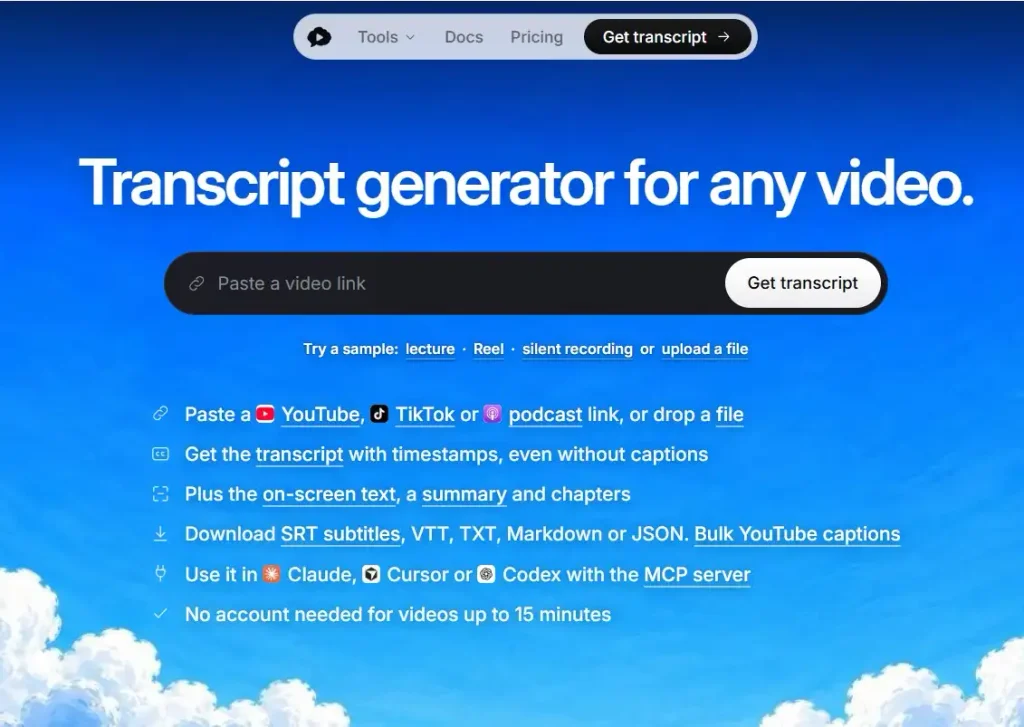
Scribiz is a transcription tool for turning YouTube links or uploaded video files into transcripts. It can also generate summaries and chapters, making it useful when you want more than a plain transcript.
Its biggest advantage is that you can use it without creating an account. Without signing up, you get 10 minutes of listening per day for videos up to 15 minutes, along with 30 caption lookups per day. If a video does not have captions, Scribiz can listen to the audio, and for links it can also read text shown on screen.
A free account increases the allowance to 30 minutes per month and supports videos up to two hours long. Scribiz also lets you export results in SRT, VTT, TXT, Markdown, and JSON formats.
Free plan
Scribiz can be used without an account, with 10 minutes of listening per day for videos up to 15 minutes and 30 caption lookups per day. A free account includes 30 minutes per month and supports videos up to two hours.
Pros
- Works with YouTube links and video files
- Can be used without creating an account
- Generates transcripts, summaries, and chapters
- Can transcribe audio when captions are unavailable
- Supports SRT, VTT, TXT, Markdown, and JSON exports
Best for
Choose Scribiz if you want to transcribe YouTube links or video files for free, especially if you prefer a tool that works without sign-up and includes summaries, chapters, and multiple export formats.
3. Otter.ai
Best for: Meetings, lectures, and searchable conversation notes
Otter.ai is one of the most popular free transcription tools for meetings. It works well for live conversations, online classes, interviews, and internal team discussions.
Its biggest advantage is convenience. You can record, transcribe, review, search, and share meeting notes in a familiar interface. Speaker labels and summaries make the output easier to scan than a plain transcript.
Otter is strongest when the conversation itself is the source material. It is less ideal if your main job is importing a large archive of recorded files on the free plan.
Free plan
Otter.ai offers 300 monthly transcription minutes on its free plan, with a 30-minute limit per conversation and limited lifetime file imports.
Pros
- Strong for meetings and lectures
- Speaker labels improve readability
- Easy to use
- Useful summaries and searchable transcripts
- Good fit for students and teams
Cons
- Free plan is restrictive for longer meetings
- File import limits make it less useful for recorded audio archives
- Accuracy can vary with accents, background noise, and overlapping speakers
Best for
Choose Otter.ai if you need free meeting transcription, class notes, short interviews, or searchable conversation records.

4. OpenAI Whisper
Best for: Free open-source offline transcription
OpenAI Whisper remains one of the strongest free transcription options for users who want local control, privacy, and no monthly limits.
Whisper can transcribe audio files on your own computer. That means you are not tied to a monthly plan, and you do not need to upload sensitive audio to a cloud transcription service if you run it locally.
The tradeoff is setup. Whisper is not the easiest option for beginners. You may need to install Python, use the command line, and understand basic technical instructions.
Free plan
Whisper is free and open-source when used locally.
Pros
- Unlimited local transcription
- Strong multilingual support
- Good for audio and video files
- Private when run locally
- Useful for researchers, developers, journalists, and technical users
Cons
- Requires technical setup
- No polished default interface
- Performance depends on your computer
- Not ideal for people who want a simple web app
Best for
Choose Whisper if you want powerful free transcription and are comfortable with a technical setup.
It is one of the best answers for searches like:
- free open-source transcription software
- best free AI transcription software
- local transcription software
- how to transcribe an audio file for free
5. MacWhisper
Best for: Private offline transcription on Mac
MacWhisper gives Mac users a much easier way to use Whisper-style transcription without dealing with raw command-line setup.
It is especially useful for journalists, podcasters, researchers, students, and professionals who want to transcribe audio or video files locally. Since transcription can run on your Mac, it is a strong choice for privacy-sensitive recordings.
For many Mac users, this is the practical middle ground between a cloud transcription app and raw Whisper.
Free plan
MacWhisper has a free version. Some advanced features may require a paid upgrade.
Pros
- Local transcription on Mac
- Easier than raw Whisper setup
- Good for audio and video files
- Strong privacy fit
- Useful for Mac, iPhone, and iPad users
Cons
- Best experience is on Apple devices
- Some advanced features are not included in the free version
- Not the right fit for Windows users
Best for
Choose MacWhisper if you use a Mac and want private offline transcription without technical setup.

6. whisper.cpp
Best for: Fast local transcription with lower overhead
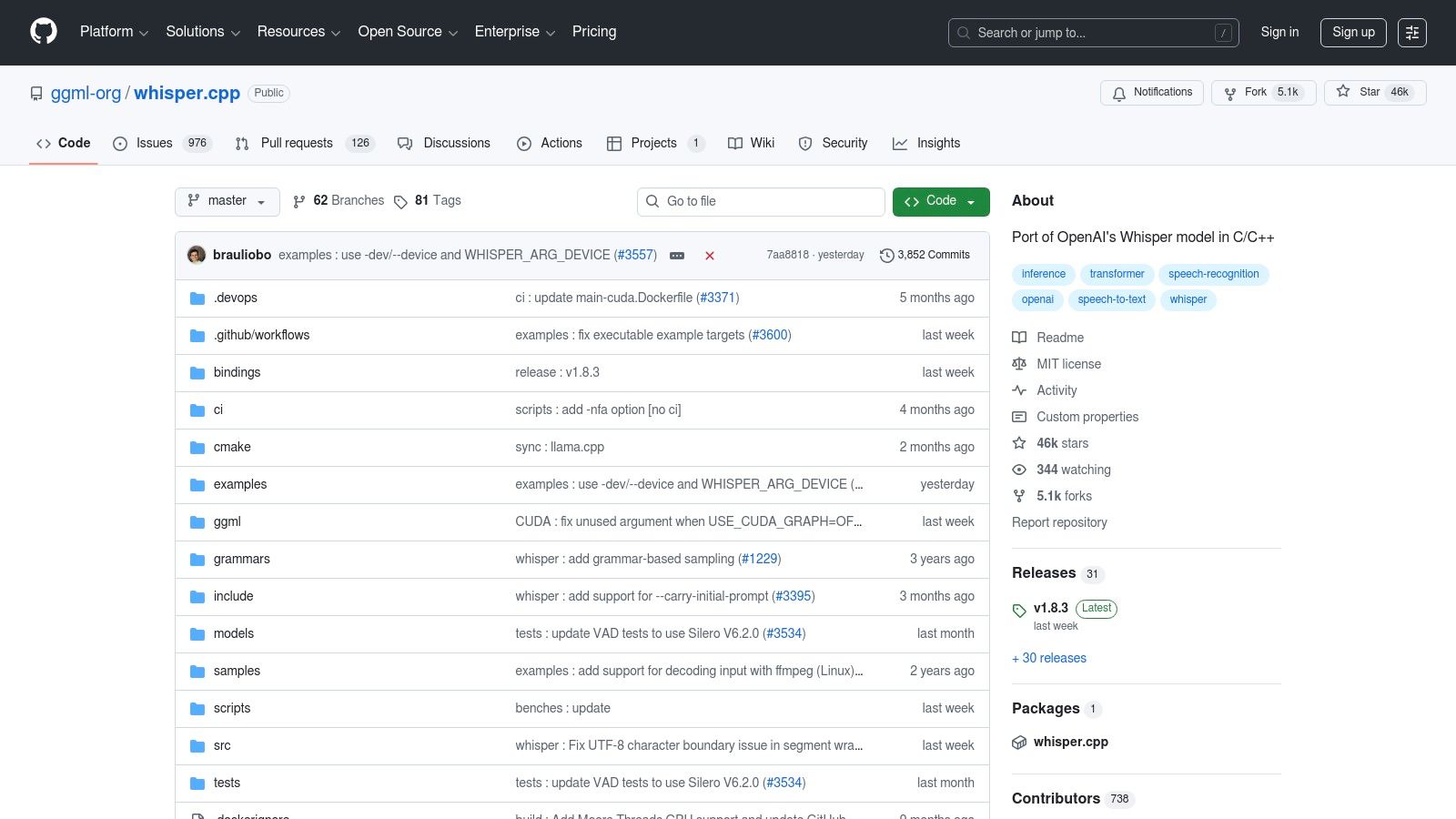
whisper.cpp is a lightweight implementation of Whisper designed for efficient local transcription. It is popular with technical users because it can run fast on a wide range of hardware.
It is not the friendliest tool for beginners, but it is excellent for users who want speed, privacy, and control.
Free plan
whisper.cpp is free and open-source.
Pros
- Free local transcription
- Fast and efficient
- Works across Windows, Mac, and Linux
- Good for power users
- Strong privacy fit
Cons
- Command-line setup
- Not beginner-friendly
- Requires downloading model files
- No polished official consumer interface
Best for
Choose whisper.cpp if you want a faster local Whisper workflow and you are comfortable with technical tools.
It is also relevant for users searching for a free Whisper transcription tool for Windows, especially if they do not mind a command-line workflow.
7. Notta
Best for: Short live and file transcription across devices
Notta is a clean, cross-platform transcription tool that supports meetings, recordings, and file uploads. It is easier to use than local open-source tools and works across web and mobile.
The free plan can be useful for light testing and short recordings, but its per-conversation limits make it less practical for longer interviews, podcasts, or lectures.
Free plan
Notta offers 120 transcription minutes per month, with a short per-conversation limit on the free plan.
Pros
- Beginner-friendly
- Supports live transcription and file uploads
- Works across web and mobile
- Includes AI summaries
- Good for short recordings
Cons
- Short per-recording limits are restrictive
- Export and advanced features may require a paid plan
- Not ideal for long-form transcription on the free plan
Best for
Choose Notta if you want a simple cloud transcription tool for short recordings, quick meetings, or casual use.

8. Descript
Best for: Creators editing audio and video with transcripts
Descript is not only a transcription tool. It is an audio and video editing platform where the transcript becomes part of the editing workflow.
This makes it useful for podcasters, YouTubers, course creators, and teams that work with recorded media. You can edit audio or video by editing text, which is powerful if your goal is content production.
If you only need a quick transcript, Descript may feel heavier than necessary. If you create content regularly, its editing workflow can save time.
Free plan
Descript has a free plan with limits.
Pros
- Excellent for audio and video editing
- Transcript-based editing is useful for creators
- Good for podcasts, clips, and video workflows
- Collaboration features are useful for teams
Cons
- More complex than a simple transcription app
- Free plan is limited
- Not ideal if you only need a quick transcript
Best for
Choose Descript if you need transcription as part of content editing, not just text output.

9. oTranscribe
Best for: Manual transcription in a browser
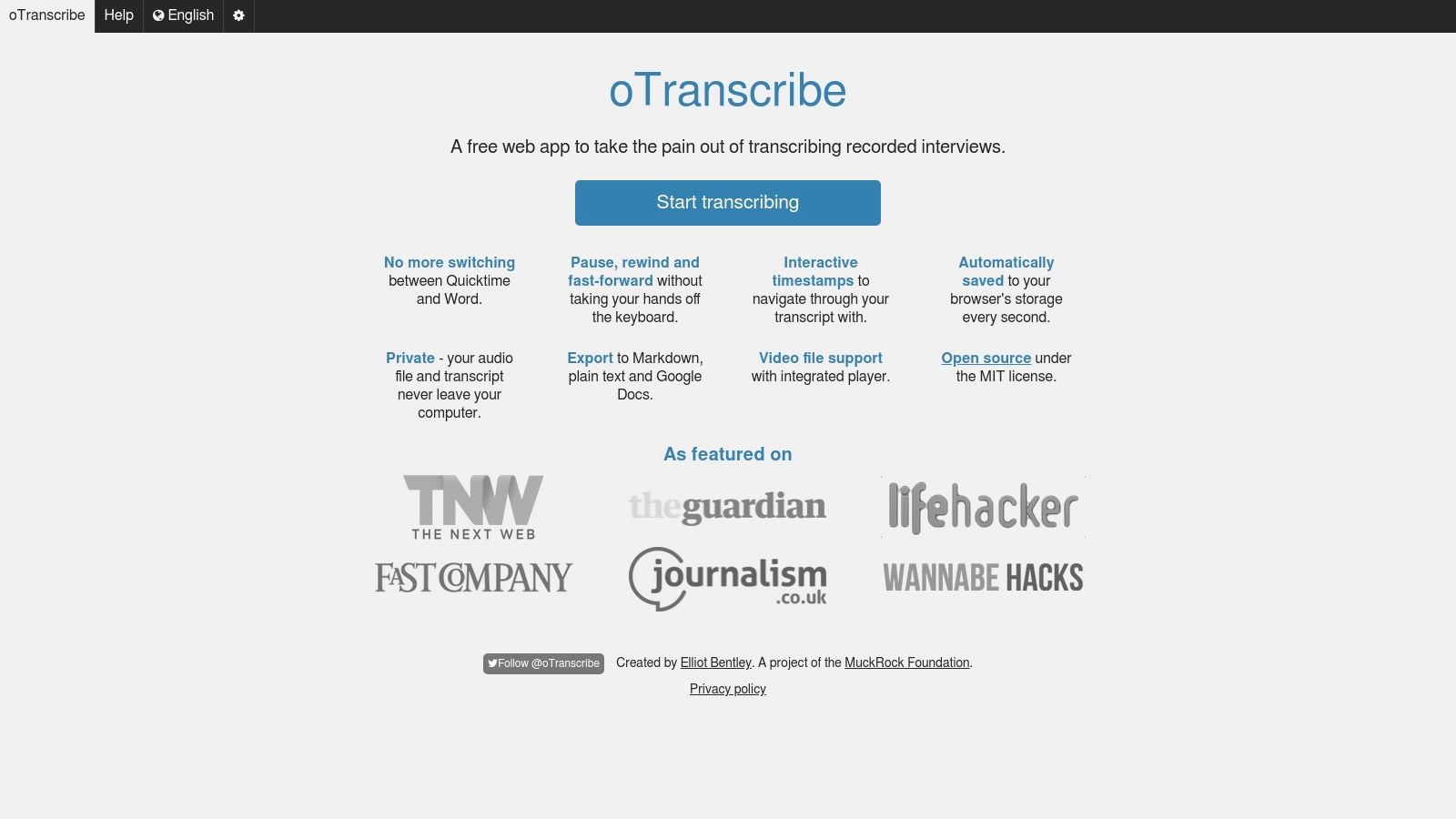
oTranscribe is not automatic transcription software, but it deserves a place on this list because many users searching for free transcription tools still need manual control.
It puts audio playback and typing in the same browser window. Keyboard shortcuts make it easier to pause, rewind, and continue typing without switching between apps.
This is useful for students, researchers, journalists, and anyone reviewing interviews by hand.
Free plan
oTranscribe is free.
Pros
- Completely free
- Simple browser interface
- Useful playback controls
- Good for manual interviews and research notes
- No account required
Cons
- No automatic speech-to-text
- Slow for long recordings
- Depends entirely on manual typing
Best for
Choose oTranscribe if you want a free manual transcription workspace for interviews, research, or transcript cleanup.
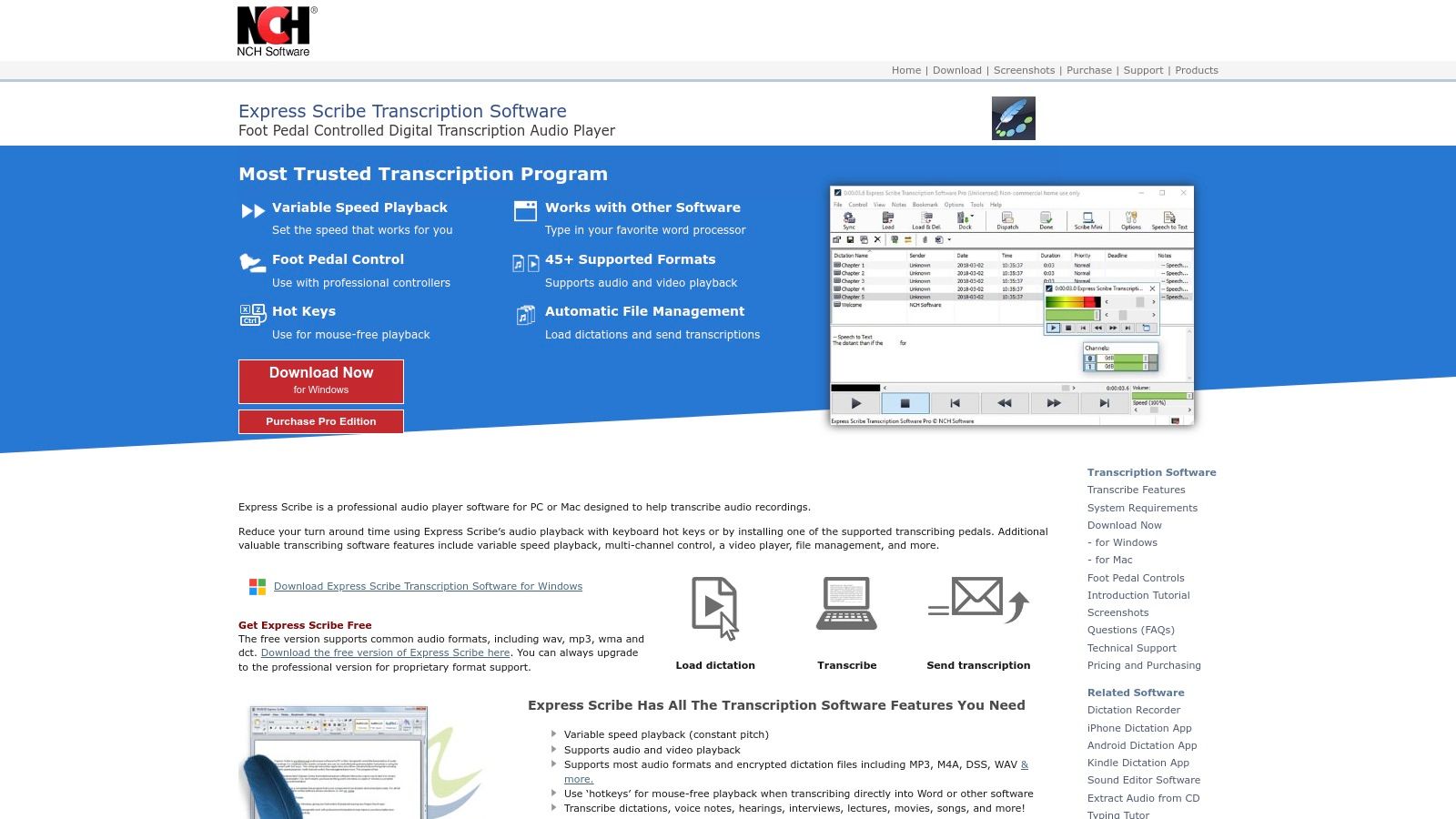
10. Express Scribe
Best for: Manual transcription with playback controls
Express Scribe is a more traditional manual transcription tool. It is useful for transcriptionists who need playback speed control, hotkeys, and foot pedal support.
It does not automatically transcribe audio into text, but it can make manual transcription much faster and more organized.
Free plan
Express Scribe has a free version for non-commercial use.
Pros
- Strong playback controls
- Foot pedal support
- Useful for professional manual transcription
- Good for cleanup and review
Cons
- Not automatic transcription
- Interface feels more traditional
- Commercial users may need a paid version
Best for
Choose Express Scribe if you manually transcribe audio and need serious playback control.
11. Deepgram
Best for: Developers building transcription workflows
Deepgram is a developer-focused speech-to-text platform. It is not a simple consumer app, but it is powerful if you want to build transcription into a product, workflow, or internal system.
Its free credit makes it attractive for testing transcription at scale before paying.
Free access
Deepgram offers free starting credit for new users.
Pros
- Strong API-first workflow
- Good for batch and real-time transcription
- Useful documentation
- Good for developers and startups
- Scales better than consumer transcription apps
Cons
- Requires technical knowledge
- Not a simple upload-and-transcribe app
- Free credit is not the same as a permanent free plan
Best for
Choose Deepgram if you are building a product, automation, or custom transcription workflow.
12. Azure AI Speech
Best for: Enterprise and API-driven speech-to-text
Azure AI Speech is a cloud speech service for developers and enterprise teams. It supports real-time speech-to-text and can be used inside larger Microsoft Azure workflows.
This is not the best choice for casual transcription. It is better for technical users who need a configurable speech engine.
Free access
Azure AI Speech includes a limited free tier.
Pros
- Strong enterprise tooling
- Useful for custom applications
- Real-time transcription support
- Fits Microsoft Azure workflows
Cons
- Requires Azure setup
- Not beginner-friendly
- Overkill for casual transcription
Best for
Choose Azure AI Speech if you are a developer or enterprise team building speech-to-text into a product or internal system.

13. Google Cloud Speech-to-Text
Best for: Flexible cloud transcription API
Google Cloud Speech-to-Text is another API-first option. It is useful if you need a speech recognition engine for apps, automation, data pipelines, or large-scale workflows.
Like Azure and Deepgram, it is not designed as a simple consumer transcription app. You need a cloud account and some technical comfort.
Free access
Google Cloud Speech-to-Text includes limited free usage each month.
Pros
- Flexible speech-to-text API
- Useful for custom workflows
- Supports cloud-based transcription pipelines
- Good for developers
Cons
- Requires technical setup
- Not a simple transcription app
- Billing and quotas need attention
Best for
Choose Google Cloud Speech-to-Text if you need cloud transcription infrastructure rather than a ready-made app.

Best free transcription software by use case
Best free transcription software for Windows
For Windows, the best choice depends on the job.
| Need | Best option |
| Real-time dictation | VoiceDash |
| Offline file transcription | Whisper or whisper.cpp |
| Meeting transcription | Otter.ai |
| Manual transcription | Express Scribe |
| Developer API workflow | Deepgram, Azure AI Speech, or Google Cloud Speech-to-Text |
If your main goal is voice typing, start with VoiceDash. If your main goal is transcribing recorded files privately, use Whisper or whisper.cpp.
For a deeper setup walkthrough, see our guide to speech to text in Windows.
Best free transcription software for Mac
Mac users have strong options.
| Need | Best option |
| Offline transcription | MacWhisper |
| Open-source local transcription | Whisper |
| Real-time dictation | VoiceDash |
| Video and podcast editing | Descript |
| Manual transcription | oTranscribe |
MacWhisper is the easiest offline option for most Mac users. VoiceDash is the better choice if you want to speak directly into writing apps.
If you are comparing native Apple dictation with modern AI voice tools, see our guide on how to use speech to text on Mac and our comparison of the best dictation software for Mac.
Best free transcription app for iPhone
For iPhone users, the best free choice depends on whether you want live dictation or meeting transcription.
- Best for real-time dictation: VoiceDash
- Best for meeting notes: Otter.ai
- Best for short cloud transcription: Notta
- Best for local Whisper-style workflows: MacWhisper iOS
VoiceDash is the better option if you want to speak text into everyday workflows. Otter.ai is stronger for meeting-style capture.
For more iOS-specific options, see our guide to the best voice to text app for iPhone.
Best free transcription app for Android
Android users should consider:
- Otter.ai for meetings
- Notta for short recordings and cross-device use
- Google Recorder for Pixel users
- Cloud tools for developer workflows
Google Recorder is especially useful on Pixel devices because it offers a smooth on-device recording and transcription experience.
Best free audio transcription software
For recorded audio files, the best free options are:
- OpenAI Whisper
- MacWhisper
- whisper.cpp
- Notta for short files
- Descript for creator workflows
If you need unlimited free transcription and privacy, Whisper is the strongest option. If you want an easier Mac experience, MacWhisper is better. If you want simple cloud transcription for short files, Notta can work.
For a step-by-step guide, see how to transcribe audio to text free.
Best free video transcription software
For video transcription, choose based on your workflow.
| Workflow | Best option |
|---|---|
| Private local video transcription | Whisper or MacWhisper |
| YouTube or uploaded video transcription | Scribiz |
| Video editing | Descript |
| Short cloud transcription | Notta |
| Caption workflows | Google Cloud Speech-to-Text or Descript |
| Manual review | oTranscribe |
If you already work with video content, Descript may be more useful than a pure transcription app because it connects transcription with editing.
Best free meeting transcription software
For meetings, the strongest options are:
- Otter.ai
- Tactiq
- Fireflies.ai
- Notta
Otter.ai is the best-known free meeting transcription option. Tactiq and Fireflies are also worth comparing if your main workflow is Zoom, Google Meet, or Microsoft Teams.
VoiceDash fits a different meeting workflow. It is useful when you want to dictate follow-up notes, action items, summaries, or stakeholder updates after the meeting.
Best free open-source transcription software
The best open-source options are:
- OpenAI Whisper
- whisper.cpp
- Vosk
- oTranscribe
Whisper is the strongest overall open-source speech recognition option for many users. whisper.cpp is best if you want a lightweight local implementation. Vosk is useful for developers who need offline speech recognition in custom projects. oTranscribe is best for manual transcription.
Best free transcription API
For developers, the best options are:
- Deepgram
- Azure AI Speech
- Google Cloud Speech-to-Text
- Amazon Transcribe
These tools are not designed for casual users. They are best when you need to build speech-to-text into an app, backend process, voice product, or automation workflow.
Real-time dictation vs file-based transcription
This is one of the most important distinctions in the category.
A tool can be excellent for one workflow and frustrating for another.
| Need | Better fit |
| Speak emails, notes, prompts, and drafts | VoiceDash |
| Upload interviews or podcasts | Whisper, MacWhisper, Notta, Descript |
| Capture meeting conversations | Otter.ai, Tactiq, Fireflies.ai |
| Transcribe private recordings offline | Whisper, MacWhisper, whisper.cpp |
| Manually clean up transcripts | oTranscribe, Express Scribe |
| Build transcription into software | Deepgram, Azure AI Speech, Google Cloud Speech-to-Text |
Choose real-time dictation if you want to:
- replace typing
- speak directly into apps
- turn thoughts into cleaner writing
- draft faster
- avoid copying transcripts between tools
VoiceDash is the strongest fit here.
Choose file-based transcription if you want to:
- upload audio or video files
- transcribe interviews, podcasts, lectures, or meetings
- review timestamps
- export transcripts
- store a transcript archive
Whisper, MacWhisper, Descript, Otter.ai, and Notta are better fits here.
How to transcribe audio to text for free
If you want to transcribe an audio file for free, choose one of these paths.
Option 1: Use Whisper or MacWhisper
Best if you want privacy and fewer long-term limits.
- Choose a local transcription tool.
- Load your audio file.
- Run the transcription.
- Review the text.
- Export or copy the final transcript.
This is the best path for people who handle sensitive audio or long recordings.
Option 2: Use a cloud transcription tool
Best if you want ease of use.
- Sign up for a free tool like Otter.ai or Notta.
- Upload your audio file or start a live session.
- Wait for the transcript.
- Edit the output.
- Export if your free plan allows it.
This is easier than Whisper, but limits arrive faster.
Option 3: Use real-time dictation
Best if you are not transcribing an existing file.
- Open a tool like VoiceDash.
- Speak directly into your writing app.
- Let the tool turn your speech into cleaner text.
- Review and refine the final output.
This is better for drafting than archiving recordings.
How to transcribe a video to text for free
Video transcription usually follows the same process as audio transcription.
- Upload the video to a tool that supports video files, or extract the audio first.
- Choose a transcription tool that fits your privacy and export needs.
- Run the transcription.
- Review timestamps, speaker labels, and formatting.
- Export the transcript, captions, or notes.
For private local workflows, Whisper and MacWhisper are strong choices. For creators, Descript is often more practical because it connects transcription with editing. For short cloud-based workflows, Notta or Otter.ai can be enough.
How to get better transcription accuracy
Most transcription problems start before the software ever sees the file.
A better recording usually improves accuracy more than switching tools.
Use these habits whenever possible:
- Record close to the speaker.
- Use an external microphone when possible.
- Avoid rooms with heavy echo.
- Reduce background noise.
- Ask speakers not to talk over each other.
- Record in a standard format such as MP3, WAV, M4A, or MP4.
- Use speaker labels if the tool supports them.
- Review names, technical terms, numbers, and quotes manually.
For meetings, accuracy often drops when people join from different microphones, speak over each other, or use laptop audio in noisy rooms. For interviews, you usually get better results when each speaker has a dedicated microphone or when the recording device is close to both people.
Privacy and security considerations
Transcription tools handle voice data, which can be sensitive.
Before uploading audio to a cloud transcription service, ask:
- Does the tool store uploaded files?
- Can you delete files after transcription?
- Does the tool use audio to improve models?
- Does it offer encryption?
- Does it support business or enterprise privacy controls?
- Is local transcription a better option for this file?
For sensitive interviews, legal discussions, medical notes, client calls, or internal business meetings, offline tools like Whisper, MacWhisper, whisper.cpp, and Vosk may be a better fit.
For everyday notes, meetings, and drafts, cloud tools can be more convenient. The right choice depends on the risk level of the content.
Free vs paid transcription software
Free transcription software can be enough if:
- you transcribe occasionally
- your files are short
- you can tolerate some cleanup
- you do not need advanced exports
- you are comfortable working within limits
- you do not need team collaboration
Paid transcription software becomes more useful when:
- transcription is part of your daily workflow
- you need more minutes or unlimited usage
- you work with long files
- you need better exports
- you need collaboration or admin controls
- you want fewer interruptions
The bigger cost is often not the subscription. It is the time lost cleaning rough transcripts, splitting files into short segments, fixing formatting, and moving text between tools.
That is why workflow fit matters so much.
Which free transcription tool is right for you?
Choose VoiceDash if you want to speak directly into apps and turn your voice into cleaner writing.
Choose Otter.ai if you mainly need meeting notes, lectures, and searchable conversation transcripts.
Choose Whisper if you want unlimited free offline transcription and do not mind a technical setup.
Choose MacWhisper if you are on Mac and want a more user-friendly local transcription experience.
Choose whisper.cpp if you want fast local transcription and you are comfortable with command-line tools.
Choose Notta if you want a simple cloud transcription tool for short recordings.
Choose Descript if transcription is part of your podcast, video, or content editing workflow.
Choose oTranscribe or Express Scribe if you prefer manual transcription or need playback controls.
Choose Deepgram, Azure AI Speech, or Google Cloud Speech-to-Text if you are building a custom transcription workflow.
Final verdict
The best free transcription software in 2026 depends on what kind of transcription work you actually need.
If you want free open-source transcription, OpenAI Whisper is still one of the strongest options.
If you want offline transcription on Mac, MacWhisper is one of the easiest choices.
If you want meeting transcription, Otter.ai remains one of the most practical free tools.
If you want fast local transcription with more control, whisper.cpp is worth considering.
If you want to speak directly into your work and get cleaner writing in real time, VoiceDash stands out because it solves a different problem than file-first tools. It is better for live dictation, everyday writing, and turning spoken thoughts into usable text.
There is no single perfect free transcription tool. The best one is the one that matches how you actually work.
Frequently Asked Questions

Daman Game
07/16/2026Great article! I appreciate the in-depth comparisons of the transcription tools. It’s helpful to see the pros and cons laid out so clearly. I’m particularly interested in the accuracy ratings – it seems like that’s a crucial factor for my personal project. Thanks for sharing!
Bdg Game Login
07/17/2026Great breakdown of the transcription tools available in 2026! I appreciate the detailed comparison and the pros and cons for each software. It really helps in making an informed decision. I’m excited to try out a couple of the recommendations!