
- Quick answer: the best AI productivity tools in 2026
- How we chose these AI productivity tools
- What counts as an AI productivity tool?
- 1. VoiceDash: best AI productivity tool for voice typing
- 2. ChatGPT: best general AI assistant
- 3. Claude: best AI tool for long-form reasoning and careful writing
- 4. Perplexity: best AI research tool with sources
- 5. NotebookLM: best AI tool for source-based document analysis
- 6. Grammarly: best AI writing cleanup tool
- 7. Jasper: best AI tool for marketing content
- 8. Copy.ai: best AI tool for sales and GTM copy
- 9. Notion AI: best AI workspace for notes and knowledge management
- 10. ClickUp: best all-in-one AI project management tool
- 11. Asana: best AI tool for structured team workflows
- 12. Motion: best AI scheduling tool
- 13. Reclaim: best AI calendar tool for protecting focus time
- 14. Granola: best AI meeting notes tool
- 15. Fireflies: best AI meeting intelligence tool
- 16. Otter.ai: best AI transcription tool for meetings and conversations
- 17. Zapier: best AI workflow automation tool
- 18. Make: best visual automation tool
- 19. n8n: best AI automation tool for technical teams
- 20. Gumloop: best AI agent builder for business workflows
- 21. Superhuman: best AI email productivity tool
- 22. Magic Hour AI: best AI tool for all-in-one video and image creation
- 23. Gamma: best AI presentation tool for fast decks
- 24. Canva: best AI design tool for non-designers
- 25. Descript: best AI video editing tool for spoken content
- 26. Cursor: best AI coding productivity tool
- Best AI productivity tools by workflow
- Why voice-to-text belongs in every AI productivity stack
- Best AI productivity stack by role
- Native AI features vs dedicated AI tools
- Which AI productivity tools are worth paying for?
- Common AI productivity mistakes
- Final recommendation
- FAQ: Best AI Productivity Tools
Best AI Productivity Tools in 2026: 26 Tools That Actually Save Time
The best AI productivity tool is not always the most powerful one. It is the one that removes the most friction from work you already do every day.
For some people, that means getting better meeting notes. For others, it means writing faster, researching with sources, protecting focus time, creating presentations, editing videos, or connecting tools that should have been connected years ago.
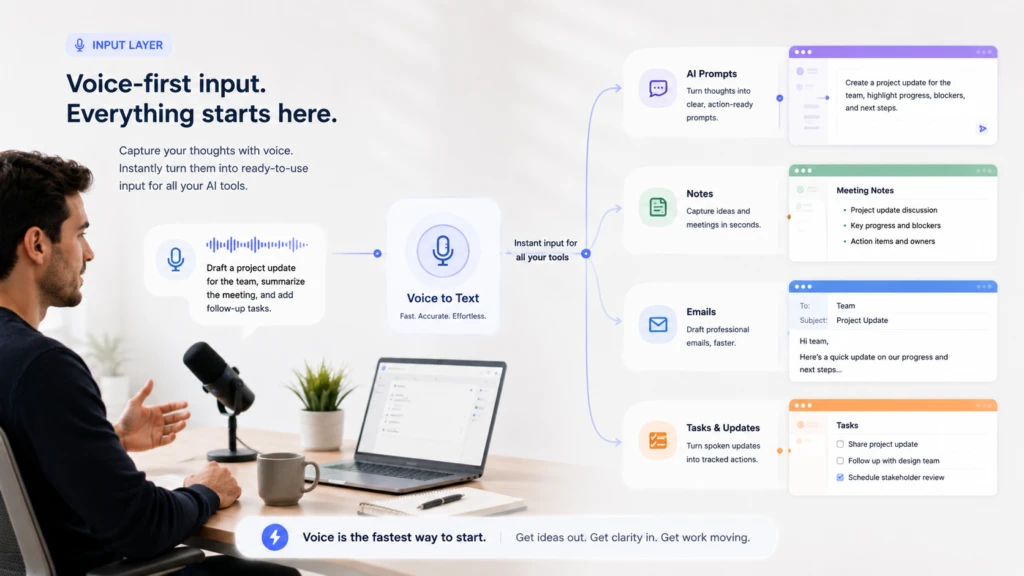
There is another productivity bottleneck most tool roundups barely mention: input.
Before AI can summarize, rewrite, automate, or organize anything, you still need to give it instructions. You still type prompts, emails, Slack messages, task updates, notes, briefs, CRM comments, tickets, and follow-ups. If that input is slow, the rest of your AI stack starts late.
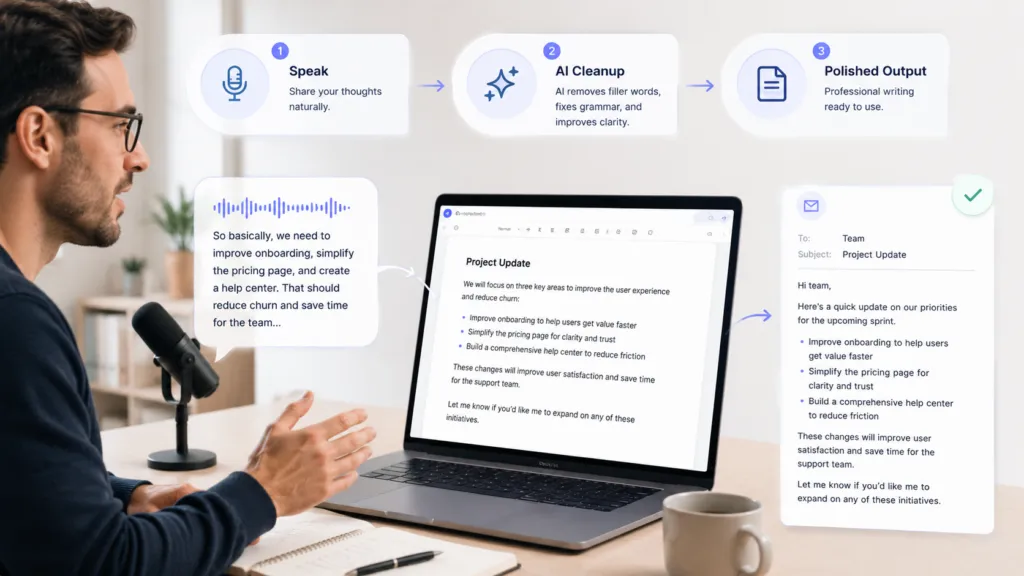
That is why voice typing belongs in the modern AI productivity conversation. A voice-to-text tool like VoiceDash helps you speak your thoughts into polished text across the apps where work already happens. Instead of typing every prompt, reply, update, and note by hand, you can dictate naturally and clean up the result with AI.
This guide compares 25 AI productivity tools by workflow, not hype. You will see what each tool is best for, whether it has a free plan, what paid plans start at, and where it fits in a real workday.
Pricing note: Prices were checked in July 2026. SaaS pricing changes often, so confirm on each tool’s pricing page before publishing or purchasing.
Quick answer: the best AI productivity tools in 2026
| Use case | Best tool | Free plan | Paid plans start at |
|---|---|---|---|
| Voice typing and speech-to-text | VoiceDash | Yes | $15/month, or $12/month annually |
| General AI assistant | ChatGPT | Yes | Plus at $20/month |
| Long-form reasoning and writing | Claude | Yes | $20/month, or $17/month annually |
| AI research with sources | Perplexity | Yes | Pro at $20/month |
| Source-based document analysis | NotebookLM | Yes | Higher limits through Google AI plans |
| Grammar and writing cleanup | Grammarly | Yes | Pro at $12/member/month annually |
| Marketing content | Jasper | Trial | Pro at $69/month |
| Sales and GTM copy | Copy.ai | Yes | Chat plan at $29/month |
| Workspace and knowledge management | Notion AI | Yes, limited AI trial | Plus at €9.50/member/month in the checked region |
| Project management | ClickUp | Yes | Unlimited at $7/user/month annually |
| Structured team workflows | Asana | Yes | Starter at $10.99/user/month annually |
| AI scheduling | Motion | Trial | Pro AI at $19/seat/month |
| Calendar protection | Reclaim | Yes | Starter at $10/seat/month annually |
| Meeting notes | Granola | Yes | Business at $14/user/month |
| Meeting intelligence | Fireflies | Yes | Pro at $10/seat/month annually |
| Meeting transcription | Otter.ai | Yes | Pro at $16.99/user/month monthly |
| Workflow automation | Zapier | Yes | Professional from $19.99/month |
| Visual automation | Make | Yes | Core at $9/month |
| Technical automation | n8n | Trial, plus self-hosted option | Cloud Starter from €20/month annually |
| AI agents | Gumloop | Yes | Pro at $37/month |
| Email productivity | Superhuman | No | Starter at $30/month |
| AI presentations | Gamma | Yes | Paid plans available, verify regional pricing |
| AI video generation and editing | Magic Hour | Yes | $19/month, or $12/month annually |
| Visual design | Canva | Yes | Pro pricing varies by region |
| Video editing | Descript | Yes | Hobbyist at $16/person/month annually |
| AI coding | Cursor | Yes | Pro at $20/month |
How we chose these AI productivity tools
A lot of AI tools are impressive in a demo and forgettable after a week. For this guide, the focus is not novelty. The focus is practical usefulness.
The tools were evaluated around seven questions:
- Does this tool save time on work people repeat often?
- Can a new user get value without a long setup process?
- Does it fit into existing apps and habits?
- Does the output still need heavy manual cleanup?
- Does it solve input friction, thinking friction, output friction, or workflow friction?
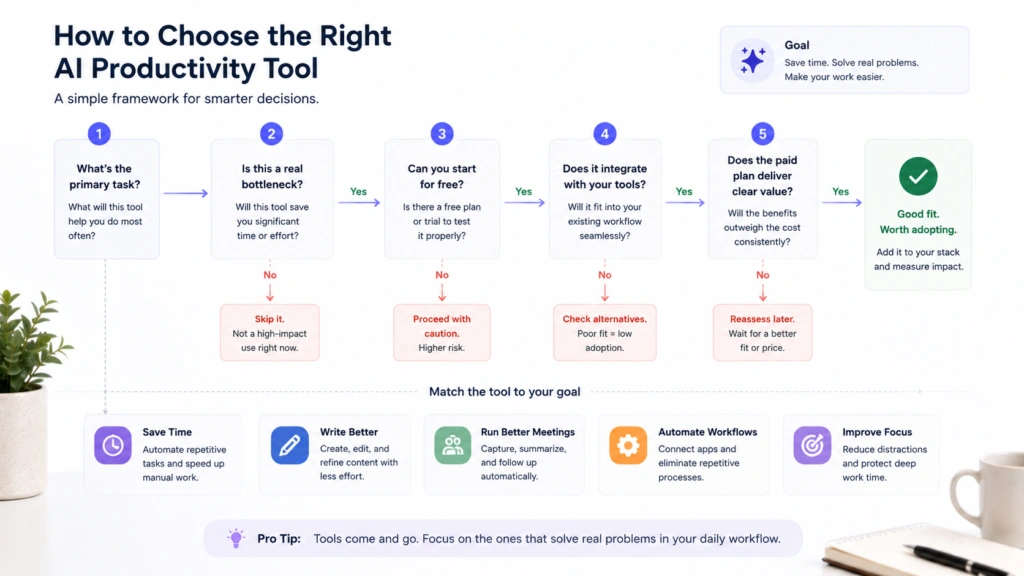
- Is the free plan useful enough to test the tool properly?
- Is the paid plan easy to justify for frequent users?
That last point matters. AI subscriptions add up quickly. A tool should earn its place in your stack.
What counts as an AI productivity tool?
An AI productivity tool is software that uses artificial intelligence to help people work faster, reduce manual effort, improve communication, organize information, or create useful output with less friction.
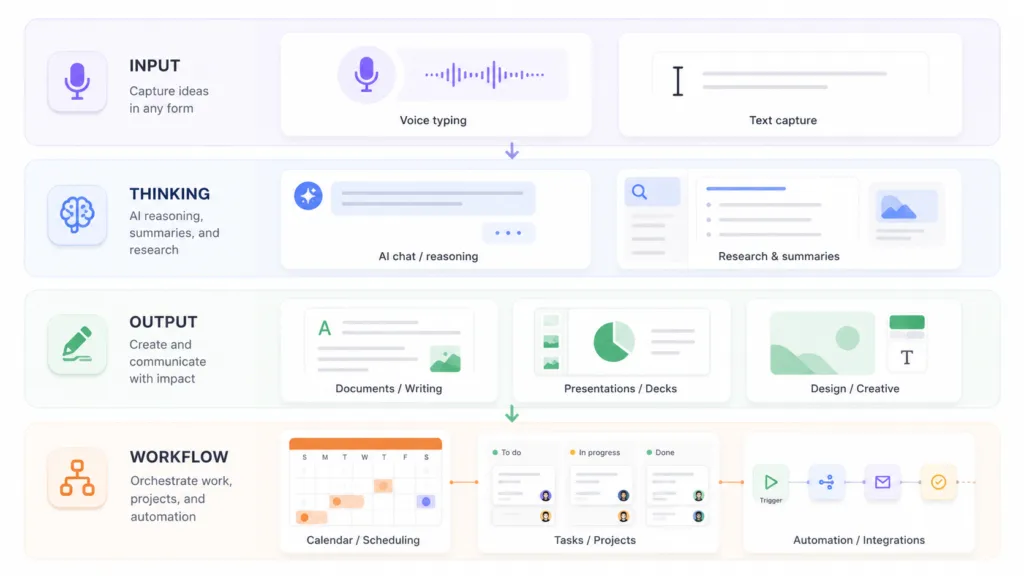
Most tools fall into four layers:
| Productivity layer | What it improves | Example tools |
|---|---|---|
| Input | Capturing thoughts, prompts, messages, notes, and drafts | VoiceDash |
| Thinking | Researching, reasoning, comparing, summarizing, and analyzing | ChatGPT, Claude, Perplexity, NotebookLM |
| Output | Writing, designing, editing, presenting, and publishing | Grammarly, Jasper, Gamma, Canva, Descript |
| Workflow | Scheduling, assigning, automating, tracking, and syncing | Motion, Zapier, ClickUp, Asana |
The best productivity stacks usually include tools from more than one layer. A chatbot alone is useful, but it does not solve every part of work. A meeting tool is useful, but it does not help you write faster across Slack, email, docs, or AI prompts. An automation tool is powerful, but it needs a clear process to automate.
That is why the best stack starts with the bottleneck.
If your bottleneck is writing and prompting, start with voice typing. If your bottleneck is meetings, start with a meeting assistant. If your bottleneck is disconnected tools, start with automation.
1. VoiceDash: best AI productivity tool for voice typing
Best for: Professionals who write a lot across email, documents, chat, prompts, notes, tasks, and support replies
Free plan: Yes
Pricing: Free plan includes 1,000 words per month. Pro is $15/month, or $12/month annually. Teams is $29/month, or $24/month annually.
Best alternative: Built-in dictation for casual use, Otter.ai for meeting transcription
VoiceDash is an AI voice-to-text app built for everyday work. It turns natural speech into polished written text, so you can write emails, documents, prompts, notes, tasks, and messages without typing everything manually.
This is different from basic dictation. Basic dictation often gives you a raw transcript. Raw transcripts usually include filler words, awkward phrasing, missing punctuation, and half-formed thoughts. VoiceDash is designed to clean up spoken language so the result is closer to usable work text.
That matters because a lot of professional work starts with writing. You write a prompt before using ChatGPT. You write an update before a teammate can act. You write a brief before a designer can start. You write notes before a decision becomes searchable.
VoiceDash works best when the problem is not “I need AI to think for me.” The problem is “I know what I want to say, but typing it is slowing me down.”
Use VoiceDash for:
- Dictating emails
- Writing AI prompts faster
- Adding notes to Notion or Google Docs
- Creating task descriptions in ClickUp, Asana, Jira, or Linear
- Drafting customer support replies
- Capturing ideas while they are still fresh
- Writing Slack updates
- Turning rough thoughts into cleaner first drafts
The biggest productivity gain usually comes from replacing short typing moments that happen dozens of times per day. One email is not the issue. Ten emails, six Slack replies, three task updates, four prompts, and a few notes are where the time disappears.
For remote teams, this can also improve async communication. Instead of scheduling another meeting, you can dictate a clear update and send it as text. If remote work is a major part of your workflow, VoiceDash also has a guide to the best remote work tools for productivity.
Main limitation: VoiceDash is most valuable if writing is a daily bottleneck. If you only dictate the occasional short note, built-in dictation may be enough.
2. ChatGPT: best general AI assistant
Best for: Brainstorming, drafting, analysis, coding help, planning, and everyday AI support
Free plan: Yes
Pricing: Free plan available. Plus is $20/month. Business pricing starts at $20/user/month on annual billing. Higher-tier plans vary by plan and region.
Best alternative: Claude
ChatGPT is the broadest AI productivity tool on this list. It can help write, rewrite, summarize, brainstorm, code, explain, compare, and plan. It is often the first AI tool people try because it can handle so many different tasks.
Its biggest strength is flexibility. You can use it to draft a client email, create a content calendar, explain a spreadsheet formula, rewrite a paragraph, summarize pasted notes, or build a first version of a workflow.
But ChatGPT is only as useful as the context you give it. Short prompts often produce shallow answers. Detailed prompts produce better work.
That is where voice typing can help. Many people under-prompt because typing a full explanation feels slow. Dictating a longer prompt with VoiceDash can make ChatGPT more useful because you can give it the background, goal, audience, constraints, and preferred format in one pass.
Best use cases:
- Brainstorming and planning
- Drafting first versions
- Rewriting rough notes
- Explaining unfamiliar concepts
- Creating checklists
- Summarizing text
- Coding help
Main limitation: ChatGPT is a generalist. For specific workflows like voice typing, meeting notes, project management, or design, a dedicated tool often works better.
3. Claude: best AI tool for long-form reasoning and careful writing
Best for: Long documents, thoughtful writing, analysis, editing, and complex reasoning
Free plan: Yes
Pricing: Free plan available. Pro is $20/month, or $17/month with annual billing. Max plans start at higher monthly tiers.
Best alternative: ChatGPT
Claude is strong for longer, more careful work. It is useful when you need to analyze a dense document, refine a memo, review an argument, improve a draft, or think through a complicated decision.
A lot of people use Claude for writing because it tends to handle tone and nuance well. It can help turn rough ideas into clearer paragraphs without making every sentence sound like generic marketing copy.
Best use cases:
- Editing long-form content
- Summarizing dense materials
- Drafting memos
- Reviewing strategy documents
- Rewriting with a specific tone
- Thinking through tradeoffs
Voice typing also pairs well with Claude. If you are working through a difficult idea, speaking your thinking out loud can be easier than typing it sentence by sentence. You can then ask Claude to organize the raw thoughts.
Main limitation: Claude is still a chat-based assistant. It does not replace a system-wide writing or dictation tool.
4. Perplexity: best AI research tool with sources
Best for: Research, fact-checking, market scans, comparison research, and source-backed answers
Free plan: Yes
Pricing: Free plan available. Pro is $20/month or $200/year. Enterprise Pro is $40/seat/month or $400/year. Enterprise Max is $325/seat/month or $3,250/year.
Best alternative: ChatGPT Search, Google, NotebookLM
Perplexity is useful when you need answers with sources. Instead of opening ten tabs and manually stitching together information, you can ask a question and get a synthesized answer with citations.
This makes it helpful for competitive research, content research, product comparisons, market scans, and quick fact-checking.
Use it when you need to understand a topic quickly, but do not treat it as a final authority. Open the sources, check the dates, and verify anything important before publishing or making decisions.
Best use cases:
- Researching competitors
- Comparing tools
- Finding source-backed claims
- Exploring technical topics
- Collecting article angles
- Checking recent information
Main limitation: It can still surface sources that are incomplete, outdated, or not the best authority. Verification is still part of the workflow.
5. NotebookLM: best AI tool for source-based document analysis
Best for: Understanding PDFs, reports, notes, transcripts, and research files
Free plan: Yes
Pricing: Free version available. Higher usage limits are available through Google AI subscription plans.
Best alternative: Claude, ChatGPT file analysis
NotebookLM is useful because it works from the sources you provide. Upload documents, reports, notes, transcripts, PDFs, or links, then ask questions about that material.
This makes it especially helpful for students, researchers, analysts, content teams, and anyone who works with long source documents.
Best use cases:
- Summarizing PDFs
- Reviewing research
- Studying class material
- Extracting themes from transcripts
- Turning source material into outlines
- Asking questions about uploaded documents
Main limitation: NotebookLM depends on the quality of your sources. If the material you upload is incomplete, the answers will be incomplete too.
6. Grammarly: best AI writing cleanup tool
Best for: Grammar, tone, clarity, proofreading, and sentence improvement
Free plan: Yes
Pricing: Free plan available. Pro is $12/member/month billed annually, or $30/member/month billed monthly. Enterprise is custom.
Best alternative: ProWritingAid, Wordtune
Grammarly is useful because it works where people already write. It helps catch mistakes, improve clarity, adjust tone, and clean up sentences across emails, documents, browser text boxes, and workplace apps.
It is not the best tool for generating original ideas. Its strength is improving text after it exists.
A practical workflow is to dictate a first draft with VoiceDash, then use Grammarly for final proofreading. VoiceDash helps you get thoughts onto the page faster. Grammarly helps tighten the final wording.
Best use cases:
- Proofreading emails
- Improving tone
- Cleaning up reports
- Editing proposals
- Reducing small communication errors
- Making writing easier to understand
Main limitation: Grammarly improves text, but it does not solve the input problem. You still need to create the draft first.
7. Jasper: best AI tool for marketing content
Best for: Marketing teams creating brand-aligned content at scale
Free plan: 7-day trial
Pricing: Pro is $69/month monthly, or $59/month billed yearly. Business is custom.
Best alternative: Copy.ai, Writer
Jasper is built for marketing teams that need repeatable content production. It can help create blog drafts, campaign copy, landing page sections, email sequences, social posts, and brand-aligned content.
The key difference between Jasper and a generic chatbot is workflow structure. Jasper is designed around marketing use cases and brand voice.
Best use cases:
- Campaign copy
- Landing page drafts
- Blog outlines
- Email sequences
- Product messaging
- Social media variations
Main limitation: Jasper still needs strategic direction and editing. If the brief is weak, the output will usually be weak too.
8. Copy.ai: best AI tool for sales and GTM copy
Best for: Sales outreach, GTM messaging, personalized sequences, and copy workflows
Free plan: Yes
Pricing: Chat plan is $29/month monthly, or $24/month annually. Growth starts at $1,000/month billed annually.
Best alternative: Jasper, ChatGPT
Copy.ai is useful for sales and go-to-market teams that need to create personalized messages at scale. It can help with cold emails, LinkedIn messages, follow-ups, objection handling, and campaign copy.
It is strongest when it has good inputs: prospect context, ICP details, pain points, and messaging direction. Without that, it may produce copy that sounds polished but generic.
Best use cases:
- Cold email drafts
- Follow-up sequences
- GTM messaging
- Sales scripts
- A/B copy variations
- Outbound campaign drafts
Main limitation: Personalization depends on the quality of the data you provide.
9. Notion AI: best AI workspace for notes and knowledge management
Best for: Docs, wikis, notes, internal knowledge, and flexible workspaces
Free plan: Yes, with limited AI trials depending on plan
Pricing: Free plan available. In the checked region, Plus is €9.50/member/month and Business is €19.50/member/month. Pricing may vary by region.
Best alternative: Coda, Mem, Evernote
Notion AI is useful if your team already uses Notion for documentation, notes, tasks, or knowledge management. It can summarize pages, draft content, answer questions from workspace context, and help organize information.
The tool is most valuable when Notion is already your source of truth. If your workspace is messy, AI can help find things, but it will not fully fix the structure.
Best use cases:
- Internal documentation
- Meeting notes
- Team wikis
- Project pages
- Knowledge search
- Content planning
Main limitation: Notion can become too flexible. Teams need clear conventions or the workspace can turn into a content pile.
10. ClickUp: best all-in-one AI project management tool
Best for: Task management, docs, dashboards, team workflows, and project visibility
Free plan: Yes
Pricing: Free Forever plan available. Unlimited is $7/user/month billed yearly. Business is $12/user/month billed yearly. Brain AI is $9/user/month.
Best alternative: Asana, Monday.com
ClickUp is one of the most complete productivity platforms. It combines tasks, docs, dashboards, timelines, chat, automations, and AI features in one place.
It works well for teams that want to reduce app switching and manage complex workflows from a central workspace. ClickUp AI can help summarize tasks, generate updates, draft content, and make project information easier to navigate.
Best use cases:
- Project tracking
- Task summaries
- Team dashboards
- Sprint planning
- Documentation
- Workflow automation
Main limitation: ClickUp has many features. Without a clean setup, it can feel overwhelming.
11. Asana: best AI tool for structured team workflows
Best for: Cross-functional projects, ownership, timelines, and workload visibility
Free plan: Yes
Pricing: Personal is free. Starter is $10.99/user/month billed annually, or $13.49 monthly. Advanced is $24.99/user/month billed annually, or $30.49 monthly. Enterprise is custom.
Best alternative: ClickUp
Asana is strong when teams need clear ownership and structured execution. It helps organize tasks, projects, timelines, dependencies, and responsibilities.
Its AI features are useful for status summaries, project insights, and workflow support. Asana is especially good for teams that want less chaos and more accountability.
Best use cases:
- Campaign planning
- Product launches
- Cross-functional projects
- Task ownership
- Timeline management
- Workload planning
Main limitation: Asana is less flexible than some all-in-one platforms. For many teams, that structure is a benefit. For others, it can feel rigid.
12. Motion: best AI scheduling tool
Best for: Automatically planning tasks, meetings, and focused work into your calendar
Free plan: Free trial
Pricing: Pro AI is $19/seat/month. Business AI is $29/seat/month.
Best alternative: Reclaim, Akiflow, Sunsama
Motion turns tasks into scheduled calendar blocks. Instead of staring at a to-do list and deciding what to do next, Motion uses priorities, deadlines, and availability to plan your day.
This is helpful for people who struggle with task overload or constantly shift between meetings and deep work.
Best use cases:
- Daily planning
- Task scheduling
- Deadline management
- Calendar-based work
- Team capacity planning
Main limitation: Motion works best if you trust your calendar. If you prefer loose planning, it may feel too strict.
13. Reclaim: best AI calendar tool for protecting focus time
Best for: Focus blocks, habits, flexible meetings, and calendar defense
Free plan: Yes
Pricing: Lite is free. Starter is $10/seat/month annually, or $12/seat/month monthly. Business and Enterprise tiers are available for larger needs.
Best alternative: Motion, Clockwise
Reclaim helps protect time for focused work, habits, and flexible tasks. It can automatically schedule time around meetings and defend blocks that would otherwise get consumed by calls.
This is useful for remote workers, managers, and teams with meeting-heavy calendars.
Best use cases:
- Focus time protection
- Habit scheduling
- Buffer time
- Flexible meetings
- Calendar optimization
Main limitation: It is most useful when your calendar is already the center of your workflow.
14. Granola: best AI meeting notes tool
Best for: Meeting summaries, 1:1s, interviews, customer calls, and team discussions
Free plan: Yes
Pricing: Basic is free. Business is $14/user/month. Enterprise is $35/user/month.
Best alternative: Fireflies, Otter.ai
Granola is popular because it feels practical and lightweight. It can create meeting notes and summaries, but it also lets you take your own notes during the meeting. The final result combines what happened with what you thought mattered.
That is useful because not every meeting summary should treat every sentence equally. Sometimes the important part is the decision, objection, concern, or follow-up.
Best use cases:
- 1:1 meetings
- Customer calls
- Interviews
- Internal syncs
- Follow-up notes
- Meeting memory
Main limitation: Granola is built for meetings. It does not replace daily voice typing across email, chat, documents, and prompts.
15. Fireflies: best AI meeting intelligence tool
Best for: Meeting transcription, summaries, action items, and searchable call history
Free plan: Yes
Pricing: Free plan available. Pro is $10/seat/month billed annually, or $18/month monthly. Business is $19/seat/month annually, or $29/month monthly. Enterprise is $39/seat/month annually.
Best alternative: Granola, Otter.ai, Avoma
Fireflies is useful for teams that need meeting notes, transcripts, summaries, and searchable conversation history. Sales, customer success, recruiting, and operations teams can benefit from having calls captured and organized.
Its value increases when meeting information needs to move into other systems, such as a CRM or project management tool.
Best use cases:
- Sales calls
- Customer meetings
- Recruiting interviews
- Team meetings
- Action item extraction
- Conversation search
Main limitation: Audio quality matters. Background noise, overlapping speakers, and unclear microphones can reduce accuracy.
16. Otter.ai: best AI transcription tool for meetings and conversations
Best for: Meeting transcription, live notes, speaker identification, and searchable transcripts
Free plan: Yes
Pricing: Basic is free. Pro is $16.99/user/month monthly, or $8.33/user/month annually. Business is $30/user/month monthly, or $19.99/user/month annually. Enterprise is custom.
Best alternative: Fireflies, Granola
Otter.ai is one of the better-known AI transcription tools. It is useful when you want a written record of calls, interviews, lectures, or meetings.
It is especially helpful for people who need to revisit exact conversations later.
Best use cases:
- Meeting transcription
- Lecture notes
- Interviews
- Conversation search
- Speaker identification
- Meeting archives
Main limitation: Otter is transcription-first. If your main goal is to write emails, prompts, notes, and documents by speaking, VoiceDash is a better fit.
17. Zapier: best AI workflow automation tool
Best for: Connecting apps and automating repetitive handoffs
Free plan: Yes
Pricing: Free plan includes 100 tasks/month. Professional starts at $19.99/month. Team starts at $69/month. Enterprise is custom.
Best alternative: Make, n8n
Zapier connects apps and automates workflows between them. It can move data from forms to CRMs, send Slack alerts, create tasks, update spreadsheets, save attachments, and trigger follow-ups.
Its AI features make automations more flexible because workflows can include summarization, classification, drafting, and routing.
Best use cases:
- Lead routing
- CRM updates
- Email automation
- Internal alerts
- Content workflows
- Data movement
- Admin task reduction
Main limitation: Zapier works best when the process is already clear. If the workflow is messy, automation will not fix the underlying problem.
18. Make: best visual automation tool
Best for: Visual workflow building, multi-step automations, and operations teams
Free plan: Yes
Pricing: Free plan available. Core starts at $9/month for 10,000 credits/month. Pro starts at $16/month. Teams starts at $29/month. Enterprise is custom.
Best alternative: Zapier, n8n
Make is useful for people who want a visual way to build automations. It is often preferred by users who need branching workflows, data transformations, and more control over how scenarios run.
Best use cases:
- Visual automation
- Marketing operations
- Data routing
- Content publishing workflows
- Internal process automation
- Multi-step scenarios
Main limitation: Make can require more setup thinking than simpler automation tools.
19. n8n: best AI automation tool for technical teams
Best for: Developers, technical operators, self-hosting, and custom workflows
Free plan: Free trial for cloud, plus self-hosting option
Pricing: Cloud Starter is €20/month billed annually. Pro is €50/month billed annually. Enterprise is custom.
Best alternative: Make, Zapier
n8n is a strong automation platform for technical teams. It gives users more control than many no-code tools and supports custom logic, API workflows, and self-hosting.
Best use cases:
- Technical automations
- API workflows
- Internal tools
- Data pipelines
- AI workflows
- Privacy-sensitive automation
Main limitation: n8n is not the easiest tool for beginners. It is better for people who are comfortable with workflows, APIs, or technical configuration.
20. Gumloop: best AI agent builder for business workflows
Best for: Building AI agents and workflow automations across tools
Free plan: Yes
Pricing: Free plan includes 5,000 credits/month. Pro starts at $37/month. Enterprise is custom.
Best alternative: Zapier Agents, Lindy, Relevance AI
Gumloop helps users build AI-powered agents and workflows. It is useful for business operators, marketers, founders, and teams that want AI to handle repeatable processes rather than only answer questions.
Best use cases:
- AI agents
- Research workflows
- Content operations
- Data enrichment
- Internal reporting
- Workflow automation
Main limitation: More advanced agent workflows need careful setup, testing, and guardrails.
21. Superhuman: best AI email productivity tool
Best for: Fast inbox management, AI email drafting, and follow-up discipline
Free plan: No
Pricing: Starter is $30/month or $300/year. Business is $40/month or $396/year. Enterprise is custom.
Best alternative: Gmail with Gemini, Outlook with Copilot, Shortwave
Superhuman is built for people who live in email. It focuses on speed, keyboard shortcuts, inbox prioritization, follow-up reminders, read statuses, and AI drafting.
For founders, sales reps, executives, and operators, email speed can have a direct effect on output.
Best use cases:
- Fast replies
- Inbox prioritization
- Sales follow-ups
- Executive email workflows
- AI email drafting
- Reminder-based follow-up
Main limitation: The price only makes sense if email is a major part of your day.
22. Magic Hour AI: best AI tool for all-in-one video and image creation
Best for: Marketers, agencies, and solo creators who need video, image, and audio content without a full production stack
Free plan: Yes
Pricing: Free plan includes 400 credits with no expiry. Creator is $19/month, or $12/month annually. Pro is $39/month, or $25/month annually. Business is $99/month, or $66/month annually.
Best alternative: Descript, Canva, Runway
Magic Hour AI is a browser-based platform that brings text-to-video, image-to-video, face swap, lip sync, talking photos, and AI image editing into one workspace. Instead of switching between separate apps for generation, animation, and editing, creators can handle the whole content pipeline from a single dashboard, with access to several third-party model families in one interface.
This makes it useful for founders, marketers, and agencies who need to turn a script, product photo, or raw clip into finished media on a tight timeline. A founder can record a short pitch and use lip sync to produce a polished spokesperson video, or turn a product photo into a moving showcase with image-to-video, without booking a film crew.
Best use cases:
- Text-to-video and image-to-video generation
- Face swap and character replacement
- Lip sync and talking photo videos
- AI headshots and product photo animation
- Background removal and image editing
- Video translation and upscaling
Main limitation: Magic Hour AI runs on a credit system, and costs shift by tool, model, resolution, and duration, so heavy users need to watch consumption closely. It is a content creation studio, not a planning or writing tool, so it fits the output layer of a stack rather than replacing task or communication tools.
23. Gamma: best AI presentation tool for fast decks
Best for: Presentations, visual documents, and quick idea-to-deck workflows
Free plan: Yes
Pricing: Free plan available. Paid plan pricing can vary, so confirm current Plus, Pro, and Ultra pricing before publishing.
Best alternative: Beautiful.ai, Canva, Plus AI
Gamma helps users create presentations, documents, and visual pages from prompts. It is useful when you need a decent structure quickly and do not want to start from a blank slide deck.
Best use cases:
- Pitch decks
- Internal updates
- Training materials
- Visual documents
- Strategy summaries
- Client explainers
Main limitation: AI-generated decks still need human editing. A deck can look good and still have weak messaging.
24. Canva: best AI design tool for non-designers
Best for: Social graphics, presentations, simple videos, brand assets, and visual content
Free plan: Yes
Pricing: Free plan available. Canva Pro and Canva Business pricing vary by region, so confirm current pricing before publishing.
Best alternative: Adobe Express, Figma, Venngage
Canva is one of the easiest design platforms for non-designers. It helps people create social media graphics, presentations, posters, reports, thumbnails, short videos, and branded assets without starting from a blank canvas.
Its AI features help generate, edit, resize, and adapt content faster.
Best use cases:
- Social media graphics
- Presentations
- Reports
- Marketing assets
- Simple videos
- Brand templates
Main limitation: Canva is great for speed and accessibility. Advanced brand systems and custom design work may still need a designer.
25. Descript: best AI video editing tool for spoken content
Best for: Editing videos and podcasts by editing text
Free plan: Yes
Pricing: Free plan available. Hobbyist is $16/person/month annually, or $24 monthly. Creator is $24/person/month annually, or $35 monthly. Business is $50/person/month annually, or $65 monthly.
Best alternative: CapCut, Runway, Adobe Premiere Pro
Descript makes video and audio editing feel closer to editing a document. Upload a recording, get a transcript, and edit the text to edit the media.
This is especially useful for talking-head videos, podcasts, interviews, tutorials, and webinar clips.
Best use cases:
- Podcast editing
- Talking-head videos
- Webinar clips
- Filler word removal
- Screen recordings
- Social video repurposing
Main limitation: Descript is strongest for spoken content. It is not a full replacement for advanced timeline editing.
26. Cursor: best AI coding productivity tool
Best for: Developers building, editing, refactoring, and understanding code
Free plan: Yes
Pricing: Hobby is free. Individual Pro is $20/month. Teams is $40/user/month. Enterprise is custom.
Best alternative: GitHub Copilot, Windsurf, Claude Code
Cursor is an AI-powered code editor built for developers. It helps write code, refactor existing code, understand codebases, debug problems, and build software faster.
It is one of the most useful AI productivity tools for technical teams because it works directly inside the coding environment.
Best use cases:
- Code generation
- Refactoring
- Debugging
- Codebase understanding
- Building internal tools
- Prototyping
Main limitation: Cursor is for developers. Non-technical users should start with no-code automation tools or AI assistants.
Best AI productivity tools by workflow
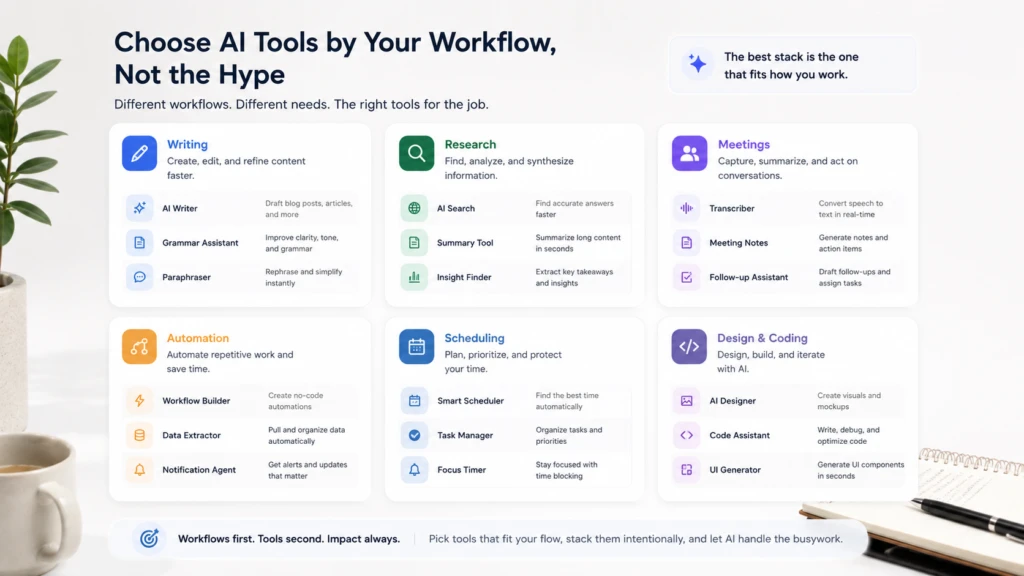
If you do not know which tool to start with, pick the workflow that slows you down most.
| Workflow problem | Best first tool |
|---|---|
| I type too much every day | VoiceDash |
| I need a general AI assistant | ChatGPT |
| I need better long-form reasoning | Claude |
| I need research with citations | Perplexity |
| I need to analyze long documents | NotebookLM |
| I need cleaner writing | Grammarly |
| I need marketing content | Jasper |
| I need sales copy | Copy.ai |
| I need better project visibility | ClickUp or Asana |
| I need my day planned automatically | Motion |
| I need protected focus time | Reclaim |
| I need meeting notes | Granola |
| I need meeting transcripts | Otter.ai |
| I need call intelligence | Fireflies |
| I need no-code automation | Zapier or Make |
| I need technical automation | n8n |
| I need AI agents | Gumloop |
| I need faster email | Superhuman |
| I need presentations | Gamma |
| I need design assets | Canva |
| I need video editing | Descript |
| I need coding help | Cursor |
Why voice-to-text belongs in every AI productivity stack
Most AI productivity tools improve what happens after text exists. They summarize text, rewrite text, analyze text, organize text, or automate text between apps.
But a lot of work still starts with manual typing.
You type:
- Prompts into ChatGPT or Claude
- Updates into Slack
- Notes into Notion
- Replies into Gmail
- Tasks into ClickUp
- Tickets into Jira
- Comments into Google Docs
- Follow-ups into your CRM
- Briefs into project management tools
If typing is the slowest part of the workflow, every tool after it waits.
Voice-to-text helps because it lets you capture thoughts at the speed you speak, then clean them into usable text. For people who think out loud, this is often the difference between having an idea and actually writing it down.
The mistake is thinking of dictation as only an accessibility feature or a mobile convenience. In real professional workflows, AI voice typing can become a daily input system.
A practical example:
- Dictate a rough client follow-up with VoiceDash.
- Paste it into Grammarly only if it needs extra polish.
- Add the final note to Gmail or Superhuman.
- Use Zapier to log the follow-up in your CRM.
- Add the next task to ClickUp or Asana.
The productivity gain does not come from one tool doing everything. It comes from reducing friction at each step.
For more ideas on reducing daily work friction, read VoiceDash’s guide to workplace productivity hacks.
Best AI productivity stack by role
For founders
A practical founder stack could include VoiceDash, ChatGPT or Claude, Perplexity, Notion AI, Superhuman, Zapier, and Gamma.
Founders usually switch between strategy, sales, hiring, product, investor updates, customer conversations, and internal communication. VoiceDash helps capture ideas and updates quickly. ChatGPT or Claude can help think through them. Superhuman helps with email. Zapier keeps systems connected.
For remote workers
A good remote work stack could include VoiceDash, Slack, Granola, Notion, ClickUp or Asana, Reclaim, and Zoom or Google Meet.
Remote work depends on clear written communication. A vague update creates delays. A clear written update can replace a meeting. VoiceDash helps turn spoken thoughts into polished async messages, which is useful when teammates are in different time zones.
For more tools in this category, see VoiceDash’s guide to the best remote work tools for productivity.
For Windows users
A strong Windows stack could include VoiceDash, PowerToys, Notion or OneNote, Todoist, Grammarly, ShareX, ClickUp, and Everything Search.
Windows users often work across desktop apps, browser apps, documents, email, and team tools. A system-wide voice typing tool can be useful because the writing does not happen in one place.
VoiceDash also has a broader guide to the best productivity apps for Windows.
For Chrome-heavy workers
A browser-first stack could include VoiceDash, Grammarly, Todoist, Notion Web Clipper, OneTab, Loom, Bitwarden, and a tab manager.
Chrome extensions can be useful, but too many extensions create clutter. The goal is not to install more tools. The goal is to reduce friction in the workflows you actually repeat.
For more ideas, see the guide to the best Chrome extensions for productivity.
For sales teams
A good sales stack could include VoiceDash, Fireflies, Superhuman, Copy.ai, Perplexity, Zapier, and a CRM.
Sales work is communication-heavy. After every call, there are notes, follow-ups, CRM updates, next steps, and internal comments. VoiceDash helps reps write those updates quickly. Fireflies captures call context. Copy.ai helps with messaging. Zapier can move information between systems.
For developers
A developer stack could include Cursor, Claude, VoiceDash, GitHub, Linear or Jira, Notion, and n8n.
Developers spend a lot of time writing, but not all of it is code. They write PR descriptions, bug reports, documentation, technical notes, prompts, and tickets. Voice typing can reduce friction in those non-code workflows.
Native AI features vs dedicated AI tools
Many tools now include AI features. Gmail has AI. Notion has AI. ClickUp has AI. Canva has AI. Even operating systems have built-in dictation.
So when should you pay for a dedicated tool?
Use the built-in feature when the task is occasional, low-stakes, and simple.
Use a dedicated tool when the task is frequent, high-value, and central to your work.
For example, built-in dictation may be enough for a quick personal note. A dedicated tool like VoiceDash makes more sense if you dictate work messages, prompts, documents, tickets, and notes every day.
The same logic applies elsewhere:
- Use ChatGPT for flexible thinking.
- Use Perplexity when sources matter.
- Use Granola or Fireflies when meeting memory matters.
- Use Zapier or Make when handoffs between apps happen often.
- Use Cursor when coding productivity is core to your job.
- Use Canva when visual content is frequent but design resources are limited.
Which AI productivity tools are worth paying for?
A tool is worth paying for when it saves time every week, improves important work, or replaces manual effort you would otherwise avoid.
Usually worth paying for if used daily:
- Voice typing and dictation
- Email productivity
- Meeting notes
- Project management
- Workflow automation
- Coding tools
- Professional writing tools
Often fine on a free plan for light use:
- Occasional AI chat
- Basic grammar checking
- Simple design work
- Light transcription
- Personal note-taking
- Basic automation
Before paying, ask five questions:
- Did I use this tool more than three times this week?
- Did it save real time or just feel interesting?
- Does it improve work quality?
- Does it work where I already work?
- Would I miss it if I removed it?
If the answer is no, do not add another subscription yet.
Common AI productivity mistakes
Mistake 1: Buying too many tools at once
The fastest way to waste money is to subscribe to five tools before one of them becomes a habit. Start with one bottleneck.
Mistake 2: Ignoring the input layer
Many people buy tools that improve output while still typing every prompt, update, and note manually. If writing is the bottleneck, solve that first.
Mistake 3: Automating unclear processes
Automation works best when the process is already clear. If nobody agrees what should happen after a lead comes in, Zapier will not solve the problem. It will only move confusion faster.
Mistake 4: Treating AI output as final
AI is useful for drafts, summaries, and suggestions. It still needs human judgment, especially for content, sales communication, legal material, financial work, and anything customer-facing.
Mistake 5: Choosing tools because competitors use them
Your best stack depends on your workflows. A video creator, founder, support rep, developer, and student should not use the same exact tools.
Final recommendation
The best AI productivity tools do not just help you do more. They help you remove the friction that keeps useful work from getting done.
For some people, that friction is research. For others, it is meetings, scheduling, task management, coding, email, or design.
For many professionals, the bottleneck is simpler.
They still type too much.
They type prompts. They type updates. They type notes. They type follow-ups. They type tasks. They type the same kinds of messages every day.
That is why voice-to-text deserves a central place in a modern AI productivity stack. It improves the first step of knowledge work: turning thoughts into text.
If you already use tools like ChatGPT, Claude, Notion, Slack, Gmail, ClickUp, Google Docs, or Cursor, VoiceDash can make those workflows faster by helping you speak your ideas directly into polished writing.
AI productivity is not about collecting more tools. It is about removing the right bottlenecks.
For people who write every day, the input layer is a good place to start.
