
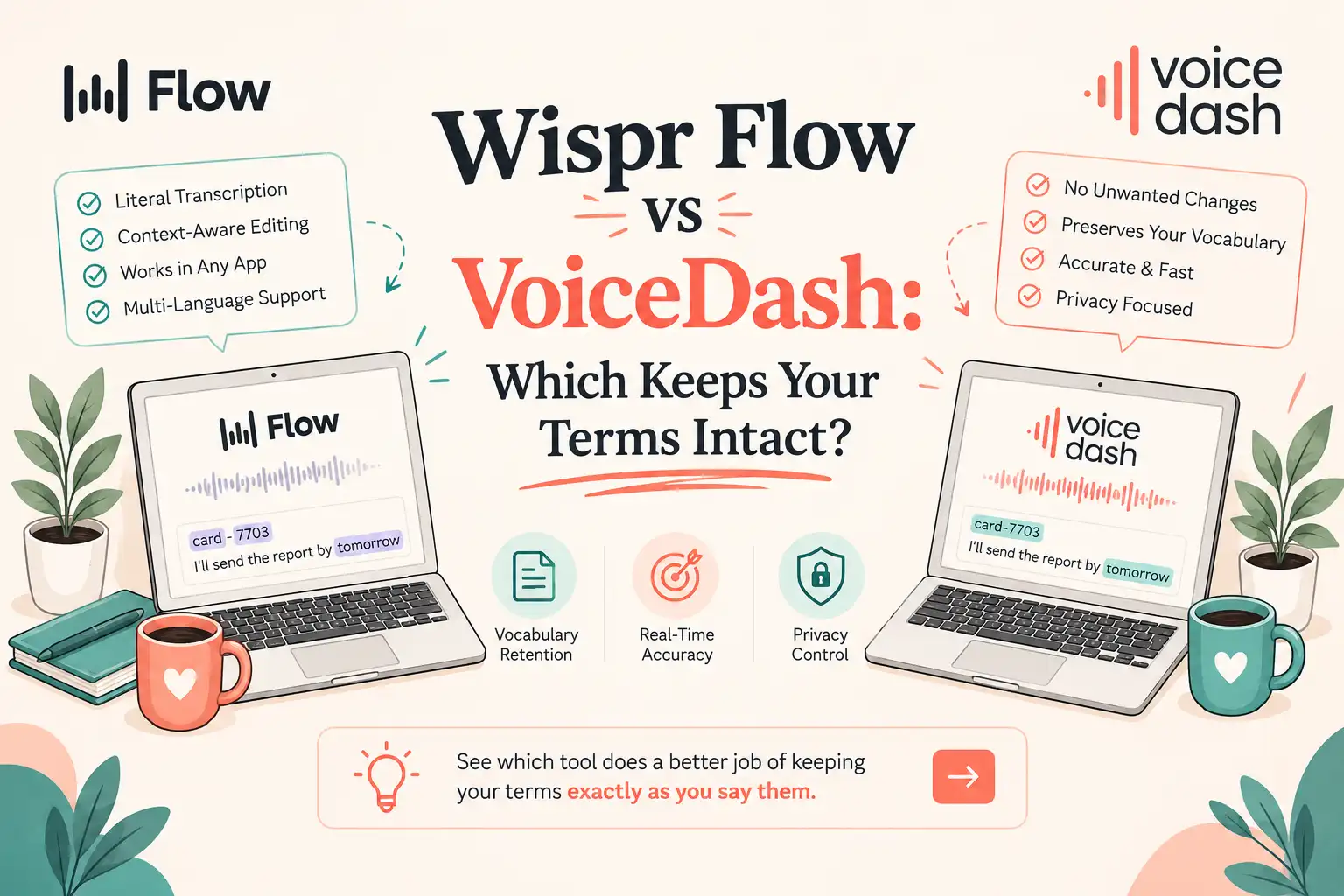
- VoiceDash vs Wispr Flow: Which Should You Use?
- VoiceDash vs Wispr Flow at a Glance
- What Is the Core Difference Between VoiceDash and Wispr Flow?
- Which errors does each tool make?
- VoiceDash vs Wispr Flow: Accuracy & Precision
- Use-Case Matrix: Writing, Technical Terms, and Meetings
- Wispr Flow Command Mode vs. VoiceDash
- Pricing & Plan Architecture
- Privacy, Compliance, and Data Governance
- OS & Platform Compatibility
- How to Choose Between VoiceDash and Wispr Flow
- Bottom Line
- Methodology & Sources
- Frequently Asked Questions
VoiceDash vs Wispr Flow for Accuracy, Pricing, Privacy, and Meetings
Looking at VoiceDash vs Wispr Flow? The real difference isn’t just transcription accuracy. However, it might be whether speech-to-text tool preserves your terms or rewrites them into something else.
VoiceDash vs Wispr Flow: Which Should You Use?
- Prefer a term-preserving draft tool when lost nouns, tickets, mixed scripts, or a shared snippet library are the failures you cannot send. VoiceDash fits that job on the tests below and lists Teams at $24/month yearly for up to five seats.
- Prefer Wispr Flow when the input is a ramble that needs dressing, Mac Notetaker must work this week, student pricing applies, the language is absent from VoiceDash’s published list, or Growth controls (SSO and an org dictation BAA) are required.
VoiceDash is a viable Wispr Flow alternative for daily cloud dictation at the same Pro yearly price tag. However, it is not a finished substitute for Mac Notetaker inside a BAA.
VoiceDash vs Wispr Flow at a Glance
VoiceDash yearly cards explicitly print “save $36 per year” on Pro and “save $69 per year” on Teams. No student plan and no lifetime tier appear on VoiceDash pricing. The yearly Pro list price matches. The post-recognition stage does not.
What Is the Core Difference Between VoiceDash and Wispr Flow?
The difference between VoiceDash and Wispr Flow starts after speech recognition.
Windows and macOS already ship with native dictation. Built-in utilities like speech-to-text in Windows and Mac cover that baseline layer. Paid voice-to-text tools only justify their cost when default engines force manual text repairs.
- VoiceDash spends its processing layer on a deterministic, inspectable draft. Filler is removed, grammar is tightened, and text lands directly at your cursor. Custom dictionaries and snippets protect specialized terminology. Command Mode runs strictly after the draft is generated.
- Wispr Flow spends its processing layer on generative rewriting. Tone and structure adapt dynamically to fit Slack threads or formal emails. A loose ramble emerges polished, but low-frequency domain terms risk being swapped for common, fluent alternatives.
If audio cannot leave the local environment due to air-gapping or privacy constraints, neither tool applies.
Which errors does each tool make?
Whether VoiceDash is better than Wispr Flow depends entirely on the error type you cannot afford to send.
- Choose VoiceDash first when an altered noun causes downstream errors.
- Choose Wispr Flow first when a draft that sounds spoken requires heavy structural editing.
Users searching for the best Wispr Flow alternative are usually seeking higher first-pass accuracy for precise technical vocabulary. Conversely, for quick email drafting and native Mac call notes, Wispr Flow is the better fit for email tone and Mac call notes that must work this week.
VoiceDash vs Wispr Flow: Accuracy & Precision
Vendor accuracy percentages rarely reflect production reality. Neither platform publishes standardized benchmark datasets covering mic setups, accents, domain jargon, or raw ASR vs. rewritten text outputs.
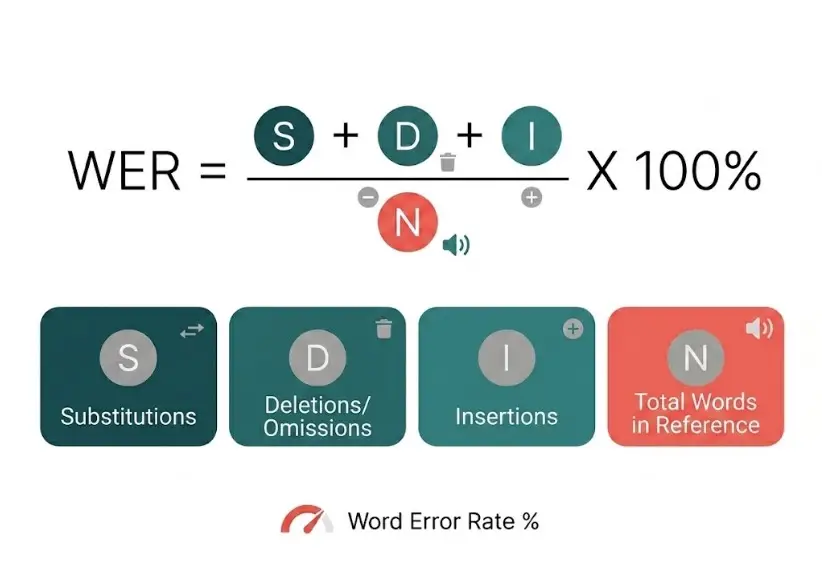
Standard Word Error Rate (WER) metrics fail to penalize grammatically fluent sentences that distort original meaning, which is precisely how generative rewriting hides transcription misses.
Clinical Script Dictation Test
- Environment: Controlled room, condenser microphone, single audio stream, single paragraph.
- Note: This test does not constitute a clinical trial or medical device validation. Bluetooth performance, ambient background noise, and multi-speaker environments were not tested.
Source Text:
“Pelvic ultrasound report: The uterus is anteverted and normal in size, and the endometrium measures 6 mm and appears regular. Both ovaries are normal. No pelvic mass or free fluid is identified. Impression: Unremarkable pelvic ultrasound.”
Wispr Flow Output:
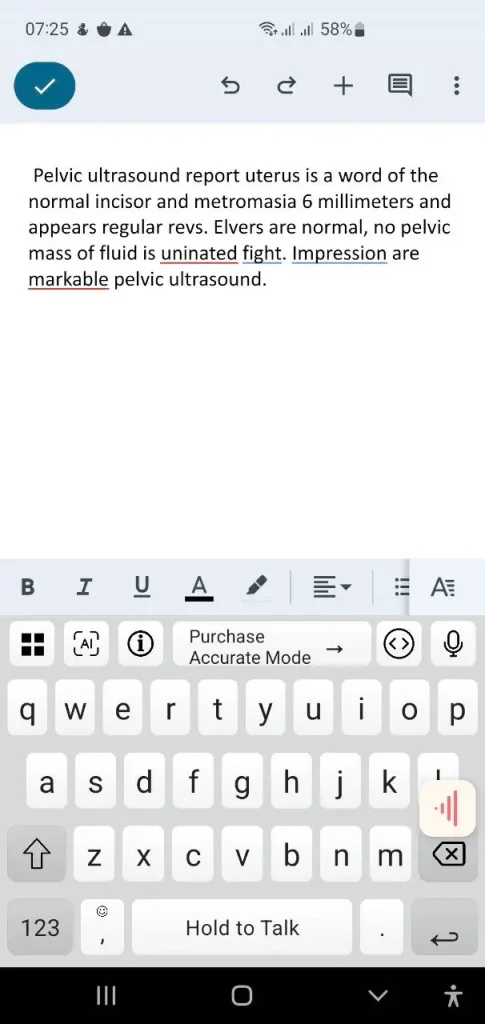
Wispr Flow output of the pelvic ultrasound dictation, with clinical terms replaced by everyday words
Analysis: Anteverted, endometrium, ovaries, identified, and Unremarkable failed to transcribe correctly. The critical clinical impression morphed into “are markable.”
VoiceDash Output:
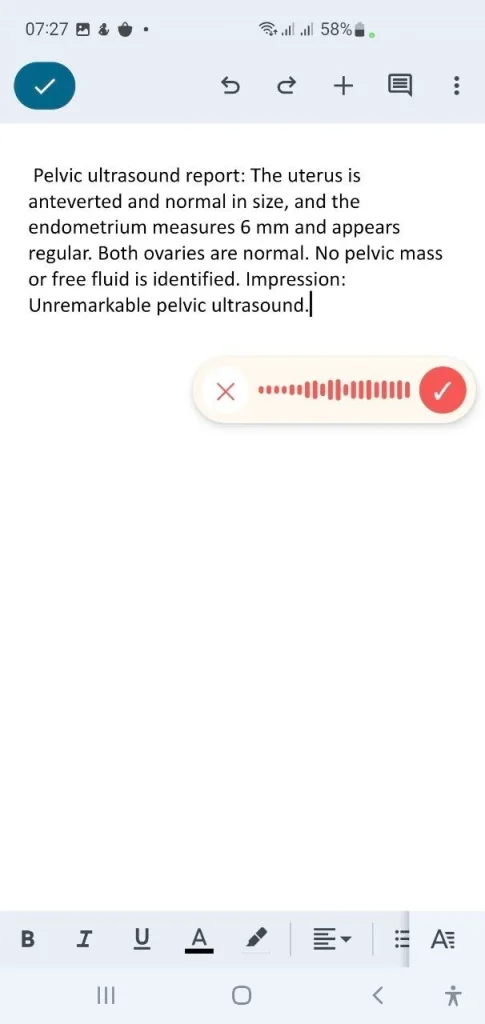
VoiceDash output of the pelvic ultrasound dictation, with the source findings intact
Analysis: Analysis: The listed findings and the impression line matched the source.
While Wispr Flow handles general conversational speech effectively, accent variations and background noise will shift outputs on both tools. Human oversight remains mandatory. If hallucinatory substitutions pose an operational risk, evaluate VoiceDash against your specific vocabulary templates.
Always test unindexed names, system metrics, ticket IDs, and mixed-script strings during evaluation.
Cardiology Dictation Test
The same audio clip was passed into both applications. This is not a clinical trial, and neither tool serves as a medical device.
Source Text
Cardiology note for accession CARD-7703. Keep the ID exactly as spoken and do not expand ms. The patient has known aortic stenosis with a peak velocity of 4.2 meters per second. ECG shows sinus bradycardia and left bundle branch block. Troponin I is 0.04 nanograms per milliliter. QT interval is 420 ms, not 420 milliseconds.
Wispr Flow Output
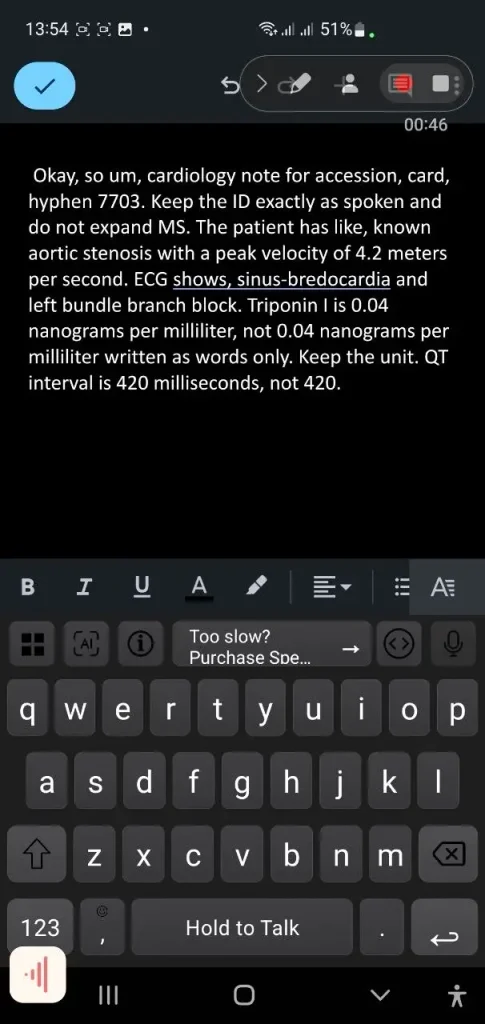
“Okay, so um, cardiology note for accession, card, hyphen 7703. Keep the ID exactly as spoken and do not expand MS. The patient has like, known aortic stenosis with a peak velocity of 4.2 meters per second. ECG shows, sinus-bredocardia and left bundle branch block. Triponin I is 0.04 nanograms per milliliter, not 0.04 nanograms per milliliter written as words only. Keep the unit. QT interval is 420 milliseconds, not 420.”
VoiceDash Output
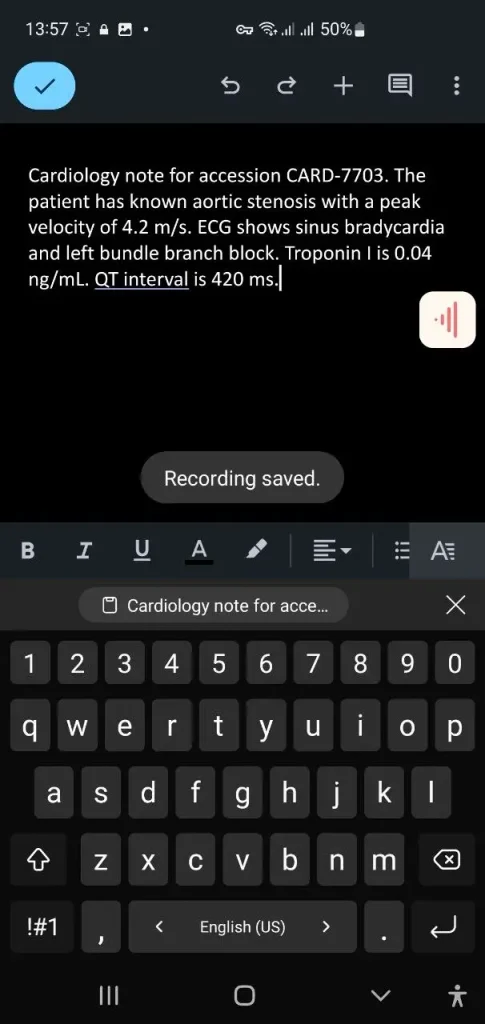
“Cardiology note for accession CARD-7703. The patient has known aortic stenosis with a peak velocity of 4.2 m/s. ECG shows sinus bradycardia and left bundle branch block. Troponin I is 0.04 ng/mL. QT interval is 420 ms.”
Feature & Extraction Breakdown
| Check / Parameter | VoiceDash | Wispr Flow |
|---|---|---|
| CARD-7703 ID | Perfectly kept | Literal transcription (card, hyphen 7703) |
| Filler Words | Stripped out | Retained verbatim (Okay so um, like) |
| 420 ms Constraint | Maintained as 420 ms | Expanded to 420 milliseconds |
| sinus bradycardia | Accurately captured | Typo / phonetic spelling (sinus-bredocardia) |
| Troponin I | Accurately captured | Misspelled clinical term (Triponin I) |
| Units | Abbreviated to m/s & ng/mL | Kept full spoken form |
| “ms” System Instruction | Applied to QT; prompt stripped | Printed verbatim in output; unapplied |
Key Takeaway
VoiceDash kept the accession ID and the named findings, removed filler and the instruction line, and shortened two units to m/s and ng/mL. Wispr Flow, on the other hand, retains filler language, prints system instructions inline, and breaks both the ID format and key medical terms.
Practical Verdict: If the report needs to head straight to print after a single review pass, the VoiceDash draft needed fewer noun fixes. Expand m/s and ng/mL if the reader wants full unit names.
Use-Case Matrix: Writing, Technical Terms, and Meetings
- Content Teams & Reusable Templates: VoiceDash fits if you deploy recurring disclaimers, intros, or boilerplates. Snippets hold them intact. (For manual entry efficiency, see Voice-to-Text for Creators.
- Speech-to-Text for Developers & Engineering Workflows: VoiceDash is the better match when you need to prevent ticket IDs, variable names, and code syntax from expanding unexpectedly.
- Spanish, Arabic, and Turkish (RTL & Mixed Scripts): Use VoiceDash if generative rewriting alters zero-width non-joiners (half-spaces) or text direction. Wispr Flow is preferred if your required language falls outside VoiceDash’s published 50+ list.
- Email & Informal Drafting: Wispr Flow fits when converting fragmented verbal thoughts into cohesive, professionally tone-mapped paragraphs.
- Meeting Workflows: Wispr Flow Notetaker is currently available on macOS, with Pro tiers granting higher storage limits. VoiceDash is engineering a meeting layer.
- Specialized (Medical/Legal) Vocabularies: VoiceDash kept exact terms on the two scripts above. Wispr Flow Growth caters to organizational compliance via enterprise BAAs and SSO.
- Desktop & Mobile Implementations: Desktop coverage is equivalent across platforms. Both support mobile platforms.
- Student Pricing: Wispr Flow offers 3 months free, followed by a 50% discount ($6/month). VoiceDash offers no dedicated student tier.
- Team Plans: VoiceDash Teams provides 5 seats for $24/month flat (yearly). Wispr Flow Growth starts at $18/user/month (yearly) with dedicated administrative controls.
- Browser Utilities: For web-only workflows, VoiceDash offers a full workflow beyond Chrome.
| Workflow Requirement | Recommended Primary Tool |
|---|---|
| Recurring Text Blocks & Templates | VoiceDash |
| Code Identifiers & System Tickets | VoiceDash |
| RTL & Mixed-Script Languages | VoiceDash (Verify language list) |
| Polished Email Generation | Wispr Flow |
| Native Mac Meeting Notes | Wispr Flow |
| Unified Dictation + Call Recording | VoiceDash (Pending live build) |
| Strict Technical/Clinical Vocabularies | VoiceDash |
| Enterprise HIPAA BAA + SSO | Wispr Flow Growth |
| Student Budget Constraints | Wispr Flow |
| Small Team Snippet Sharing (5 Seats) | VoiceDash Teams |
| Air-Gapped / Offline Audio | Neither (Requires local models) |
| Pre-recorded Multi-Speaker Files | Neither (Requires dedicated transcription) |
Wispr Flow Command Mode vs. VoiceDash
The distinction between Wispr Flow Command Mode and VoiceDash lies in execution timing, not AI capability.
VoiceDash executes Command Mode post-drafting after the baseline text populates the field. Wispr Flow integrates Command Mode directly near the default generation path on paid desktop apps.
| Capability | VoiceDash | Wispr Flow |
|---|---|---|
| Feature Availability | Included | Included (Paid Mac/Win) |
| Execution Trigger | Post-draft insertion | Integrated default path |
When testing either system, validate edge cases like “preserve ticket ID” or “do not expand abbreviations.”
Pricing & Plan Architecture
While both tools advertise a $12/month entry price on annual Pro tiers, the underlying deliverables differ significantly.
- VoiceDash Pro ($12/mo yearly / $15 monthly): Includes unlimited word processing, custom dictionary, snippet library, and cross-platform access. VoiceDash Teams ($24/mo flat yearly / $29 monthly): Covers up to 5 seats with shared snippets and dedicated support.
- Wispr Flow Pro ($12/user/mo yearly / $15 monthly): Includes unlimited dictations, advanced models, priority support, and extended meeting note history. Wispr Flow Growth ($18/user/mo yearly / $23 monthly): Unlocks SSO/SCIM, administrative audit controls, training opt-outs, enterprise HIPAA BAAs, and custom invoicing.
Scaling a 5-person team on VoiceDash Teams costs $24/month total. The equivalent of 5 seats on Wispr Flow Growth costs $90/month ($18 × 5). The cost delta reflects enterprise compliance overhead and administrative provisioning.
| Plan Tier | VoiceDash | Wispr Flow |
|---|---|---|
| Free Tier | 1,000 words/month | Larger weekly usage cap |
| Pro (Yearly) | $12/month | $12/user/month |
| Pro (Monthly) | $15/month | $15/user/month |
| Team (Yearly) | $24/month (5 seats included) | From $18/user/month |
| Student Pricing | Not offered | $6/month (After 3-month trial) |
| Lifetime Pass | Not offered | Not offered |
Evaluating individual ROI comes down to testing priorities: Wispr Flow’s free trial tests dictation volume and fluid editing, whereas VoiceDash Free tests whether your technical domain terms survive the pipeline.
Privacy, Compliance, and Data Governance
Privacy protocols vary based on deployment scope. Both tools process audio via cloud infrastructure.
- VoiceDash: The standard privacy policy states that raw audio and transcripts are not permanently stored (excluding user-saved Notes). Processing is handled via OpenAI APIs with Zero Data Retention (ZDR) enabled on eligible endpoints, alongside a processor-level BAA with OpenAI. It does not issue direct customer-facing BAAs or native SSO on team plans.
- Wispr Flow offers Privacy Mode, training opt-outs, and enterprise-level HIPAA compliance with signed BAAs on Growth tiers. Marketing materials cite SOC 2 Type II and ISO 27001 certifications. However, the official Help Center clarifies that SOC 2 Type I was completed in April 2026 (Type II pending at the last update), with ISO Stage 1 completed in April 2026 and Stage 2 targeted for June 2026.
- Note on Meetings: Wispr Flow’s Notetaker operates outside its standard dictation BAA umbrella; active BAA configurations automatically disable Notetaker functionality.
| Governance Requirement | VoiceDash | Wispr Flow |
|---|---|---|
| Zero Permanent Audio/Transcript Storage | Policy-enforced (Excluding Notes) | Privacy Mode & opt-outs |
| OpenAI API Zero Data Retention (ZDR) | Documented on security pages | Not specified in core policy |
| Shared Team Snippets (5 Seats) | Included in the Teams tier | Not a primary Growth focus |
| Direct Customer HIPAA BAA | Not available | Supported (Growth tier) |
| BAA Coverage for Call Recording | Unverified | Explicitly excluded |
| Enterprise SSO / SCIM | Not supported on Teams | Supported (Growth tier) |
| SOC 2 Certification | No public report | Type I completed (April 2026) |
| Local / On-Device Processing | No | No |
Re-evaluate data policies once VoiceDash launches its native meeting layer, multi-speaker call capture introduces distinct compliance requirements compared to single-user dictation.
OS & Platform Compatibility
Platform distribution is closely matched. Both vendors provide desktop (macOS/Windows) and mobile (iOS/Android) applications. VoiceDash explicitly notes cross-platform coverage on its Free tier.
| Category | VoiceDash | Wispr Flow |
|---|---|---|
| Supported Operating Systems | macOS, Windows, iOS, Android | macOS, Windows, iOS, Android |
| Language Support | 50+ published languages | 100+ listed languages |
| English Language Performance | Accurate default engine | Optimized/mature core |
| Multi-Speaker Identification | Unverified | Supported via Mac Notetaker |
Note: Stated language counts do not guarantee script stability across complex character sets. Always benchmark using actual production phrases.
How to Choose Between VoiceDash and Wispr Flow
Run a side-by-side benchmark using a real production paragraph:
- Use the same room, microphone, and audio input.
- Dictate the passage into both applications simultaneously.
- Quantify accuracy based on missing domain nouns, expanded abbreviations, script directional errors, and total manual edit time required before sending.
- Choose VoiceDash if accuracy failures center on lost technical terms or altered identifiers.
- Choose Wispr Flow if accuracy failures center on awkward conversational phrasing requiring manual rewriting.
For meeting workflows, evaluate Wispr Flow’s live Mac Notetaker today rather than scoring against VoiceDash’s upcoming meeting module.
VoiceDash Free offers 1,000 words per month with no credit card required. Start with VoiceDash Free.
Bottom Line
- Pick VoiceDash if you require precise vocabulary retention, use custom snippet libraries, process technical IDs, work with non-standard scripts, or want cost-effective 5-seat team pricing ($24/month yearly).
- Pick Wispr Flow if you require corporate Growth governance (SSO/BAAs), need immediate Mac meeting note generation, qualify for student rates, or need a language absent from VoiceDash’s catalog.
- Pick neither if your security policies strictly prohibit cloud audio processing or you require offline, local-only speech recognition.
The core choice comes down to generative rewrite vs. precise draft cleanup at an identical $12/month entry point. Wispr Flow delivers superior enterprise paperwork and active meeting tools. In the two scripts in this article, VoiceDash kept the listed nouns unchanged.
Methodology & Sources
Data compiled through September 4, 2026, from official vendor documentation: VoiceDash Pricing, Privacy Policy, and FAQ; Wispr Flow Pro/Growth cards, Security FAQ, and Enterprise Notetaker FAQ. Dictation test results reflect single-pass performance under controlled conditions. Latency, Bluetooth codecs, and non-English localization were not benchmarked. VoiceDash meeting features remain in active development.
