

- Best TurboScribe Alternatives at a Glance
- 1. VoiceDash — Best for Live Dictation and Voice Writing
- 2. Scribiz — Best for Video Links and Videos Where the Screen Matters
- 3. MacWhisper — Best for Local and Offline Transcription
- 4. Otter.ai — Best for Live Meeting Transcription
- 5. Descript — Best for Podcasts and Video Editing
- 6. Happy Scribe — Best When You Need More Than AI Transcription
- 7. Rev — Best When You Specifically Want Human Transcription
- 8. Notta — Best for Multilingual Meetings
- Best TurboScribe Alternative by Use Case
- VoiceDash vs TurboScribe: Which One Actually Fits Your Workflow?
- Final Verdict
- Frequently Asked Questions
8 Best TurboScribe Alternatives in 2026
TurboScribe is hard to beat if you mainly want to upload existing audio or video and get a transcript back. Its Unlimited plan handles files up to 10 hours or 5 GB, allows 50 uploads at once, and is built for people processing a lot of recorded material.
There is not much point replacing it just because another transcription app exists.
VoiceDash makes more sense if your real problem is typing rather than transcribing files. It lets you speak directly into emails, documents, browsers, forms, chat boxes, notes, and other apps, then use Command Mode to rewrite or format the text with your voice. It works across Mac, Windows, iPhone, and Android.
The other alternatives have clearer specialist strengths: MacWhisper for local transcription, Otter.ai for meetings, Descript for editing podcasts and video through text, Happy Scribe for subtitles and human proofreading, Rev when you specifically want human transcription, and Notta for multilingual meeting workflows.
Best TurboScribe Alternatives at a Glance
| Tool | Best for | Why choose it | Pricing |
|---|---|---|---|
| VoiceDash | Live dictation and voice writing | Write directly inside the apps you already use | Free; Pro $15/mo or $12/mo annually |
| Scribiz | Video links and videos where the screen matters | Transcribe video links or files with summaries, chapters, timestamped key points, and on-screen text | Free without an account; free account includes 30 min/month; Pro $10/mo |
| MacWhisper | Local/offline transcription | Process recorded audio on your own device | Free; Pro €64 lifetime |
| Otter.ai | Meetings | Live transcription, summaries, speaker identification | Free; Pro from $8.33/mo annually |
| Descript | Podcasts and video | Edit the recording by editing the transcript | Free; paid plans from $16/mo annually |
| Happy Scribe | Transcripts, subtitles + human review | AI workflow with optional human proofreading | Free; paid and per-minute options |
| Rev | Human transcription | Use human transcription when AI is not enough | Free AI tier; paid AI and human services |
| Notta | Multilingual meetings | Meeting transcription across 58 languages | Free; Pro from $8.17/mo annually |
1. VoiceDash — Best for Live Dictation and Voice Writing
Best for: People who thought they needed another transcription tool but actually want to speak instead of type.
The easiest way to understand VoiceDash is to look at where the audio starts.
With TurboScribe, you normally already have a recording.
With VoiceDash, you have a blank text field.
Put the cursor in an email, Google Doc, browser form, chat box, notes app, AI prompt, CRM field, or other place you would normally type, and start talking. The text appears there instead of being created as a separate transcript that you have to move later.
That makes VoiceDash more useful for everyday writing than for processing a folder full of recordings.
The more interesting part is what happens after the first draft appears.
VoiceDash’s Command Mode lets you keep working with the text by voice. You can say things like:
- Make this shorter.
- Turn this into bullet points.
- Rewrite this professionally.
- Fix the grammar.
- Format this as an email.
Dictation creates the text. Command Mode lets you do something with it.
That distinction matters if you spend a lot of the day writing emails, notes, reports, messages, prompts, or documentation.
VoiceDash currently has a free plan with 1,000 words per month. Pro costs $15 per month or $12 per month with annual billing and adds unlimited words, advanced AI editing, a personal dictionary, snippets, and support across its platforms.
There is also a very good reason not to switch.
If you have 30 hours of interviews sitting on a hard drive and your job is to turn them into transcripts, keep TurboScribe—or look at MacWhisper. VoiceDash is not trying to beat either tool at bulk file transcription.
VoiceDash makes sense when the workflow starts with:
“I know what I want to write. I just don’t want to type it.”
If that sounds closer to your problem, see how real time transcription software differs from traditional file transcription.

2. Scribiz — Best for Video Links and Videos Where the Screen Matters
Best for: People who want to transcribe a video link or file and also capture useful context from what appears on screen.
Scribiz is the tool I would look at first if two things are true:
the source is a video, and the visuals matter as much as the words.
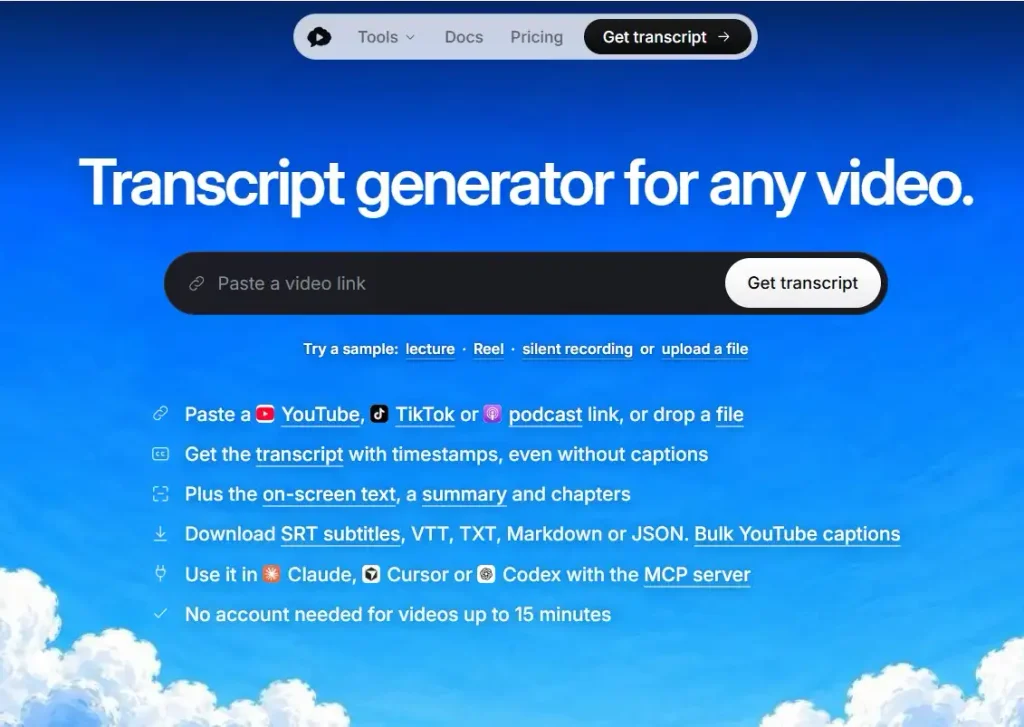
You can paste a YouTube link or upload a video file without creating an account, and Scribiz returns more than a transcript. It also generates a summary, chapters, and timestamped key points.
That makes it meaningfully different from a basic audio-only transcription workflow.
When captions already exist, Scribiz uses them. When they do not, it listens to the audio instead. For video links, it can also note text that appears on screen, including things like slides and code.
That can be useful for tutorials, presentations, walkthroughs, and other videos where part of the meaning is visual rather than spoken.
Scribiz also supports several export formats, including SRT, VTT, TXT, Markdown, and JSON.
Without an account, it supports videos up to 15 minutes. A free account adds 30 minutes per month, while Pro costs $10 per month.
A simple way to separate the two:
Choose Scribiz when you want context-rich transcription from video links or files. Choose TurboScribe when you want bulk file transcription.
3. MacWhisper — Best for Local and Offline Transcription
Best for: Mac users who already have the recording and would rather not upload it to a cloud transcription service.
MacWhisper is the tool I would look at first if two things are true:
the audio already exists, and privacy matters.
It can transcribe audio, video, meetings, and system audio using models that run locally on a Mac. By default, local transcription data stays on the device, although MacWhisper also offers optional cloud features.
That is a meaningful difference from TurboScribe’s cloud-first workflow.
A journalist transcribing an interview, a researcher working with sensitive recordings, or someone dealing with internal company conversations may simply prefer not to upload the source audio.
MacWhisper has grown beyond basic file transcription as well. It supports speaker recognition and has an iOS version, but recorded media is still the clearest reason to choose it.
Its pricing also stands out in a category full of subscriptions: MacWhisper Pro currently costs €64 as a one-time license with lifetime updates.
A simple way to separate the two:
Choose TurboScribe when you want convenient, high-volume cloud transcription. Choose MacWhisper when you want the transcription happening on your Mac.

4. Otter.ai — Best for Live Meeting Transcription
Best for: People who want the transcription tool in the meeting, not waiting for the recording afterward.
TurboScribe and Otter can both produce transcripts, but they become useful at different moments.
TurboScribe starts making sense once you have something to transcribe.
Otter earns its place while the conversation is happening.
It can join Zoom, Microsoft Teams, and Google Meet workflows, produce live transcription, identify speakers, and generate summaries and action items. Its free plan currently includes 300 monthly transcription minutes, while paid tiers expand meeting and file-import limits.
That makes Otter an easier recommendation for:
- Weekly team meetings.
- Sales calls.
- Customer interviews.
- Recruiting calls.
- Research conversations.
- Meetings where everyone would rather participate than manually take notes.
The tradeoff is that Otter is much more opinionated about the use case.
If you have a folder containing hours of podcasts, lectures, or recorded video, its meeting features do not buy you much. TurboScribe is simpler for that job.
Language support is another difference. Otter currently supports transcription in English, Spanish, French, German, Japanese, and Simplified Chinese. TurboScribe supports a much broader set of transcription languages.
If the conversation is happening now, look at Otter. If the recording happened last week, TurboScribe probably makes more sense.
If meetings are the reason you are shopping around, our guide to the best Otter AI alternatives goes deeper into that category.

5. Descript — Best for Podcasts and Video Editing
Best for: Creators who transcribe recordings because they intend to edit them afterward.
Descript is a poor choice if all you want is a TXT file.
That is also why it is one of the most useful alternatives on this list.
Descript takes the transcript and turns it into the editing interface. Delete a section of text and you can change the corresponding media. The product is built around editing video and audio much like you would edit a document.
For a podcaster or YouTube creator, that removes an awkward handoff.
Instead of:
transcribe → download transcript → open editor → find the same section in the timeline
you can work from the words themselves.
Descript also includes tools around captions, filler-word removal, clips, audio cleanup, screen recording, and AI-assisted media editing. Its paid plans currently start at $16 per person per month with annual billing.
None of that makes it a better pure transcription service than TurboScribe.
It makes it better when the transcript is not the finished product.
If you transcribe podcasts because you need show notes, captions, clips, articles, and an edited episode afterward, Descript is solving more of the actual job.
For that workflow, see our guide to choosing a podcast transcription service.

6. Happy Scribe — Best When You Need More Than AI Transcription
Best for: People who move between transcripts, subtitles, translation, and occasional human proofreading.
Happy Scribe makes sense when your transcription needs are inconsistent.
Maybe most recordings are fine with AI.
Then one project needs subtitles.
Another needs translation.
And every so often, there is a transcript important enough that you want a human to check it.
Rather than specializing in only one of those jobs, Happy Scribe puts them in the same workflow.
Its current service includes AI transcription and subtitling, automatic speaker detection, meeting recording, collaborative editing, multiple export formats, and optional human proofreading. Human proofreading currently starts from around $2 per minute depending on the plan and service.
That flexibility is the appeal.
The downside is pricing complexity.
TurboScribe is very easy to understand if you are a heavy AI-transcription user: pay for Unlimited and process files.
Happy Scribe mixes subscriptions, included minutes, extra credits, pay-as-you-go options, and human services. That is useful if your work varies, but less elegant if you simply want to process a large volume of ordinary transcripts.
Choose Happy Scribe when the work sometimes needs a human or a subtitle workflow. Choose TurboScribe when it is mostly just audio-to-text at scale.

7. Rev — Best When You Specifically Want Human Transcription
Best for: Important recordings where the cost of a mistake matters more than getting the cheapest transcript.
Rev has changed considerably from the old “send us a recording and a human types it” model. It now has AI transcription, AI meeting features, multi-file analysis, mobile recording, and subscription plans.
But human transcription is still the clearest reason to put Rev on a TurboScribe alternatives list.
There are recordings where you may not want to spend your own time checking every name, number, technical term, or difficult exchange against the original audio.
That does not mean human transcription is automatically necessary for legal, medical, research, or professional work. Requirements vary. It means Rev gives you the option to involve a human when a particular file justifies the additional cost.
That can make sense for:
- Difficult interviews.
- Important quotations.
- Multi-speaker recordings.
- Research material that will be cited.
- Professional transcripts where manual cleanup would take too long.
For ordinary recordings, the economics move quickly in the other direction.
If you have 20 hours of clear podcast audio and AI results are good enough, paying for human work is usually solving a problem you do not have.
That is where TurboScribe’s high-volume subscription model becomes more attractive.
If interviews are the main reason you’re comparing tools, this guide on how to transcribe interview audio to text accurately covers the workflow beyond simply picking software.
8. Notta — Best for Multilingual Meetings
Best for: Teams whose meetings happen in more languages than Otter currently supports.
Notta and Otter overlap enough that you probably do not need both.
Both are built around capturing conversations, creating transcripts, and turning meetings into something more useful afterward.
The reason to look at Notta is language coverage.
Notta currently supports transcription in 58 languages, along with uploaded files, in-person and online meetings, AI summaries, and integrations with services including Zoom, Teams, Google Meet, Slack, Notion, Salesforce, and Google Drive. Its free plan includes 200 transcription minutes per month, and Pro starts at $8.17 per month with annual billing.
That makes it an easier recommendation for international teams and people conducting interviews across several languages.
TurboScribe still supports more transcription languages overall and is better suited to processing large batches of files.
But counting languages alone misses the point.
TurboScribe is better at processing recordings. Notta is better at making live conversations part of an ongoing meeting workflow.
If most of your transcription comes from recurring meetings rather than an archive of recordings, that difference matters more than the raw language count.

Best TurboScribe Alternative by Use Case
| If this is what you need | Start with |
|---|---|
| High-volume transcription of existing recordings | TurboScribe |
| Speak directly into emails, documents, forms, chat boxes, and apps | VoiceDash |
| Edit and format dictated text using voice commands | VoiceDash |
| Local/offline transcription on Mac | MacWhisper |
| Automatic meeting notes | Otter.ai |
| Multilingual meeting transcription | Notta |
| Podcast or video editing through a transcript | Descript |
| AI transcription plus optional human proofreading | Happy Scribe |
| Human transcription for an important recording | Rev |
If cost is the main reason you are leaving TurboScribe, compare the limits carefully rather than assuming another free tier is automatically better. Our guide to the best free transcription software covers that question separately.
VoiceDash vs TurboScribe: Which One Actually Fits Your Workflow?
You do not need a giant feature matrix to separate these two.
They are useful at different ends of the speech-to-text workflow.
TurboScribe makes more sense when:
- The audio or video already exists.
- You have long recordings.
- You regularly process files in batches.
- You want transcripts, subtitles, translations, or exports.
- You care more about file-processing capacity than live dictation.
TurboScribe’s current Unlimited plan costs $10 per month when billed yearly, supports files up to 10 hours or 5 GB, allows 50 uploads at once, and includes translation into 134+ languages. Its free plan allows three transcripts per day with files up to 30 minutes.
VoiceDash makes more sense when:
- The “recording” does not exist yet because you are speaking your thoughts live.
- You want text to appear directly in the app where you are working.
- You move between Mac, Windows, iPhone, and Android.
- You want to rewrite, shorten, format, or clean up text using your voice.
- You want voice to replace part of your normal keyboard workflow.
VoiceDash’s free plan includes 1,000 words per month, while Pro adds unlimited words, advanced AI editing, a personal dictionary, snippets, and all-platform access.
The practical difference is simpler than the feature lists make it sound:
TurboScribe is built around recordings you already made. VoiceDash is built around words you want to create now.
That is also why VoiceDash should not replace TurboScribe for everyone.
If bulk transcription is working well for you, keep TurboScribe.
If you keep transcribing yourself because you ultimately just want the words inside an email, document, note, or prompt, there is a shorter workflow.
Final Verdict
TurboScribe is still one of the strongest choices here for high-volume file transcription. If you already use it for long recordings, batch uploads, subtitles, or multilingual transcripts and it does the job, there is no strong reason to switch.
The alternatives become interesting when the job changes.
VoiceDash is the one I would choose if the actual goal is to stop typing so much. It puts live speech directly into the apps where you work and lets you keep editing with your voice afterward.
MacWhisper is the more natural choice when you want recorded files processed locally.
Otter.ai makes more sense when meetings are the source of most of your transcripts.
Descript is built for people who are going to edit the podcast or video after transcription anyway.
Happy Scribe is useful when subtitles, translation, and occasional human proofreading belong in the same workflow.
Rev is the option to consider when a particular recording is important enough to justify human transcription.
And Notta is easier to recommend when multilingual meetings are the real problem.
The mistake is looking for a tool that beats TurboScribe at every feature.
A better question is:
What are you actually trying to do once the speech becomes text?
That answer usually makes the choice obvious.
Frequently Asked Questions
VoiceDash is the best fit when you want live dictation across apps rather than file transcription. MacWhisper is stronger for local Mac transcription, Otter.ai for live meetings, Descript for podcast and video editing, Happy Scribe for transcription plus human proofreading, Rev for human transcription, and Notta for multilingual meeting workflows.
If your main task is processing large quantities of existing recordings, TurboScribe may still be the best option.
Happy Scribe and Rev also compete more directly with TurboScribe’s traditional transcription workflow than dictation-first tools such as VoiceDash.
TurboScribe primarily turns existing recordings into transcripts. VoiceDash is designed to turn live speech into text directly inside the applications where you are working.
VoiceDash is therefore a better TurboScribe alternative when the underlying problem is typing, not when the problem is a backlog of recorded audio.
TurboScribe is primarily designed around transcription workflows. A dictation app such as VoiceDash is designed to place live speech directly into emails, documents, browser fields, notes, chat boxes, and other text inputs while you work.
TurboScribe itself currently allows three free transcripts per day, with files up to 30 minutes. VoiceDash offers 1,000 free words per month for basic voice-to-text on Mac and Windows. MacWhisper has a free version for local transcription, while Otter, Descript, Rev, Notta, and Happy Scribe also have free entry points with different limits.
The useful comparison is not simply which one is free. It is what the free plan lets you accomplish before you hit the limit.
Notta is worth considering instead if broader multilingual transcription is important. It currently supports 58 transcription languages.
Use TurboScribe if you mainly want a transcript of the finished recording.
Use Descript if you want the transcript to become part of the audio or video editing process.
Use Happy Scribe if subtitles, translation, or human proofreading are also part of the publishing workflow.
