
- Top Aqua Voice Alternatives at a Glance
- Voice Dictation vs. Voice Writing: Understanding the Difference
- 1. VoiceDash: Best Overall for Polished Voice Writing and Cross-Platform Integration
- 2. Wispr Flow: Multilingual Workflows and Automated Tone Adaptation
- 3. Superwhisper: Premier Choice for On-Device Offline Privacy
- 4. VoiceInk: Open-Source Native Mac Tool
- 5. Typeless: Best AI Voice Writing for Executive Teams
- 6. MacWhisper: Solution for Pre-Recorded Audio Files
- 7. OpenWhispr: Free Open-Source Option for Developers
- 8. Willow Voice: Low-Latency Desktop System Dictation
- 9. Apple Dictation: Best Built-In Option for Apple Users
- 10. Windows Voice Typing: Native Speech Tool for PC Users
- 11. whisper.cpp Hybrids: Lightweight Command-Line Dictation
- 12. Otter.ai: Dedicated Automated Meeting Platform
- Technical Benchmarks: Privacy, Security, and 3-Year Cost Analysis
- Bottom Line: Which Aqua Voice Alternative Fits Your Needs?
- Frequently Asked Questions
Aqua Voice Alternatives: Full Comparison of Accuracy, Privacy & Pricing
If you are searching for top-tier Aqua Voice alternatives, you likely appreciate context-aware dictation but need capabilities that Aqua Voice simply does not provide. While Aqua Voice gained attention for cleaning up filler words in desktop environments, power users often run into clear friction. It supports macOS, Windows, and iOS, but does not offer native Android or Linux clients, offers no true offline local model execution for sensitive data, and does not provide lifetime licensing options.
Whether you need strict HIPAA compliance, multi-device support, or software that transforms unscripted thoughts into polished text directly at your cursor, this guide compares the overall top choices available today.
Top Aqua Voice Alternatives at a Glance
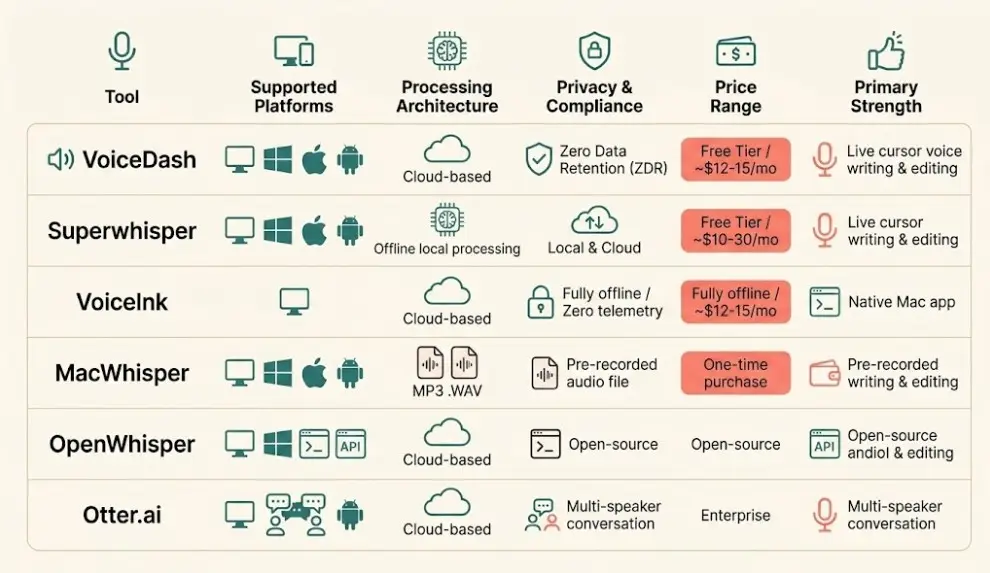
For quick decision-making, here is how the top tools compare across core platforms, privacy architecture, execution speed, and pricing models.
| Tool | Platforms | Processing Architecture | Privacy & Compliance | Price Range | Primary Strength |
|---|---|---|---|---|---|
| VoiceDash | Mac, Windows, iOS, Android | Cloud-based | Zero Data Retention (ZDR) | free tier / ~$12-15/mo | Live cursor voice writing & editing |
| Wispr Flow | Mac, Windows, iOS, Android | Cloud | Enterprise BAA / Encryption | Free / ~$12-15/mo | Multilingual & auto-tone shifts |
| Superwhisper | Mac, Windows, iOS | Local & Cloud | Local + Cloud | Free / $8.49/mo / $250 LT | Offline local processing |
| VoiceInk | macOS (Apple Silicon) | Local | Fully offline / Zero telemetry | $29–$69 (One-time) | Lightweight native Mac app |
| Typeless | Mac, Windows, iOS, Android | Cloud | Standard Cloud | Subscription | Executive document drafting |
| MacWhisper | macOS | Local | Local default | Free / ~€59 (Pro) | Pre-recorded audio files |
| OpenWhispr | Mac, Windows, Linux | Local / API | Open-source auditable | Free (Open-Source) | Developer custom setups |
| Willow Voice | Mac, Windows, iOS | Cloud | Standard Cloud | Freemium | Low-latency system dictation |
| Apple Dictation | macOS, iOS, iPadOS | On-Device | Apple Privacy Framework | Free (Built-in) | Quick native Apple notes |
| Windows Voice | Windows 10 / 11 | Cloud | MS Privacy Statement | Free (Built-in) | Basic native PC typing |
| Otter.ai | Web, iOS, Android | Cloud | SOC 2 Type II / Enterprise | Free / From ~$10/mo | Multi-speaker meeting notes |
Voice Dictation vs. Voice Writing: Understanding the Difference
Before choosing a dictation platform, it is crucial to understand that modern speech tools have split into two distinct product categories:
- Voice Dictation (Verbatim Capture): These tools transcribe your exact words as spoken. They focus heavily on Word Error Rate (WER) and technical terminology insertion. They output raw speech, including your natural hesitations if not manually paused. Examples include Apple Dictation and Windows Voice Typing.
- Voice Writing (Polished Output): These platforms process stream-of-consciousness speaking, filter out filler words (such as “um” and “ah”), fix grammatical errors on the fly, and restructure spoken thoughts into ready-to-send copy directly where your cursor sits. Examples include VoiceDash, Wispr Flow, and Typeless.
Understanding this distinction helps you avoid spending hours editing raw transcripts when your true goal is rapid document creation.
1. VoiceDash: Best Overall for Polished Voice Writing and Cross-Platform Integration
VoiceDash is a leading AI dictation option for professionals who want to dictate thought streams and receive clean, publication-ready copy directly at their active cursor. Unlike basic dictation tools that output raw, rambling speech, VoiceDash operates everywhere a cursor exists, including emails, web browsers, document editors, and messaging apps across iOS, Android, Mac, and Windows.
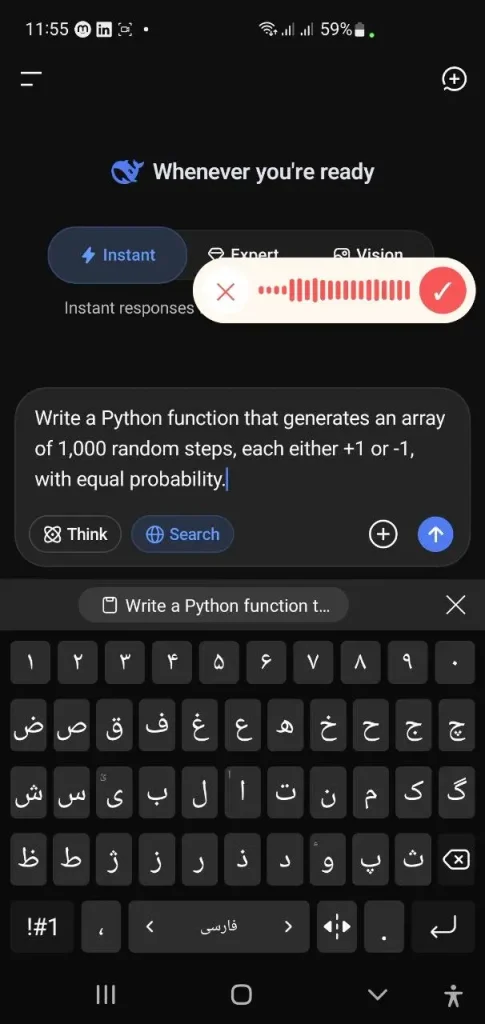
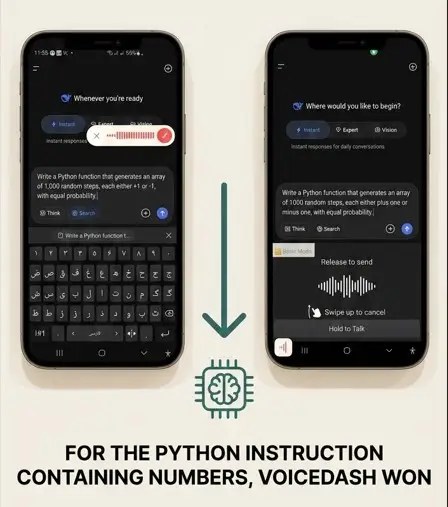
VoiceDash performed better than Wispr Flow and correctly dictated the numbers as digits instead of spelling them out as words, and unlike Wispr Flow it did not take over keyboard control.
Key Capabilities & Workflows
VoiceDash directly addresses post-dictation fatigue. It automatically strips out verbal stutters and false starts before inserting text into your application. Its integrated Command Mode allows users to reformat, edit, or adjust the tone of highlighted text purely using voice commands without touching the keyboard or mouse. This makes it an essential tool when discovering how to use voice-to-text to maximize daily productivity.
Security & Compliance Profile
- Supported Platforms: macOS, Windows, iOS, Android.
- Execution Architecture: Cloud-primary sub-second text streaming.
- Data Security: VoiceDash claims a Zero Data Retention (ZDR) architecture. According to the company, audio is processed in memory and not retained or used for model training. Review the official privacy policy for details.
- Pricing: Generous free tier; Pro tier available at about $12/month (billed annually).
When to Use vs. When NOT to Use
- When to use: You work across multiple operating systems and want clean, pre-edited text placed directly into your active apps without manual cleanup.
- When NOT to use: You operate on air-gapped hardware without an internet connection.
2. Wispr Flow: Multilingual Workflows and Automated Tone Adaptation
Wispr Flow focuses on sub-second voice delivery, deep language capabilities, and app-aware formatting adjustments.
Key Features & Performance
Wispr Flow automatically detects which desktop application is active and adjusts its output style accordingly. For example, it adopts a formal tone when drafting emails inside Microsoft Outlook and switches to a conversational tone inside Slack. It supports over 100 languages, making it a strong contender for international teams.
- Platforms: macOS, Windows, iOS, Android.
- Pricing: Limited free tier; Pro plan costs about $12/month.
- Pros: Smooth multilingual switching; application-aware formatting.
- Cons: Cloud dependency prevents offline usage; free word limits are reached quickly.
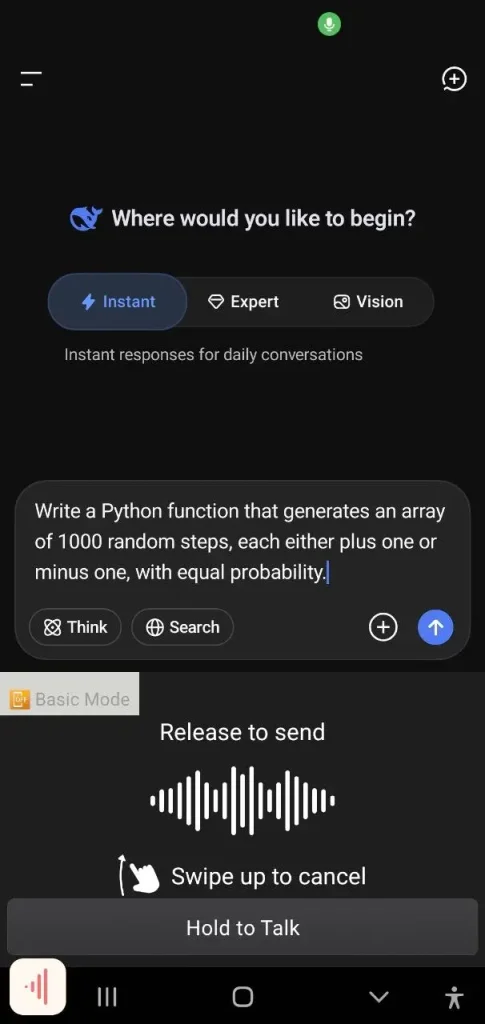
Wispr Flow dictated cleanly and handled everyday speech well during testing. The only notable issue appeared with code-related symbols: it converted “+1” and “-1” into the words “plus one” and “minus one” instead of preserving the actual characters.
3. Superwhisper: Premier Choice for On-Device Offline Privacy
Superwhisper is an on-device speech processing framework designed for users who cannot allow audio data to leave their local machine.
Key Features & Performance
By leveraging local AI models running on device hardware, Superwhisper processes voice inputs with zero network data transfer. It is ideal for legal professionals, financial analysts, and healthcare workers handling sensitive information. If you are exploring the best dictation software for Mac, Superwhisper stands out for strict privacy needs.
- Platforms: macOS, Windows, iOS.
- Pricing: Free tier (basic models); Pro tier at $8.49/month or a $249.99 lifetime license.
- Pros: Complete offline functionality; zero telemetry; includes file transcription mode.
- Cons: Requires powerful hardware (such as Apple Silicon) to avoid processing lag.
4. VoiceInk: Open-Source Native Mac Tool
VoiceInk is a lightweight, open-source dictation utility optimized specifically for Apple Silicon processors.
Key Features & Performance
VoiceInk runs entirely on the device using Apple’s Neural Engine. It offers a clean one-time purchase model for Mac users who prefer open-source software over recurring SaaS subscriptions.
- Platforms: macOS (Apple Silicon native).
- Pricing: $29–$69 for a single purchase.
- Pros: Auditable codebase; zero background data collection; lightweight memory footprint.
- Cons: Restricted to macOS; lacks cross-device mobile synchronization.
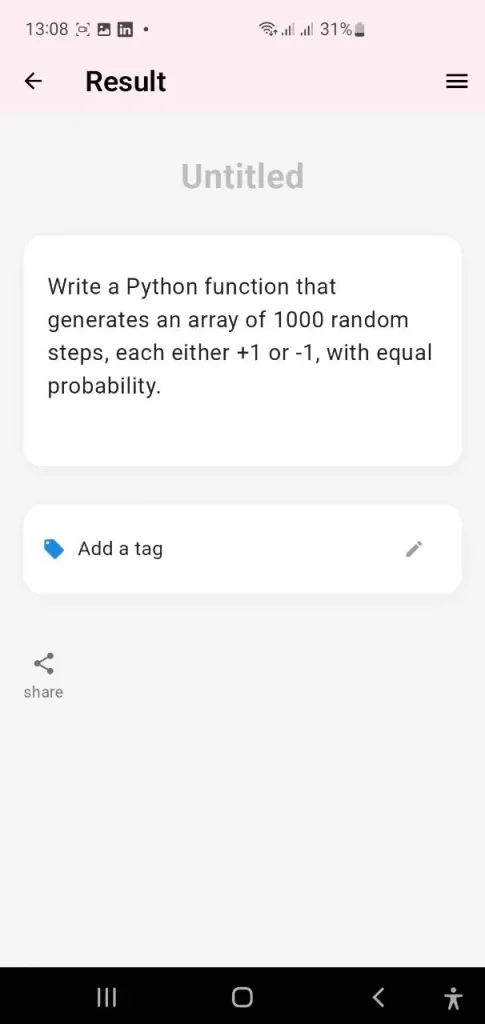
Want to see how VoiceInk measures up against VoiceDash? Check out the full comparison.
5. Typeless: Best AI Voice Writing for Executive Teams
Typeless turns spoken stream-of-consciousness thoughts into structured business documents, meeting updates, and emails.
Key Features & Performance
Designed primarily for managers and executives, Typeless excels at taking long voice notes and structuring them into bulleted updates, project charters, or task lists.
- Platforms: macOS, Windows, iOS, Android.
- Pricing: Subscription model.
- Pros: Excellent document structuring; strong contextual memory.
- Cons: Higher cost; less effective for simple live cursor text placement.
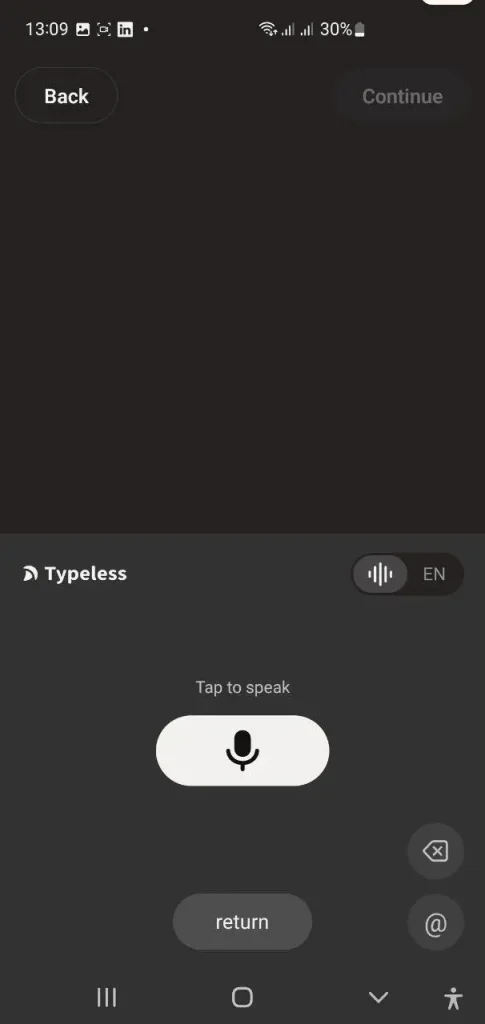
Typeless hung during testing, making a full evaluation impossible.
6. MacWhisper: Solution for Pre-Recorded Audio Files
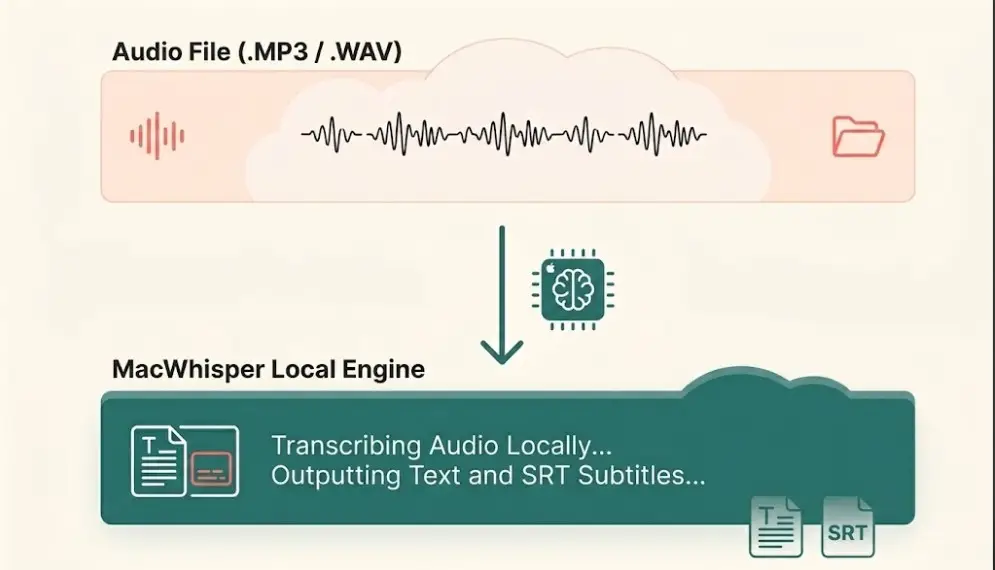
MacWhisper specializes in converting pre-recorded audio files and meeting recordings into accurate transcripts on macOS.
Key Features & Performance
While Aqua Voice focuses on real-time typing, MacWhisper is built to handle multi-hour MP3, WAV, or video recordings. Users can drop files directly into the app to produce detailed transcripts, export subtitle files, and review speaker identification. It is frequently highlighted among the speech-to-text software for local file management.
- Platforms: macOS and iOS.
- Pricing: Free tier; Pro tier around €59 (one-time payment).
- Pros: Outstanding batch file transcription; subtitle export (.SRT, .VTT); local processing.
- Cons: Mac-only; not optimized for live cursor dictation inside mobile apps.
7. OpenWhispr: Free Open-Source Option for Developers
OpenWhispr gives developers and technical power users full control over their voice-to-text pipeline.
Key Features & Performance
OpenWhispr lets users connect custom OpenAI API keys or run self-hosted Whisper models locally on Linux, Windows, or Mac.
- Platforms: macOS, Windows, Linux.
- Pricing: Free and open-source.
- Pros: Highly customizable; free local execution; flexible model choices.
- Cons: Requires manual technical setup; lacks a polished consumer user interface.
8. Willow Voice: Low-Latency Desktop System Dictation
Willow delivers ultra-fast keypress-to-text insertion for rapid data entry.
Key Features & Performance
Willow focuses on minimizing text insertion latency. It triggers instantly via global hotkeys to insert short text phrases directly into web forms, CRM tools, and database fields.
- Platforms: macOS, Windows, iOS.
- Pricing: Freemium.
- Pros: Extremely low latency; lightweight system overhead.
- Cons: Basic editing and text transformation capabilities.
9. Apple Dictation: Best Built-In Option for Apple Users
Apple Dictation comes pre-installed across iOS, iPadOS, and macOS devices.
Key Features & Performance
For basic notes, quick messaging, and simple hands-free typing, Apple Dictation requires zero installation and works natively across the Apple ecosystem. It is often the first step for users learning how to use speech-to-text on Mac. If you are looking for a dedicated mobile experience, you can also explore the best voice-to-text app for iPhone.
- Platforms: macOS, iOS, iPadOS.
- Pricing: Free (Built-in).
- Pros: Fully integrated into system menus; zero setup required; offline support on modern chips.
- Cons: Lacks AI cleanup; struggles with complex industry jargon; locked to Apple devices.
10. Windows Voice Typing: Native Speech Tool for PC Users
Windows Voice Typing (triggered via Win + H) provides built-in speech recognition for Windows 10 and 11.
Key Features & Performance
Powered by Azure Speech Services, Windows Voice Typing provides free speech recognition across all Windows software. Learn more about setting up native tools in our guide to speech-to-text in Windows.
- Platforms: Windows 10 / 11.
- Pricing: Free.
- Pros: Native system hotkey; automatic punctuation support.
- Cons: Requires an active network connection for full accuracy; outputs raw verbatim text.
11. whisper.cpp Hybrids: Lightweight Command-Line Dictation
Command-line utilities built on Whisper.CPP provides ultra-lightweight offline dictation for technical environments.
Key Features & Performance
These community-driven tools run local C/C++ implementations of OpenAI’s Whisper model. They are popular among Linux system administrators and terminal-focused developers who prefer low resource overhead.
- Platforms: Linux, macOS, Windows.
- Pricing: Free / Open Source.
- Pros: Ultra-low RAM footprint; complete data privacy; terminal scriptable.
- Cons: No graphical user interface; requires manual global hotkey configuration.
12. Otter.ai: Dedicated Automated Meeting Platform
Otter.ai is designed primarily for capturing, summarizing, and transcribing multi-speaker meetings.
Key Features & Performance
Unlike live cursor tools, Otter connects to Google Meet, Zoom, and Microsoft Teams to record conversations, identify individual speakers, and generate key action items.
- Platforms: Web, iOS, Android.
- Pricing: Free tier; Pro plan starts around $10/month.
- Pros: Speaker diarization; automated meeting summaries; slide capture.
- Cons: Not designed for inserting text live at your active cursor.
Technical Benchmarks: Privacy, Security, and 3-Year Cost Analysis
When evaluating a speech-to-text tool, two factors matter most beyond the feature list: how the tool handles your data and how quickly the output becomes usable.
Word Error Rate vs. Time-to-Usable-Text
When choosing a speech-to-text platform, raw transcription accuracy (measured by Word Error Rate) is only part of the equation.
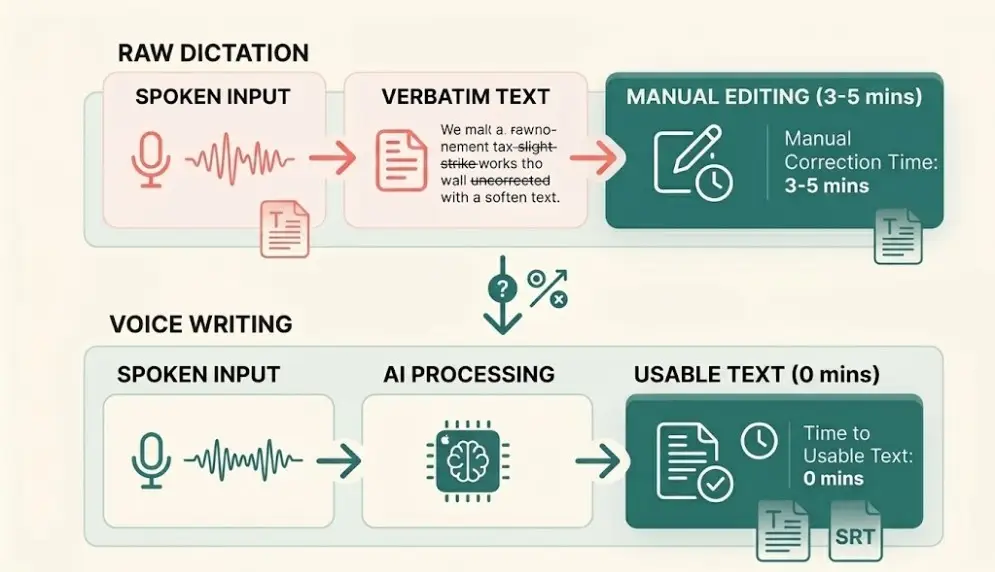
Raw dictation tools like Aqua Voice aim for low WER on technical terms. However, platforms like VoiceDash focus on Time-to-Usable-Text. By removing filler words, fixing stutters, and polishing syntax automatically, VoiceDash AI cleanup features (filler-word removal and grammar polishing) can significantly reduce post-dictation editing time compared to raw transcription tools.
Privacy and Regulatory Compliance Matrix
If you handle legal disclosures, financial records, or medical notes, a data handling policy is a critical selection factor:
- On-Device Processing (Superwhisper, VoiceInk): Audio data never leaves local system memory. This approach can support strict air-gapped and high-privacy needs. Always verify current compliance certifications (including any HIPAA BAA) directly with the vendor.
- Zero Data Retention Cloud (VoiceDash): Audio streams pass through secure RAM buffers, are converted to text instantly, and are immediately deleted from server memory. This provides high-speed cloud performance without persistent data storage.
3-Year Total Cost Comparison
Subscription pricing accumulates over time. Here is a breakdown of total estimated costs over a three-year period:
| Software Solution | Licensing Structure | Monthly Equivalent | 3-Year Total Investment |
| VoiceDash Pro | Pro Subscription | ~$12/mo | ~$432 |
| Aqua Voice Pro | Pro Subscription | ~$8/mo | ~$288 |
| Wispr Flow Pro | Pro Subscription | ~$12/mo | ~$432 |
| Superwhisper Pro | Lifetime License | One-Time Purchase | $249.99 |
| VoiceInk | One-Time Purchase | One-Time Purchase | $29 – $69 |
| MacWhisper Pro | One-Time Purchase | One-Time Purchase | ~€59 |
| OpenWhispr | Open-Source | Free | $0 |
Bottom Line: Which Aqua Voice Alternative Fits Your Needs?
Selecting the right alternative depends on your primary workflow priorities:
- Choose VoiceDash if you want clean, publish-ready copy inserted wherever your cursor is located across Mac, Windows, iOS, and Android, with claimed Zero Data Retention.
- Choose Superwhisper or VoiceInk if you require offline, on-device processing to satisfy strict corporate privacy or HIPAA requirements.
- Choose MacWhisper if your primary goal is to convert pre-recorded audio files, podcasts, or meeting recordings into text.
- Choose OpenWhispr if you are a developer looking for an open-source tool powered by your own API keys.
