
- Wispr Flow vs Superwhisper: Quick Answer
- Wispr Flow vs Superwhisper at a Glance
- What Is Wispr Flow?
- What Is Superwhisper?
- The Main Difference: Cloud Convenience vs Local Control
- Which App Is Easier to Use?
- Text Cleanup, Formatting and Voice Editing
- Platform Support
- Does Wispr Flow or Superwhisper Work Offline?
- Privacy and Data Processing
- Which App Is More Accurate?
- Speed and Latency
- Languages and Custom Vocabulary
- Which Is Better for Developers?
- Meetings and File Transcription
- Wispr Flow vs Superwhisper Pricing
- Wispr Flow vs Superwhisper: Which Should You Choose?
- Best Choice by Use Case
- Where VoiceDash Fits
- Final Verdict
- Frequently Asked Questions
Wispr Flow vs Superwhisper: Which Voice Dictation App Is Better?
Wispr Flow is built for polished cloud dictation across desktop and mobile. Superwhisper gives users more control over local processing, offline use and customizable AI workflows.
Here is how they differ in practice.
Wispr Flow vs Superwhisper: Quick Answer
Choose Wispr Flow if you want straightforward AI dictation across Mac, Windows, iPhone and Android with automatic cleanup and limited setup. Choose Superwhisper if you need offline transcription, local processing, file transcription, meeting capture or deeper control over models and prompts.
Wispr Flow always relies on cloud transcription. Superwhisper can process speech locally or use cloud models, depending on the mode and model selected.
Wispr Flow vs Superwhisper at a Glance
| Category | Wispr Flow | Superwhisper |
|---|---|---|
| Best for | Polished cross-platform dictation | Offline, private and customizable dictation |
| Platforms | macOS, Windows, iOS, Android | macOS, Windows, iOS and iPad |
| Speech processing | Cloud | Local or cloud |
| Offline dictation | No | Yes, with local models |
| Automatic cleanup | Yes | Yes, in AI-powered modes |
| Voice editing | Command Mode on Mac and Windows | Custom modes, prompts and reprocessing |
| Languages | 100+ | 100+ |
| Custom vocabulary | Dictionary and snippets | Custom vocabulary and custom modes |
| File transcription | Not a core workflow | Yes |
| Meeting transcription | Not a core workflow | Yes |
| Free access | Weekly word limits | Permanent free tier |
| Monthly Pro price | $15 | $8.49 |
| Annual Pro price | $144 | $84.99 |
| Lifetime plan | No | $249.99 |
What Is Wispr Flow?
Wispr Flow is a cloud-based AI dictation app available on Mac, Windows, iPhone and Android. It works inside supported text fields, allowing users to speak into emails, documents, chats, browsers and productivity apps.
The app does more than produce a literal transcript. It adds punctuation, removes filler words, corrects false starts and adapts formatting based on the writing context.
Wispr Flow also includes:
- A custom dictionary for names and specialized terms
- Reusable snippets
- Support for more than 100 languages
- Context-aware formatting
- Command Mode for editing selected text
- Team dictionaries, shared snippets and administrative controls on business plans
Its main limitation is architectural: transcription happens in the cloud, so the normal dictation workflow requires an internet connection.
What Is Superwhisper?
Superwhisper is an AI dictation app for macOS, Windows, iPhone and iPad. It works in applications and websites wherever the user can enter text.
Unlike products built around a single cloud workflow, Superwhisper lets users choose between local and cloud speech-recognition models. It also separates speech recognition from optional language-model processing.
For example, a user can:
- Run a local voice model for offline transcription
- Use direct Voice-to-Text Mode without AI rewriting
- Apply Email, Message, Note or Super Mode for processed output
- Create custom modes with specific prompts
- Connect external AI providers with personal API keys
- Transcribe audio and video files
- Record meetings and generate summaries
Older articles that describe Superwhisper as Mac-only are outdated. The current product supports Mac, Windows and iOS.
The Main Difference: Cloud Convenience vs Local Control
The most important distinction is where speech is processed.
How Wispr Flow processes speech
Wispr Flow sends speech to remote infrastructure for transcription and text processing.
This gives Wispr Flow a consistent model experience across devices because the user’s computer or phone does not have to run a large speech model. It also allows the product to apply automatic formatting and cleanup without asking the user to choose a local model.
The tradeoffs are clear:
- Internet access is required for transcription.
- Performance can be affected by connection quality.
- Audio must leave the device for processing.
- Offline dictation is not available.
Wispr Flow has separate privacy controls for different purposes. Privacy Mode determines whether dictation data can be used to improve or train models. Private Cloud Sync determines whether supported content is stored on Wispr’s servers for synchronization and related cloud features.
Turning off cloud storage is not the same as local transcription. Speech still reaches Wispr’s systems so it can be converted into text.
How Superwhisper processes speech
Superwhisper separates the workflow into two possible stages:
- A speech-recognition model converts audio into text.
- An optional language model formats or rewrites that text.
Either stage can use a local or cloud model, depending on the user’s configuration.
A fully local setup can keep the audio and text processing on the device. A hybrid setup might use local speech recognition followed by a cloud language model. Users can also select cloud speech-recognition models when they prefer remote processing.
This flexibility creates more setup decisions, but it gives users greater control over privacy, speed and output behavior.
Which App Is Easier to Use?
Wispr Flow is easier for most new users.
The default workflow is simple: activate dictation, speak naturally and receive cleaned-up text. Users do not need to understand model sizes, local hardware requirements or processing pipelines before getting useful output.
Superwhisper requires more initial configuration. Users choose a microphone, language, speech model and mode. Advanced users can then change prompts, model providers and processing rules.
That difference is intentional.
Wispr Flow tries to make most decisions automatically. Superwhisper exposes those decisions to the user.
Choose Wispr Flow when minimal configuration matters more than model control. Choose Superwhisper when you want to shape how transcription and rewriting work.
Text Cleanup, Formatting and Voice Editing
Both products can improve dictated text, but they organize those features differently.
Wispr Flow automatic cleanup
Wispr Flow’s normal dictation workflow handles:
- Punctuation
- Capitalization
- Filler-word removal
- False starts
- Spoken corrections
- Paragraph structure
- Context-dependent tone
Its Backtrack feature can recognize when a speaker changes direction and restates a sentence. Instead of inserting every spoken word, Flow attempts to preserve the corrected version.
This makes Wispr Flow useful for users who speak in rough ideas but want readable text immediately.
Wispr Flow Command Mode
Command Mode lets paid users transform text through spoken instructions on Mac and Windows.
A user can highlight text and say:
- Make this more concise.
- Turn this into bullet points.
- Translate this into Spanish.
- Rewrite this as a professional email.
- Fix the grammar.
Wispr Flow then replaces the selected text with the edited result.
Command Mode can also generate text without a selection. The user places the cursor in a field, activates the command shortcut and describes what should be written.
The feature is currently presented as experimental and must be enabled in the app settings.
Superwhisper modes and prompts
Superwhisper uses task-specific modes.
Voice-to-Text Mode performs basic transcription without language-model rewriting. Other modes process the transcript for a particular purpose:
- Message Mode
- Email Mode
- Note Mode
- Meeting Mode
- Super Mode
- Custom Mode
A user who regularly dictates client emails can create an email mode with a fixed tone, preferred structure and formatting instructions. Another mode can preserve technical language for AI prompts or development notes.
Superwhisper’s approach takes longer to configure, but it is better for repeatable workflows that need consistent rules.
The practical difference: Wispr Flow is stronger at automatic cleanup and direct commands over selected text. Superwhisper gives power users more control over reusable processing behavior.
Platform Support
Platform availability is one of the clearest differences.
Wispr Flow supports:
- macOS
- Windows
- iPhone
- Android
Superwhisper supports:
- macOS
- Windows 10 and 11
- iPhone
- iPad
Wispr Flow is the better choice for Android users because Superwhisper does not currently offer an Android app.
Both products cover Mac, Windows and iOS, although their desktop and mobile experiences are not identical.
Mac users deciding whether they need a paid AI product at all should also compare Apple Dictation vs Wispr Flow. Apple’s built-in option may be enough for occasional messages and short notes, while dedicated apps become more useful when dictation is part of daily work.
Does Wispr Flow or Superwhisper Work Offline?
Superwhisper works offline when a local speech-recognition model is selected.
That makes it suitable for:
- Flights
- Weak or unavailable Wi-Fi
- Restricted company networks
- Air-gapped environments
- Users who do not want audio sent to a remote service
Some Superwhisper workflows still require internet access. A local speech model followed by a cloud language model is not fully offline. Users must check both the voice model and the language model selected for a particular mode.
Wispr Flow does not provide offline transcription. Privacy and retention settings can change what happens to the data after processing, but they do not remove the need for cloud speech recognition.
Offline winner: Superwhisper.
Privacy and Data Processing
Privacy comparisons often become misleading because they treat compliance, retention and local processing as the same thing.
They are separate questions.
Wispr Flow privacy model
Wispr Flow processes transcription in the cloud.
Its current privacy controls include:
- Privacy Mode for controlling model-training use
- Private Cloud Sync controls
- Local history-storage settings
- Business Associate Agreement options
- Enterprise-enforced privacy settings
- SOC 2 Type II and ISO 27001 claims on its Enterprise plan
- SSO and administrative controls
According to Wispr’s security documentation, dictation is not used for model training when Privacy Mode is enabled. Server-side storage is controlled separately through Private Cloud Sync.
This is a stronger privacy framework than a basic consumer cloud transcription service, but the audio still leaves the device.
Superwhisper privacy model
Superwhisper can run both speech recognition and text processing locally.
In a fully local configuration:
- Audio stays on the device.
- Transcripts stay on the device.
- No cloud model is required.
- An internet connection is not needed for processing.
Superwhisper also offers cloud models and bring-your-own-key configurations. Those options create different data paths, so users handling sensitive information must verify the models used in each mode.
Superwhisper publishes separate guidance for local-only, hosted-cloud and BYOK configurations. It also provides access to compliance documentation, DPA and BAA processes, and SOC 2 materials through its Trust Center.
Privacy winner: Superwhisper provides the stronger architectural option because users can keep the complete processing workflow local.
That does not make every Superwhisper configuration automatically compliant. Device security, local history, access controls, backups and organizational policy still matter.
Which App Is More Accurate?
There is no reliable evidence that one product is universally more accurate across every language, accent, device and environment.
Many comparison pages publish accuracy percentages without explaining:
- What was dictated
- Which microphone was used
- Which model was selected
- Whether the test included background noise
- How errors were counted
- Whether rewritten text was treated as accurate transcription
- How many samples were tested
Those numbers should not be treated as objective benchmarks.
A more useful comparison separates three concepts.
Recognition accuracy
Did the app correctly identify the words that were spoken?
Transcript faithfulness
Did the output preserve what the speaker actually said?
Writing quality
Did the finished text become clearer, cleaner or more useful after processing?
Wispr Flow often produces polished text because automatic cleanup is central to its normal workflow. That can make the result look more accurate even when the app has rewritten the original sentence.
Superwhisper can produce direct transcription or processed writing, depending on the selected mode. Users have more control over how closely the output follows their exact words.
Choose Wispr Flow when polished default output matters most. Choose Superwhisper when you want to control the balance between literal transcription and AI rewriting.
Speed and Latency
Neither cloud nor local processing is always faster.
Wispr Flow’s speed depends on:
- Internet quality
- Distance from remote infrastructure
- Service load
- Length of the dictation
- Time required for cleanup and formatting
Superwhisper’s local speed depends on:
- Processor
- Available memory
- Model size
- Operating system
- Length of the recording
- Whether a second language model is used
Cloud processing can perform consistently across older computers because the remote server does the heavy work. Local processing removes the network round trip but depends more heavily on the user’s device.
Words-per-minute claims are also easy to misuse. A person speaking at 150 words per minute does not prove that an app transcribes faster than a competing product. A useful latency test must measure the time between finishing a dictation and receiving usable text.
Without a controlled side-by-side test, there is no defensible universal speed winner.
Languages and Custom Vocabulary
Wispr Flow and Superwhisper both advertise support for more than 100 languages.
Wispr Flow includes a dictionary and snippets. Users can teach the app names, acronyms, product terminology and phrases they use regularly. Teams can manage shared dictionaries and snippets through business features.
Superwhisper supports custom vocabulary in Pro and allows users to combine terminology with custom prompts and modes. This is useful when specialized words also need particular formatting or writing rules.
Wispr Flow is simpler for managing repeated words and reusable text.
Superwhisper offers more control when vocabulary is part of a larger custom workflow.
Which Is Better for Developers?
Both tools can dictate inside code editors, terminals, browser-based development tools and AI assistants.
Wispr Flow documents support for workflows involving Cursor, Windsurf, VS Code and terminals. It also offers file tagging for supported development environments, although current documentation does not list the same file-tagging functionality for every editor.
Superwhisper works system-wide and provides modes for code prompts, comments, documentation and technical writing. Users can combine screen context, custom prompts and different models depending on the task.
Wispr Flow is the easier option for developers who want a polished cloud workflow with documented IDE features.
Superwhisper is better for users who want to build their own technical modes or keep development-related speech local.
Meetings and File Transcription
Superwhisper is broader than a basic push-to-talk dictation app.
Its Meeting Mode can:
- Record meeting audio
- Convert discussions into structured summaries
- Highlight decisions
- Extract action items
- Preserve relevant context
- Use optional speaker separation
Superwhisper also supports existing audio and video files. Users can import a recording, select a model and process the transcript through an appropriate mode.
Wispr Flow focuses mainly on live dictation, notes, snippets, text commands and writing workflows. Its public product and pricing materials do not position file transcription and meeting capture as equivalent core features.
Choose Superwhisper when one app must handle dictation, meetings and recorded files.
Choose Wispr Flow when live writing is the main use case.
Wispr Flow vs Superwhisper Pricing
Wispr Flow pricing
Wispr Flow currently lists:
- Basic: Free
- Pro monthly: $15 per user per month
- Pro annual: $12 per user per month, billed annually
- Enterprise: Custom pricing
- Initial Pro trial: 14 days without a credit card
The Basic plan includes:
- 2,000 words per week on Mac or Windows
- 1,000 words per week on iPhone
- Temporarily unlimited Android dictation
- Custom dictionary and snippets
- Support for more than 100 languages
- Privacy Mode
Pro adds unlimited dictation, Command Mode, priority support, early features and team collaboration features.
Superwhisper pricing
Superwhisper currently lists:
- Free: Permanent free tier
- Pro monthly: $8.49
- Pro annual: $84.99
- Lifetime: $249.99
- New-user Pro trial: 15 minutes
The free plan includes basic dictation and limited cloud voice-model use. Pro unlocks local models, custom vocabulary, AI-powered modes, custom modes and speaker separation.
One-year and three-year cost
| Plan | One-year cost | Three-year cost |
|---|---|---|
| Wispr Flow monthly | $180 | $540 |
| Wispr Flow annual | $144 | $432 |
| Superwhisper monthly | $101.88 | $305.64 |
| Superwhisper annual | $84.99 | $254.97 |
| Superwhisper lifetime | $249.99 | $249.99 |
The calculations use equivalent billing periods and exclude taxes, discounts and optional third-party API charges.
Superwhisper is cheaper on its published monthly and annual plans. Its lifetime license becomes cheaper than three years of its annual subscription and costs less than two years of Wispr Flow’s annual plan.
Wispr Flow’s free plan may be more useful for casual users who prefer a weekly word allowance. Superwhisper’s permanent free tier is better suited to basic transcription without the full Pro feature set.
Wispr Flow vs Superwhisper: Which Should You Choose?
Choose Wispr Flow if:
- You need Android support.
- You regularly move between desktop and mobile.
- You prefer automatic formatting with minimal configuration.
- Cloud processing is acceptable.
- You want dictionaries, snippets and team controls.
- Your organization values Wispr Flow’s administrative and enterprise features.
Users who like Wispr Flow’s general workflow but want different platform, privacy or pricing options can compare the best Wispr Flow alternatives.
Choose Superwhisper if:
- You need offline dictation.
- Local processing is important.
- You want to choose your speech and language models.
- You need custom prompts and reusable modes.
- You transcribe meetings or recorded files.
- You prefer lower annual pricing or a lifetime license.
- Android support is not required.
Users who want a simpler or more mobile-focused product can review the best Superwhisper alternatives.
Best Choice by Use Case
| Use case | Better fit | Reason |
|---|---|---|
| Android dictation | Wispr Flow | Superwhisper does not currently support Android |
| Offline dictation | Superwhisper | Local speech models work without internet |
| Fast setup | Wispr Flow | Useful automatic cleanup with fewer configuration decisions |
| Local privacy | Superwhisper | Audio and text processing can remain on-device |
| Custom workflows | Superwhisper | Custom modes, prompts and model selection |
| Team vocabulary | Wispr Flow | Shared dictionaries and snippets |
| Meeting summaries | Superwhisper | Dedicated Meeting Mode |
| File transcription | Superwhisper | Existing audio and video files can be imported |
| Cloud dictation across mobile and desktop | Wispr Flow | Mac, Windows, iPhone and Android support |
| Long-term price | Superwhisper | Lower annual price and a lifetime option |
Where VoiceDash Fits
Wispr Flow and Superwhisper are not the only options.
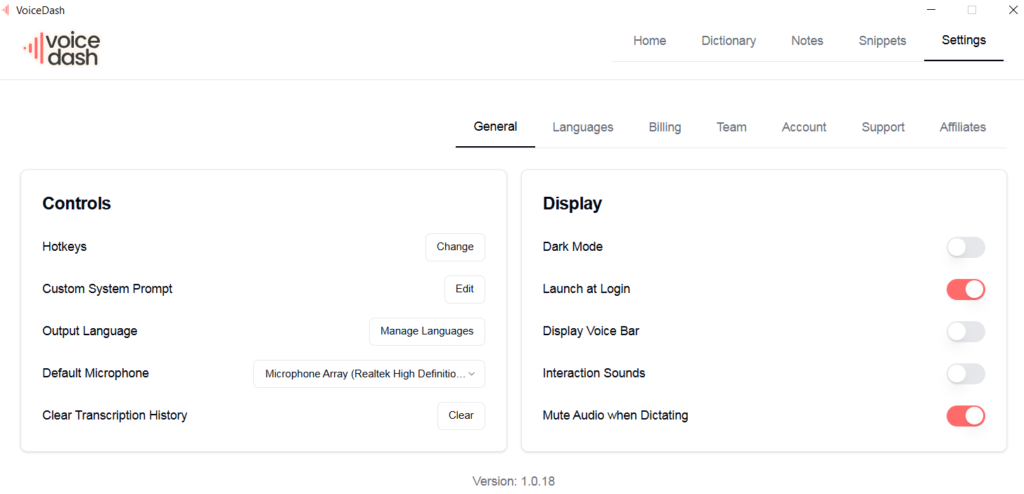
VoiceDash is built for users who want one live voice-to-text and editing workflow across iOS, Android, Mac and Windows.
It works wherever there is an active cursor, including:
- Email compose windows
- Documents
- Browser forms
- Chat boxes
- Notes apps
- AI assistants
- CRM fields
- Productivity tools
Users speak directly where the text belongs rather than recording in one app and copying the result into another.
VoiceDash also includes Command Mode. A user can describe what should be written or how existing text should change:
- Rewrite this professionally.
- Make this shorter.
- Turn this into a checklist.
- Correct the grammar.
- Add a heading.
- Replace Friday with Monday.
- Format this as an email.
Wispr Flow also has a Command Mode on Mac and Windows, so voice editing is not exclusive to VoiceDash.
The distinction is product focus.
Superwhisper emphasizes local processing, model selection and reusable modes. Wispr Flow emphasizes automatic cloud dictation and team features. VoiceDash centers its workflow on cross-device dictation and direct voice-controlled writing without requiring users to configure model pipelines.
VoiceDash vs Wispr Flow vs Superwhisper
| Feature | Wispr Flow | Superwhisper | VoiceDash |
|---|---|---|---|
| Mac | Yes | Yes | Yes |
| Windows | Yes | Yes | Yes |
| iOS | Yes | Yes | Yes |
| Android | Yes | No | Yes |
| Works in active text fields | Yes | Yes | Yes |
| Automatic text cleanup | Yes | Mode-dependent | Yes |
| Voice editing | Command Mode | Custom modes and reprocessing | Command Mode |
| Personal vocabulary | Dictionary | Custom vocabulary | Personal dictionary |
| Reusable content | Snippets | Configurable workflows | Snippet library |
| Offline transcription | No | Yes | No |
| File transcription | Not a core feature | Yes | Not a core feature |
| Meeting transcription | Not a core feature | Yes | Not a core feature |
| Free plan | Weekly platform limits | Permanent free tier | 1,000 words per month |
| Monthly Pro price | $15 | $8.49 | $15 |
| Annual Pro price | $144 | $84.99 | $144 |
VoiceDash uses cloud processing. Its privacy policy states that recordings are sent to OpenAI for real-time transcription and response generation, while VoiceDash does not permanently store the voice files or resulting text on its servers. Text intentionally saved in Notes is an exception.
VoiceDash is the better fit when users need:
- Android and iPhone support
- The same writing workflow on desktop and mobile
- Direct dictation wherever the cursor is active
- Spoken editing and formatting
- Personal dictionary and reusable snippets
- Less configuration than a mode-and-model-based tool
Superwhisper remains the stronger choice for fully local or offline processing. Wispr Flow remains strong for teams that need shared terminology, administrative controls and its established cloud workflow.
Final Verdict
Wispr Flow is best for users who want polished cloud dictation across Mac, Windows, iPhone and Android without spending time configuring models. It is particularly useful for Android users, multilingual users and teams that need shared dictionaries, snippets and administrative controls.
Superwhisper is better for users who need offline transcription, local processing, custom modes, model selection, meeting summaries or file transcription. It also has lower published subscription prices and a lifetime license.
VoiceDash fits users who want live dictation and direct voice editing across iOS, Android, Mac and Windows without managing local models or complex processing modes.
The decision comes down to three questions:
- Must dictation work without an internet connection?
- Which operating systems do you use?
- Do you prefer automatic cleanup, configurable modes or direct voice commands?
