
- VoceDash and Notta at a Glance:
- 1. Notta and VoiceDash Systemic Architectures
- 2. Speech Recognition Linguistics: WER, CER, SER, and Latency
- 3. Empirical Evaluation: Legal and Medical Domain Testing
- 4. Speech Recognition Error and Hallucination Mitigation
- 5. Privacy Compliance Comparison Between VoiceDash and Notta
- 6. VoiceDash Versus Notta Technical Feature Matrix
- 7. Strategic Implementation Framework Between VoiceDash & Notta
- Bottom Line
- Frequently Asked Questions
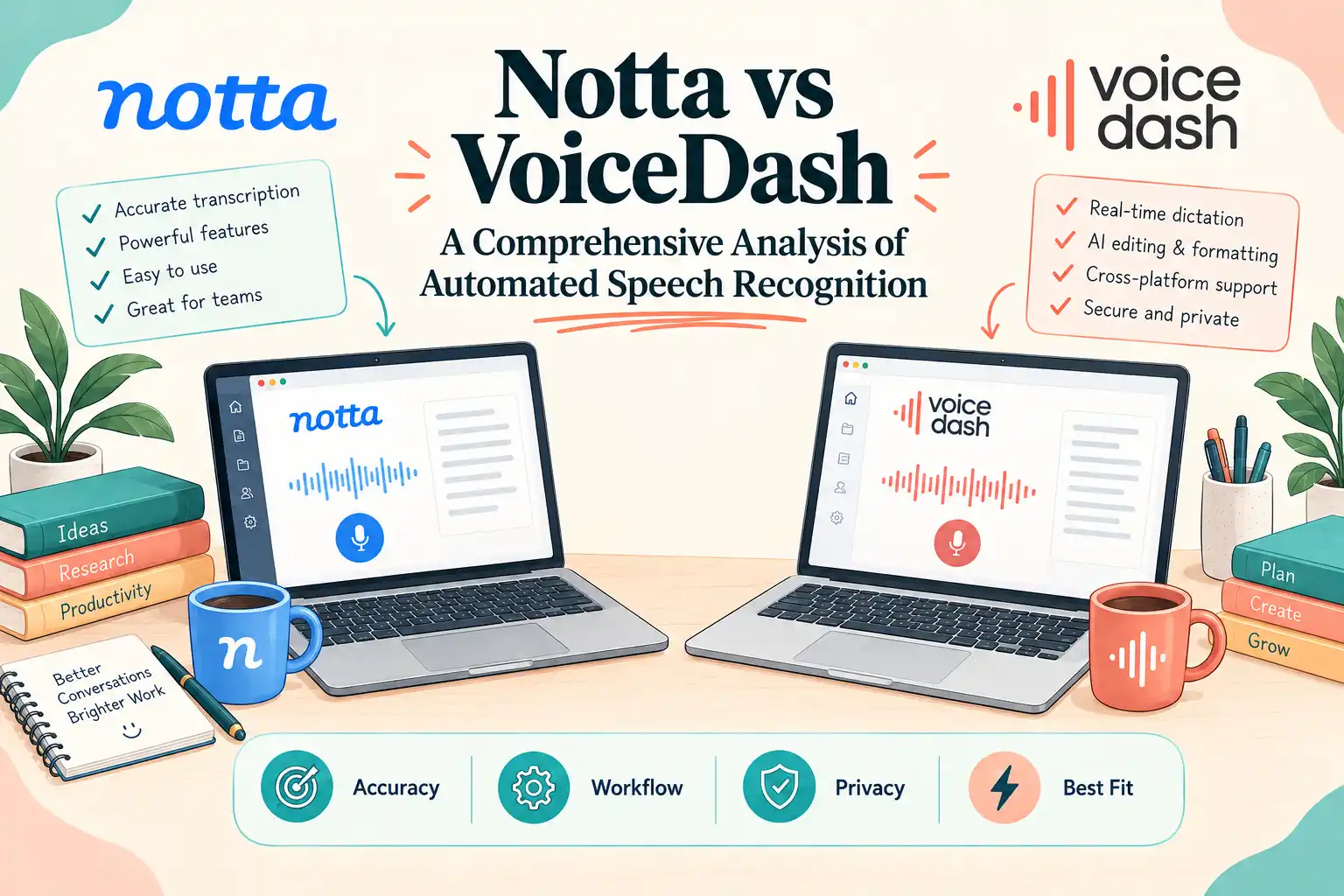
Notta vs VoiceDash: A Comprehensive Analysis of Automated Speech Recognition
VoiceDash or Notta? Automated Speech Recognition (ASR) technology has evolved beyond simple speech-to-text conversion into a core component of meeting intelligence, productivity software, documentation workflows, and voice-driven writing.
Modern products combine speech recognition with natural language processing, speaker identification, summarization, grammar correction, formatting, and application-level text insertion. As a result, comparing ASR products requires more than asking which one produces the most accurate raw transcript.
This analysis compares Notta and VoiceDash across their documented workflows, speech-processing capabilities, accuracy claims, latency positioning, privacy controls, pricing, platform support, and practical use cases.
VoceDash and Notta at a Glance:
- Notta is an AI transcription and meeting-intelligence platform designed for real-time and recorded transcription, speaker identification, meeting capture, searchable transcripts, and AI-generated notes.
- VoiceDash is an AI voice-typing and dictation application designed to turn natural speech into polished written text across supported applications.
- Notta is the more natural fit for meetings, interviews, multi-speaker recordings, searchable archives, and post-meeting analysis.
- VoiceDash is the more natural fit for individual voice dictation, email drafting, documents, prompts, messages, and other writing workflows.
1. Notta and VoiceDash Systemic Architectures
| Workflow Dimension | Notta | VoiceDash |
|---|---|---|
| Primary use case | Meeting transcription and conversation intelligence | AI voice typing and writing |
| Input methods | Meetings, recordings, uploads, desktop capture | Microphone-based voice dictation |
| Multi-speaker workflows | Supported | Not the primary use case |
| Speaker identification | Supported, subject to recording method and language | Not a core feature |
| AI text processing | Summaries, AI Notes, transcription workflows | Grammar, punctuation, filler-word removal, text refinement |
| Output | Transcript workspace, summaries, exports | Text inserted into active applications |
| Primary workflow | Capture → transcribe → review → summarize | Speak → transcribe → refine → insert |
Notta: Meeting Transcription and Conversation Intelligence
Notta is designed around recording, transcribing, reviewing, and organizing spoken conversations. Its current product supports multiple capture methods, including meeting integrations, desktop recording, mobile recording, screen recording, and uploaded audio or video. Notta also supports AI-generated meeting notes and speaker identification.
This makes Notta particularly useful when the recording itself is an important asset. A user or team can retain a transcript, identify speakers, search previous conversations, and generate structured outputs after a meeting.
Notta’s speaker identification is supported, but availability depends on the recording method and language. Its documentation distinguishes between file uploads, screen recording, real-time microphone recording, Chrome tab recording, and Notta Bot workflows.
VoiceDash: AI Voice Typing and Writing
VoiceDash takes a different approach. Its primary purpose is not meeting archiving but converting a user’s spoken language into polished written text.
VoiceDash is an AI-powered speech-to-text and voice-dictation application that removes filler words, improves grammar, adds punctuation, and works across applications. It also has Personal Dictionary and Snippet Library features on Pro. VoiceDash includes Windows, macOS, Android, and iPhone as supported platforms.
Meeting transcription is currently in development. VoiceDash’s current product is primarily optimized for individual voice dictation and writing, rather than multi-speaker meeting transcription. A dedicated Meeting experience is being developed to extend VoiceDash into conversation and meeting workflows.
| Architectural / Workflow Dimension | Notta | VoiceDash |
|---|---|---|
| Primary system role | Meeting transcription and conversation intelligence | AI voice typing and writing assistance |
| Primary input | Meetings, recordings, uploaded audio/video | Individual spoken dictation |
| Multi-speaker workflow | Yes | Not the primary use case |
| Speaker identification | Yes, with conditions | Not a core feature |
| Primary output | Transcript workspace and AI summaries | Text inserted into active application fields |
| AI cleanup | Yes | Core feature |
| Personal vocabulary | Custom vocabulary available | Personal Dictionary |
| Snippets | Not the core meeting workflow | Snippet Library |
| Main platform coverage | Web, desktop, mobile and meeting integrations | macOS, Windows, iPhone, Android |
2. Speech Recognition Linguistics: WER, CER, SER, and Latency
Evaluating ASR performance requires separating standardized measurements from vendor marketing claims.
Mathematical Definitions of Error Metrics
The standard quantitative metric for ASR evaluation is Word Error Rate (WER):
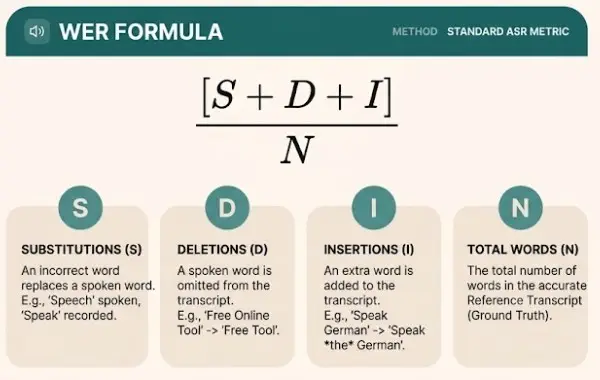
Character Error Rate (CER) measures edit distance at the character level and can be useful for names, abbreviations, technical terminology, and languages where word segmentation is less straightforward.
Sentence Error Rate (SER) measures the proportion of sentences containing at least one error according to the evaluation protocol.
None of these metrics can be inferred from general statements such as “high accuracy” or “real-time transcription.” A meaningful comparison requires the same reference transcript, audio, hardware, and evaluation methodology for both products.
Accuracy Claims
Notta currently advertises transcription accuracy of up to 98%, while its public materials also use the more specific 98.86% figure. These should be described as vendor-reported accuracy claims, not as independent universal WER benchmarks.
VoiceDash emphasizes accurate real-time speech recognition and AI-assisted text refinement. However, it does not establish an independently verified WER or CER benchmark.
Model and Architecture Attribution in VoiceDash
VoiceDash uses:
- OpenAI Whisper V3,
- Groq LPUs,
- a proprietary contextual scoring engine,
- token-probability ranking based on cursor context,
Latency Mechanics
Latency is highly dependent on:
- audio duration,
- network conditions,
- server load,
- microphone hardware,
- endpoint detection,
- model configuration,
- buffering,
- and the timing methodology.
For this reason, the previously stated 120–200 ms VoiceDash TTFT and 2–10 second Notta latency should not be presented as universal product benchmarks.
A defensible benchmark would use identical:
- hardware,
- microphone,
- network,
- audio sample,
- application versions,
- speech content,
- and measurement methodology.
| Performance Dimension | Notta | VoiceDash |
|---|---|---|
| Real-time transcription | Supported | Core workflow |
| Recorded transcription | Supported | Not the primary workflow |
| Speaker identification | Supported, with conditions | Not a core feature |
| AI text cleanup | Supported | Core feature |
| Public independent WER benchmark | Not established | Not established |
| Public independent CER benchmark | Not established | Not established |
| Public universal TTFT benchmark | Not established | Not established |
Notta explicitly supports real-time transcription as well as uploaded recordings. VoiceDash similarly positions itself around real-time voice typing and transcription.
3. Empirical Evaluation: Legal and Medical Domain Testing
Specialized-domain testing can provide useful observations, but a single test should not be presented as proof of universal product superiority.
Test 1: Legal Text Transcription
A meaningful legal transcription test should include:
- specialized terminology,
- Latin legal phrases,
- long clauses,
- proper names,
- abbreviations,
- realistic speaking speed,
- and a reference transcript.
If the same three-minute passage is recorded under identical conditions and tested through both products, the results can be reported as an observed test result. For example:
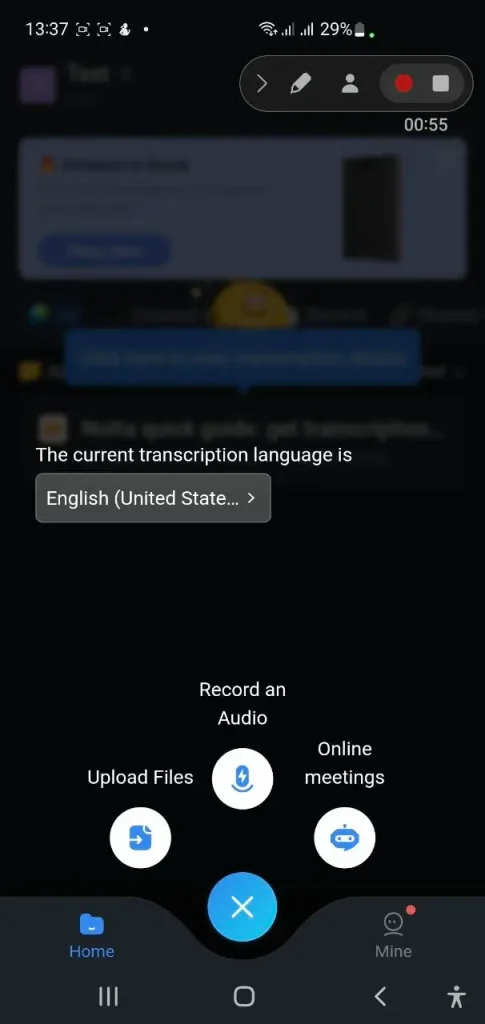
Notta can involve more user friction, particularly when the goal is quick, direct voice-to-text writing rather than full meeting transcription.
Observed result: In our three-minute legal dictation sample, VoiceDash required fewer manual corrections than Notta. That is a test observation.
By contrast, the following statements require substantially stronger evidence:
- VoiceDash has lower legal-domain CER than Notta.
- Notta’s acoustic model is inherently worse for legal terminology.
- VoiceDash’s cursor-context scoring engine increases legal terminology accuracy.
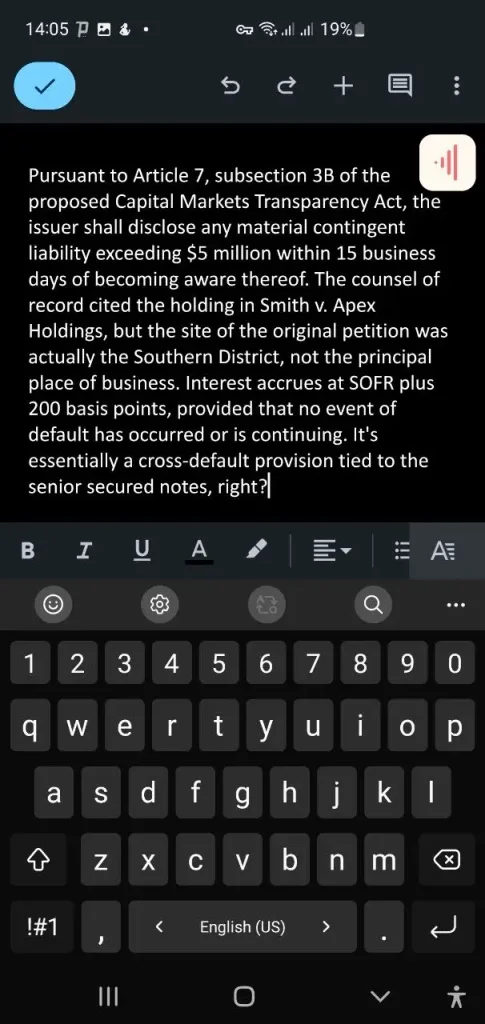
VoiceDash handled the legal audio-to-text test smoothly, accurately converting complex spoken legal terminology into text. Notta’s higher latency, however, created enough delay to bring the live test to a standstill.
These generalized or implementation-specific claims should not be made without supporting evidence.
Test How VoiceDash AI Voice to Text Works for Leaders
Test 2: Pharmaceutical and Medical Dictation
Medical dictation requires additional caution because errors in drug names, numbers, dosages, or clinical instructions can materially change the meaning.
A useful test can include:
- pharmaceutical names,
- chemical terminology,
- dosage values,
- abbreviations,
- clinical instructions,
- and numerical information.
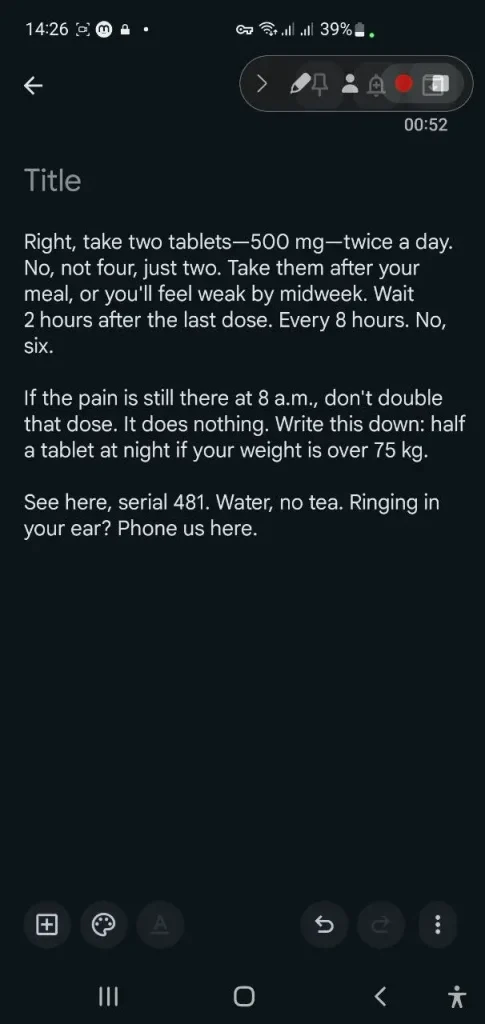
VoiceDash correctly converted the medication recommendation into text, including the drug names and dosage instructions. Meanwhile, Notta’s Online Transcription feature was only available after upgrading to a paid plan, preventing the free-tier test from continuing.
Again, the result is an observed transcription test rather than proof of clinical-grade superiority.
Notta Free-Tier Constraints
Notta’s current Free plan provides 120 transcription minutes per month and limits each transcription to 3 minutes per conversation. The current pricing page also lists 50 file uploads per month and 10 AI summaries per month.
Notta Pro currently provides 1,800 transcription minutes per month. The pricing page lists the Pro plan starting at $8.17/month when billed annually.
4. Speech Recognition Error and Hallucination Mitigation
ASR systems can produce incorrect text under difficult acoustic conditions, including background noise, low signal levels, unusual speech patterns, and ambiguous audio.
However, proprietary applications do not necessarily disclose their exact internal mitigation algorithms.
The previous version attributed the following specific mechanisms to VoiceDash:
- acoustic-energy thresholding,
- SNR thresholding,
- entropy filtering,
- token-probability suppression,
- cursor-context validation.
| Error-Control Area | Notta | VoiceDash |
|---|---|---|
| Automatic punctuation | Supported | Supported |
| AI text cleanup | Supported | Core feature |
| Filler-word removal | Available in product workflows | Core feature |
| Speaker identification | Supported, with conditions | Not a core feature |
| Custom vocabulary | Supported | Personal Dictionary |
| Public hallucination benchmark | Not established | Not established |
VoiceDash apply filler-word removal, grammar correction, punctuation, and AI text refinement. That establishes the user-facing capability, but not the exact algorithm used internally to produce it.
5. Privacy Compliance Comparison Between VoiceDash and Notta
Privacy is an important distinction between a meeting archive and a voice-typing application.
| Security / Privacy Parameter | Notta | VoiceDash |
|---|---|---|
| Cloud processing | Yes | Yes |
| Local transcription option | Yes, through Privacy Mode | Not the primary workflow |
| Zero-retention positioning | Not the core product positioning | Yes |
| AI training exclusion | Depends on applicable product/data policy | VoiceDash voice and transcription data are not used for AI training |
| Enterprise security controls | Yes | Privacy-focused architecture |
| HIPAA claim | Verify applicable plan/workflow | Do not describe as blanket HIPAA compliance |
Notta Privacy Mode and Local Transcription
Notta now provides a documented Privacy Mode in Notta Desktop. When Privacy Mode is enabled, recordings and transcripts remain on the user’s device, and Notta uses an offline speech-recognition model installed locally. Cloud transcription is not used during the local transcription workflow.
Notta states that Privacy Mode can be used fully offline after the required initial setup and periodic license validation. It also supports local real-time recording and local transcription of imported audio/video. This is an important correction to the simplistic characterization of Notta as exclusively cloud-based.
VoiceDash Privacy Architecture
VoiceDash positions Zero Data Retention as part of its privacy architecture and states that voice recordings and transcriptions are not stored or used to train AI models.
VoiceDash’s privacy/security materials also include OpenAI partnership and ZDR arrangement.
However, ZDR should not be translated into “RAM-only processing.” A zero-retention policy describes retention behavior; it does not independently prove that every intermediate data object exists exclusively in volatile memory.
Likewise, the existence of a BAA or HIPAA-eligible infrastructure should not automatically be described as blanket “HIPAA compliance.”
For healthcare deployment, organizations should verify:
- the applicable product and plan,
- processing configuration,
- BAA coverage,
- retention settings,
- access controls,
- and their own regulatory obligations.
6. VoiceDash Versus Notta Technical Feature Matrix
| Feature / Metric | Notta | VoiceDash |
|---|---|---|
| Core architecture | AI transcription and meeting-intelligence platform | AI voice dictation and writing assistant |
| Primary input | Meetings, recordings, uploaded audio/video | Spoken dictation |
| Primary output | Transcript workspace, summaries, exports | Text inserted into active applications |
| Speaker identification | Yes, subject to conditions | Not a primary feature |
| Multi-speaker meetings | Yes | Not the primary use case |
| Real-time transcription | Yes | Yes |
| AI text cleanup | Yes | Core feature |
| Filler-word removal | Available | Yes |
| Custom vocabulary | Supported | Personal Dictionary |
| Snippet library | Not a primary meeting feature | Yes |
| Accuracy claim | Up to 98% / 98.86% vendor-reported | No comparable independent public WER/CER benchmark |
| Languages | 58 transcription languages | 50+ languages |
| Platform compatibility | Web, desktop, mobile and meeting integrations | macOS, Windows, iPhone, Android |
| Linux | N/A | Not currently listed as supported |
| Local/offline transcription | Yes, through supported Privacy Mode workflows | Not documented as a general offline mode |
| Privacy positioning | Cloud workflows plus local Privacy Mode | Zero Data Retention positioning |
| Free plan | 120 minutes/month; 3-minute conversation limit | 1,000 words/month |
| Pro pricing | Starts at $8.17/month billed annually | $15/month or $12/month billed annually |
Notta’s current public documentation confirms 58 transcription languages and the Free plan limits.
VoiceDash’s current pricing offers 1,000 words/month on Free, $15/month for Pro, or $12/month when billed annually. Pro includes unlimited words, Advanced AI Editing, Personal Dictionary, Snippet Library, priority support, and all platforms.
7. Strategic Implementation Framework Between VoiceDash & Notta
The decision should be based primarily on workflow rather than unsupported assumptions about proprietary ASR architecture.
| Decision Criteria | Notta | VoiceDash |
|---|---|---|
| Main goal | Meeting transcription and intelligence | Voice typing and writing |
| Direct writing into apps | Not the primary workflow | Strong fit |
| AI cleanup of dictated text | Yes | Strong focus |
| Filler-word removal | Available | Strong focus |
| Personal dictionary | Custom vocabulary | Personal Dictionary |
| Snippets | Not a primary differentiator | Snippet Library |
| Local/offline processing | Available through Privacy Mode | No general offline mode documented |
| Best use case | Meetings, interviews, calls, searchable records | Emails, documents, prompts, notes and everyday writing |
Deploy Notta if:
- Your operational objective is meeting intelligence.
The workflow centers on recording, transcribing, reviewing, and summarizing conversations. - You need speaker identification.
Notta supports speaker identification, although availability varies by recording method and language. - You need a searchable meeting archive.
Notta is designed around transcripts, recordings, AI notes, and meeting-oriented workflows. - You need local transcription for sensitive recordings.
Notta Desktop’s Privacy Mode provides local recording and offline transcription under supported configurations. - You need enterprise administration.
Notta’s paid tiers provide additional workspace, security, and administrative functionality.
Deploy VoiceDash if:
- Your operational objective is hands-free writing acceleration.
VoiceDash is designed around turning spoken language into polished text for everyday writing workflows. - You want the output cleaned up while you speak.
VoiceDash emphasizes filler-word removal, grammar correction, punctuation, and AI-assisted text refinement. - You use macOS, Windows, iPhone, or Android.
- You want a personal vocabulary and reusable snippets.
- You prefer a cloud-based dictation workflow rather than local/offline transcription.
VoiceDash’s current positioning centers on real-time AI voice typing rather than a general offline transcription mode.
Bottom Line
Notta and VoiceDash are built for different jobs. Notta makes more sense for meetings, interviews, recordings, and multi-speaker transcription. VoiceDash is a better fit when the goal is to speak directly into your writing workflow and turn ideas into clean, usable text with less editing.
So the choice comes down to what you need: transcribe conversations, or replace typing with voice. If the second workflow sounds closer to yours, try VoiceDash with your own words, terminology, and daily tasks to see how much editing it can save.
Note: Public vendor claims should not be confused with independent WER, CER, or latency benchmarks. Where no reproducible benchmark is publicly available, this analysis does not assign one.
