
Spokenly vs VoiceInk: What Happens When the Transcript Must Become a Document
Spokenly and VoiceInk both offer local speech-to-text tools, but they differ in platform support, licensing, and cloud options. VoiceInk is an open-source Mac dictation app with one-time licensing, while Spokenly supports macOS, Windows, Linux, and iOS, with unlimited free local transcription plus optional cloud models and AI features. The practical difference appears only when the spoken input contains currency figures, code identifiers, homophones, email addresses, ticket IDs, and URLs. That is the test that matters.
Spokenly vs VoiceInk in a Nutshell
The following matrix provides an executive summary of the architectural, financial, and functional differences between Spokenly and VoiceInk:
| Criterion | Spokenly | VoiceInk | Winner |
|---|---|---|---|
| Platforms | macOS, Windows, Linux, iOS | Apple Silicon Mac + separate iOS companion | Spokenly |
| Pricing Model | $99.99/year on the official page ($8.33/mo billed annually) | $29-$69 | VoiceInk for long-term cost |
| Local Processing Default | Yes | Yes | Tie |
| Open Source | No | Yes (GPLv3) | VoiceInk |
| AI Post-Editing | Yes, AI text cleanup & polish on Pro | Optional AI Enhancement via separately configured providers | Spokenly |
| Symbol Emission (@ / _ / ://) | No | No | Neither |
| Homophone Discrimination | Weak | Partial | Neither fully reliable |
| Code and Path Output | Spoken form | Spoken form | Neither |
Dictation software has historically been evaluated using crude metrics like raw Word Error Rate (WER). However, in modern technical workflows, WER is a deeply flawed metric. A speech recognition engine can achieve a 95% accuracy score on paper while remaining entirely unusable in practice if it renders an API route as https colon slash slash example dot com instead of a clickable URL, or converts getUserById(userId) into four separate prose words.
When professionals dictate, they are not looking for a closed-caption transcript of their voice; they are attempting to draft a functional document, an inline code review, a Jira ticket, or an email that can be pasted immediately without requiring five minutes of manual cleanup.
This comparative report evaluates Spokenly and VoiceInk across real-world edge cases
In our internal test using a British-English dictation script, VoiceInk preserved more of the intended meaning than Spokenly. Neither Spokenly nor VoiceInk produced notation-ready text for code, URLs, or mathematical symbols. However, VoiceDash did.
Disclosure: VoiceDash is our product. The comparative results below come from our internal test and should not be interpreted as a general accuracy benchmark.
Dictation Test By VoiceDash
To make the comparison consistent, we ran the same complex, high-density dictation file through Spokenly, VoiceInk, and VoiceDash. In our test, VoiceInk understood the report, Spokenly merely heard the audio stream, and only VoiceDash produced a usable document. The objective was not to judge which user interface looked sleeker, but to determine whether these tools could cross the threshold from intermediate audio transcription into true written document generation.
Most voice applications perform admirably when dictating casual sentences such as “remind me to buy milk.” The underlying acoustic models crumble, however, when a single spoken breath contains $1,048.75, the programming function getUserById(userId), contextual homophones (there/their/they’re), and a complex URL containing query parameters. Modern knowledge workers are not paying for raw transcripts; they are paying for structured artifacts that can be pasted directly into Slack, GitHub, IDEs, or client-facing emails without secondary editing.
In this controlled script, the performance gap was clear:
- VoiceDash
- VoiceInk
- Spokenly
VoiceInk preserved more of the report’s intended meaning than Spokenly, while VoiceDash produced the most notation-ready output.
The Audio Clip Benchmark
The source file used for this test is a dense English report specifically engineered to expose speech-to-text failure modes. It rapidly shifts register every few seconds, moving seamlessly between financial figures, foreign exchange rates, calendar dates, algebraic equations, homophone pairs, policy statements, code reviews, brand casing rules, email addresses, ticket tracking IDs, REST API endpoints, sensor metrics, and a concluding sequence of identical-sounding words.
A capable speech-to-document engine must execute four distinct tasks simultaneously:
- Acoustic Parsing: Accurately transcribe the raw phonemes spoken by the user.
- Entity Recognition: Correctly identify and case proper nouns, technical acronyms, and brand names.
- Symbol Emission: Convert spoken notation instructions into functional symbols (e.g., translating “slash” into / or “at sign” into @).
- Contextual Homophone Resolution: Select the correct word spelling based on surrounding sentence syntax rather than raw phonetic volume.
In our test, Spokenly remained closer to literal transcription than notation-aware document formatting. VoiceInk preserved more contextual meaning and handled some formatting conventions, while VoiceDash produced the most complete notation-aware output.
Deep-Dive Performance Analysis of VoiceInk & Spokenly
This deep-dive performance analysis highlights how each tool handles structural and typographical challenges across five controlled testing scenarios.
1. Homophone Discrimination in Spokenly, VoiceInk, & VoiceDash
Homophone handling is one of the clearest differences between literal transcription and context-aware dictation. When words sound identical, a dictation engine must rely entirely on language model context to choose the correct spelling.
| Pair | Spokenly | VoiceInk | VoiceDash |
|---|---|---|---|
| buy / by | Clause dropped | Kept both uses | Kept both uses |
| flower / flour | Broke after flower | Correct contrast | Correct contrast |
| principal / principle | Correct | Both became principal | Correct |
| there / their / they’re | there, there, there | their, their, their | there, there, they’re |
| four / for | four twice | four twice | four / for |
| one / won | one twice | one twice | one / won |
| right / write | Finally, right | Finally, write, then collapsed | Both uses correct |
| hear / here | here / here | here / here | here / hear |
In our test, Spokenly dropped part of one spoken clause, changing the meaning of the resulting sentence. The benchmark script contrasts “blue flower by the sea” with “flour for the bakery.” Spokenly abruptly failed after transcribing “blue flower by the” and jumped directly to the next clause. Dropping entire phrases destroys user trust because it alters the underlying meaning of the message.
You can find Spokenly Alternatives
In our test, VoiceInk captured the contrast between “flower” and “flour,” but produced the same spelling for both uses of “principal” and “principle.” It defaulted to printing principal in both instances. VoiceDash approached the final test line as an intentional contextual spelling evaluation, whereas Spokenly and VoiceInk treated it as a simple repetition exercise.
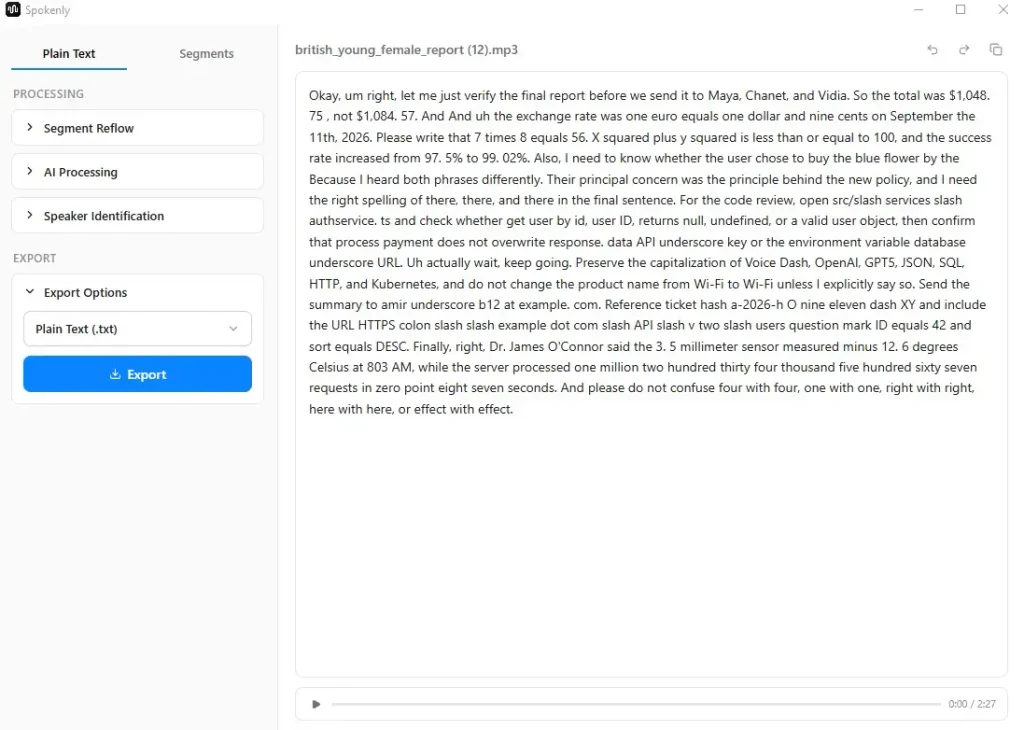
The Spokenly Output: Sticking strictly to literal audio tracking, Spokenly phonetically spells out complex entities (Maya, Chanet, and Vidia) and inserts spaces into currency figures ($1,048. 75), reflecting raw acoustic speech rather than structured writing.
2. Numbers, Currency, Time, and Mathematics
Formatting numerical data requires understanding context: knowing when digits represent financial values, mathematical operations, dates, or time designations.
| Item | Spokenly | VoiceInk | VoiceDash |
|---|---|---|---|
| $1,048.75 / $1,084.57 | $1,048. 75 | Correct | Correct |
| 97.5% → 99.02% | Spaces inside the numbers | Correct | Correct |
| 1,234,567 | Spoken out in full | Digits | Digits |
| 0.87 | zero point eight seven | 0.87 | 0.87 |
| Sept 11, 2026 | September the 11th, 2026 | September the 11th, 2026 | September 11th, 2026 |
| EUR / USD | one euro equals one dollar and nine cents | 1 euro / $1.09 | 1 euro / $1.09 |
| −12.6 | minus 12. 6 | minus 12.6 | -12.6 |
| 8:03 a.m. | 803 AM | 8.03 AM | 8:03 AM |
| x² + y² ≤ 100 | Fully spoken | Fully spoken | x² + y² ≤ 100 |
In our test, VoiceInk produced more usable formatting for monetary values, percentages, and decimal numbers than Spokenly. It recognizes that monetary values and percentages are formal notations rather than conversational prose. However, VoiceInk still struggles to emit superscripts (²) or relational operators (≤), falling back to verbatim verbal descriptions. VoiceDash handles mathematical symbols natively.
Tired of spending more time fixing transcripts than writing code? If your daily workflow involves dictating logic, API endpoints, ticket IDs, and code comments, stop settling for tools that treat technical syntax like casual prose.Try Voice to Text for Developers
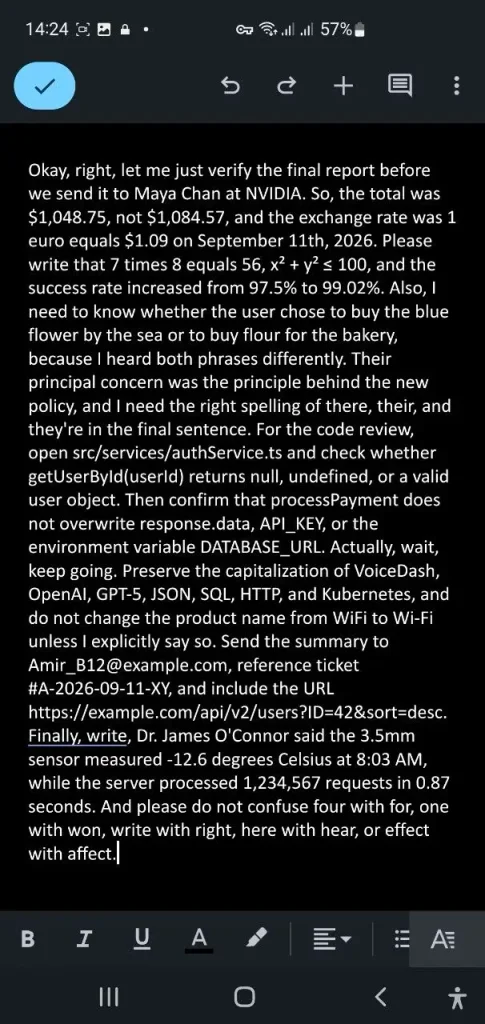
The Real Dictation Test: While typical speech-to-text tools choke on code paths (src/services/authService.ts), symbols (#A-2026-09-11-XY), math formulas, and complex URLs, VoiceDash outputs a document you can paste straight into production without manual cleanup.
3. Names, Brands, and Letter Casing
Capitalization and proper noun recognition are critical when dictating team communications or corporate documentation.
| Target | Spokenly | VoiceInk | VoiceDash |
|---|---|---|---|
| Maya Chen / NVIDIA | Maya, Chanet, and Vidia | Maya Chan at NVIDIA | Maya Chan at NVIDIA |
| James O’Connor | Correct, apostrophe kept | Correct, apostrophe kept | Correct, apostrophe kept |
| VoiceDash / OpenAI / GPT-5 | Voice Dash, OpenAI, GPT5 | voice dash, open AI, GPT-5 | VoiceDash, OpenAI, GPT-5 |
| Wi-Fi vs WiFi | Instruction missed | Instruction missed | Kept WiFi as instructed |
| API, Kubernetes, SQL, HTTP | Preserved | Preserved | Preserved |
Spokenly’s output of Maya, Chanet, and Vidia is phonetically understandable based on raw acoustic input. However, in a corporate setting, resolving that audio to Maya Chan at NVIDIA is far more useful. Spokenly prioritizes raw acoustic tracking, while VoiceInk and VoiceDash apply contextual language modeling to match real-world entities.
4. Technical Syntax: Code, Emails, and URLs
This category represents the ultimate test for voice dictation software. If an app cannot reliably emit syntax characters, a developer or technical writer must spend more time manually fixing the text than it would have taken to type it.
| Target | Spokenly | VoiceInk | VoiceDash |
|---|---|---|---|
| File Path | src/slash services slash authservice. ts | src slash services slash auth service dot ts | src/services/authService.ts |
| camelCase / PascalCase | get user by id, user ID | get user by ID, user ID | getUserById(userId), processPayment |
| snake_case / CONSTANTS | API underscore key / database underscore URL | API underscore key / database underscore URL | API_KEY, DATABASE_URL, response.data |
| null / undefined | Kept as words | Kept as words | Kept as words |
| Email Address | amir underscore b12 at example. com | Amir underscore B12 at example.com | [email protected] |
| Ticket ID | a-2026-h O nine eleven dash XY | A dash 2026 dash 0911 dash XY | #A-2026-09-11-XY |
| URL Syntax | Fully spoken out | Fully spoken out | https://example.com/api/v2/users?ID=42&sort=desc |
| Symbols (#, @, &, ?, =, /) | Spoken as words, not emitted | Spoken as words, not emitted | Emitted cleanly as symbols |
If a processing layer cannot convert spoken commands into actual characters (@, ://, ?, &, _), it is not providing document formatting; it is simply delivering a clean output from an acoustic model like Whisper.
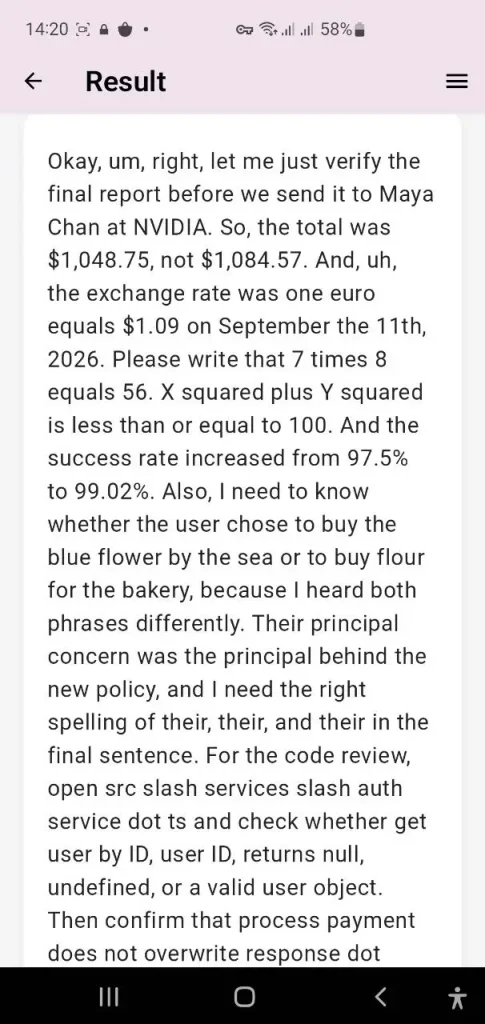
When a dictation app hears the audio but misses the notation
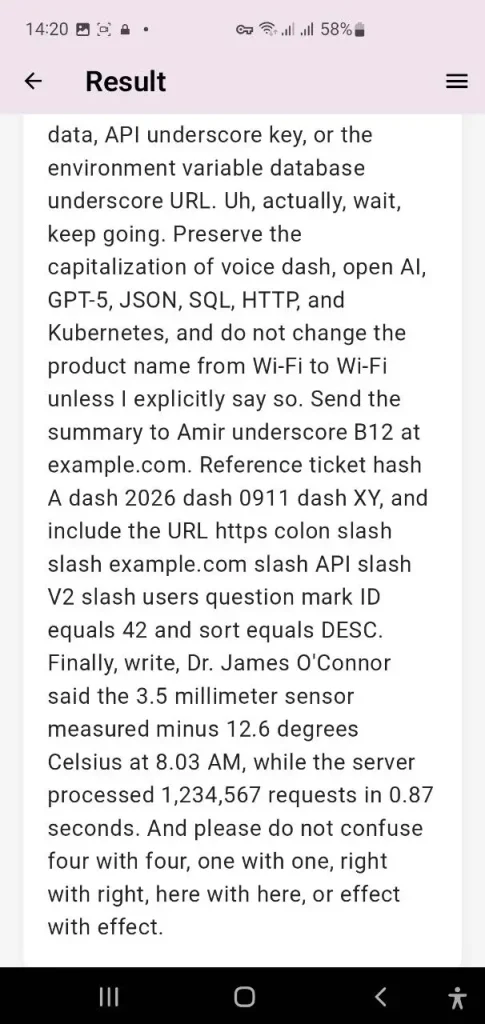
VoiceInk recovers more meaning than basic tools, but still leaves code paths, URLs, and symbols in spoken form, requiring manual editing before it’s ready to ship.
Still comparing your options? See how Spokenly and VoiceDash compare in real-world dictation and everyday writing workflows.
5. Fillers, Self-Corrections, and Punctuation Dynamics
Human speech is naturally disorganized, filled with hesitation sounds, pauses, and mid-sentence corrections.
| Behavior | Spokenly | VoiceInk | VoiceDash |
|---|---|---|---|
| Filler Words (um / uh) | Retained | Retained | Mostly stripped |
| Self-Correction handling | Left as audio debris | Left as audio debris | Treated as an inline edit command |
| Quoted Speech | No quotation marks | No quotation marks | No quotation marks |
| Punctuation & Register | Standard transcript punctuation | Cleaner paragraphs, same spoken form | Document punctuation; alters formatting based on context |
The most valuable takeaway from this benchmark is the concept of register shifting. The test script frequently jumps from financial metrics to math formulas, spoken homophones, code functions, and contact details. Spokenly remains locked in a single mode: literal spoken English. VoiceInk infers intended meaning but preserves conversational structure. VoiceDash actively shifts structural formatting depending on the domain of the content.
Also read VoiceInk Alternatives
Architectural Deep-Dive & Licensing
Understanding the underlying software architecture, hardware utilization, and licensing models of these tools helps clarify their target audiences.
Architecture & Pricing: Spokenly vs. VoiceInk
| Spokenly Architecture | VoiceInk Architecture |
|---|---|
| Cross-Platform: macOS, Windows, Linux, iOS | Apple Silicon Mac, macOS 14.4+; separate iOS companion |
| Local Core: Whisper / Parakeet (Free tier) | Strict On-Device: Whisper / Parakeet Models |
| Optional cloud models and AI features: Pro at $99.99/year; BYOK available without a Spokenly subscription | Open Source & Perpetual: GPLv3 / $29-$69 one-time (current official page) |
| System Load: ~60% CPU usage on MacBook Air | Lightweight Load: ~25–35% CPU usage |
Informal MacBook Air check: Spokenly near 60% CPU, VoiceInk near 25–35%. Model year and local model not published.
VoiceInk Architecture
- Desktop app: Apple Silicon Macs running macOS 14.4 or later, with a separate iOS companion.
- Engine Core: Local transcription using on-device AI models, with optional cloud features configured separately.
- Licensing: Fully open-source under the GNU General Public License v3 (GPLv3).
- Pricing Tier: $29-$69. Includes a 7-day trial and 14-day refund window.
- System Footprint: Informal MacBook Air check: VoiceInk near 25–35% CPU. Model year and local model are not published.
- Features: Supports custom vocabulary lists and a “Power Mode” that adjusts context rules based on the active application or browser URL. Optional BYOK enhancement is available. It is not limited to filler removal.
Spokenly Architecture
- Target OS: Multi-platform support spanning macOS, Windows, Linux, and iOS.
- Engine Core: Local, offline transcription via Whisper/Parakeet is free and unconstrained.
- Licensing: Proprietary closed-source application.
- Pricing Tier: Free local processing tier. A Pro Subscription costs $99.99 per year, adding cloud-hosted model access and AI text refining via GPT-4 or Claude. Users can also supply their own API keys without additional vendor markup.
- System Footprint: Informal MacBook Air check: Spokenly near 60% CPU. Model year and local model not published
- Features: Includes a local-only network kill switch. Additional developer features include a Model Context Protocol (MCP) server for integration with AI coding agents, an Agent Mode, and custom script execution hooks.
Privacy & Data Handling: Spokenly vs. VoiceInk
Privacy is a primary marketing claim for both platforms. Both offer a local mode. Audio stays on-device only if cloud features stay off.
| Local Processing Mode (Both Apps) | Cloud Processing Mode (Spokenly Pro / Optional VoiceInk) |
|---|---|
| Data Flow: User Voice Input, Local Neural Engine, and On-Device Text Output | Data Flow: User Voice Input, Ephemeral Forwarding, and Provider API Processing |
| Security: Zero external data transmission; audio never leaves local RAM. | Retention: No permanent server-side audio retention. |
| Compliance Status: Neither platform publishes SOC 2 Type II or HIPAA BAA documentation. | Compliance Status: Neither platform publishes SOC 2 Type II or HIPAA BAA documentation. |
- VoiceInk Privacy: VoiceInk processes voice transcription locally on the device by default. Cloud Enhancement is optional, and VoiceInk says only transcribed text, not the user’s voice, is processed when enhancement is enabled.
- Spokenly Privacy: Provides a dedicated local-only toggle that completely disables network access. When using cloud processing, audio is ephemerally forwarded to provider APIs without persistent server storage.
- Enterprise Compliance Gap: As of current public records, neither Spokenly nor VoiceInk publishes official SOC 2 Type II audit reports nor offers signed HIPAA Business Associate Agreements (BAAs). Organizations with strict data compliance mandates must keep both tools locked to local-only offline mode.
Which Tool Between Spokenly and VoiceInk Fits Your Needs?
Selecting the right tool depends heavily on your hardware ecosystem, budget preferences, and formatting requirements:
- Choose VoiceInk if you use an Apple Silicon Mac, prefer a one-time license, value open-source software, and want local-first dictation with configurable vocabulary, replacements, and app-specific Modes.
- Choose Spokenly if you need cross-platform support across macOS, Windows, Linux, and iOS, want unlimited free local transcription, or need optional cloud models, AI cleanup, and developer integrations such as MCP.
- Consider VoiceDash if your daily work requires dictating functional code, technical support tickets, complex financial metrics, or structured documents containing functional symbols and URLs that must be pasted directly into software tools without manual editing.
Bottom Line
Spokenly and VoiceInk both succeed at local, private speech recognition. VoiceInk recovers more intended meaning on difficult input and costs less over time for Apple users. Spokenly reaches more platforms and adds optional AI cleanup. Neither consistently emits the symbols or casing required for code, URLs, or formal documents. The practical ranking on a single high-difficulty script placed VoiceInk ahead of Spokenly and both behind a system that already treats the output as a finished document.
Neither Spokenly nor VoiceInk is finished with technical work. In the controlled test, only VoiceDash emitted the symbols, paths, and casing required for a pasteable ticket or code review. Give VoiceDash a try when the output must be a document rather than a transcript.
Ready to turn voice into actual documents? If your workflow requires precise code identifiers, correct mathematical symbols, clean URLs, and zero manual cleanup, stop settling for raw transcripts.
Try VoiceDash Free Today
